


Proton Black Friday, until 30 November: 60% off Proton Pass Plus on the 12-month plan, $23.88 for the first 12 months.
After that it renews at $35.88 a year, the regular price. See every Proton Black Friday deal.
Short answer: In Proton Pass vs Bitwarden, Proton Pass wins for most privacy-minded individuals, because its free plan shares vaults with two people instead of one, it encrypts item metadata as well as passwords, and its paid plan builds unlimited hide-my-email aliases straight into the password manager. Bitwarden wins on price and control: Premium costs $19.80 a year against $35.88 for Pass Plus, the Families plan is $12 a year cheaper for six people, and Bitwarden can be self-hosted on your own server. Both are open source, independently audited and zero-knowledge, so neither is the wrong choice on security.
- Pick Proton Pass if email aliases matter to you, or you already use Proton Mail or Proton VPN.
- Pick Bitwarden if you want the cheapest good paid plan, or you want to run the server yourself.
- Either free plan gives you unlimited passwords on unlimited devices, so try both before paying.
- For families, Bitwarden Families is $47.88 a year and Pass Family is $59.88 a year, both for six people.
Proton Pass: Free; Pass Plus $4.99/mo or $35.88/yr; Pass Family $6.99/mo or $59.88/yr. Bitwarden: Free; Premium $19.80/yr; Families $47.88/yr. Proton.me and Bitwarden.com, checked October 13, 2026.
Table of contents
Proton Pass and Bitwarden in one paragraph each
Proton Pass is the password manager from Proton AG, the Swiss company behind Proton Mail and Proton VPN. It stores logins, notes, credit cards and passkeys in end-to-end encrypted vaults, autofills them on any browser or device, and leans heavily on a privacy feature most password managers leave to someone else: hide-my-email aliases, which give each website its own forwarding address so your real email never leaks. It is available on its own or as part of the Proton Unlimited bundle.
Bitwarden is the open-source password manager many security people recommend first, largely because its free plan has long been generous and its paid plan is cheap. It offers zero-knowledge, end-to-end encryption, apps for every major platform, Bitwarden Send for sharing encrypted text and files, and an option that very few consumer password managers offer at all: you can run the Bitwarden server yourself.
This Proton Pass vs Bitwarden comparison reads both pricing pages in US dollars, Proton’s Pass security page, Bitwarden’s compliance page and help documentation, and both apps’ public ratings on Google Play, all on October 13, 2026. If you are weighing the wider Proton ecosystem, our Proton Mail review and Proton VPN review cover the other apps in the bundle.
Free plans compared
Both free plans are good enough to replace a browser’s built-in password saver, which is unusual in this category. Proton Pass Free includes unlimited logins, notes and credit cards on unlimited devices, browser, mobile and desktop apps, a password generator, alerts for weak and reused passwords, passkey support on all devices, easy import, two vaults, sharing a vault with up to two other people, and 10 hide-my-email aliases. Bitwarden’s free plan also covers unlimited passwords on unlimited devices, browser, mobile and desktop apps, passkeys, a username and password generator, encrypted export, Bitwarden Send, and free sharing with one other user.
| Free plan | Proton Pass | Bitwarden |
|---|---|---|
| Passwords and devices | Unlimited on unlimited devices | Unlimited on unlimited devices |
| Sharing | Share vaults with up to 2 others | Share with 1 other user |
| Email aliases | 10 built-in hide-my-email aliases | Generator connects to outside alias services |
| Passkeys | Supported on all devices | Passkey management included |
| Built-in 2FA authenticator | Paid plans | Paid plans |
| Extras | Weak and reused password alerts | Bitwarden Send, encrypted export |
The free plans are closer than the marketing on either side suggests. Proton’s edge is sharing with two people instead of one and aliases that work without another account. Bitwarden’s edge is Send, which lets you pass a password or a file to someone who does not use Bitwarden through an end-to-end encrypted link. Both lock the integrated two-factor code generator behind the paid plan.
Paid plans and what they cost
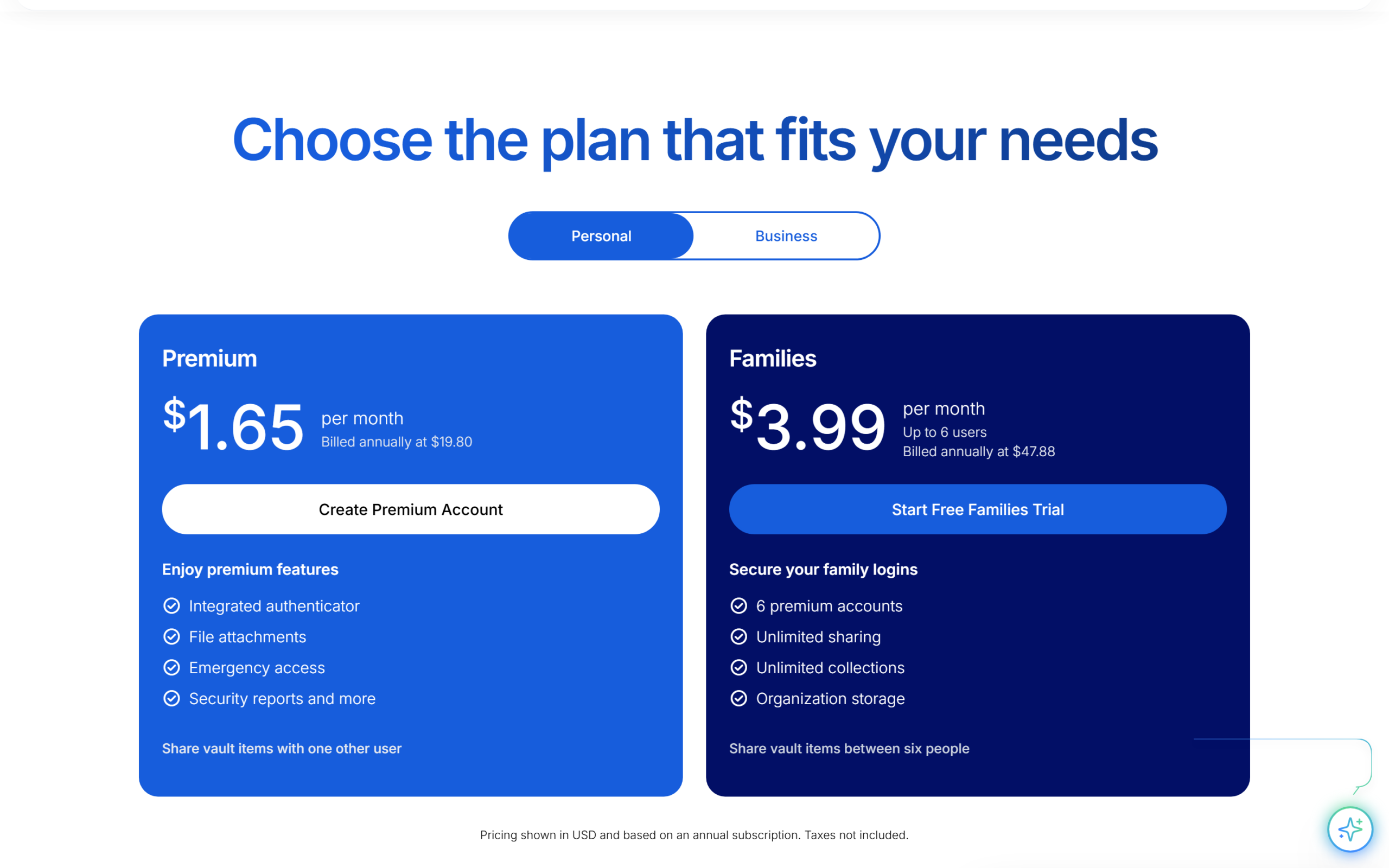
This is where Bitwarden’s reputation for value is earned. Its Premium plan costs $1.65 a month, billed annually at $19.80, and Families costs $3.99 a month, billed annually at $47.88 for six premium accounts. Bitwarden’s pricing page shows annual billing only. Proton Pass offers both monthly and yearly billing: Pass Plus is $4.99 a month or $2.99 a month billed yearly at $35.88, and Pass Family is $6.99 a month or $4.99 a month billed yearly at $59.88 for six users.
| Plan | Proton Pass | Bitwarden |
|---|---|---|
| Individual, yearly | Pass Plus $35.88/yr ($2.99/mo) | Premium $19.80/yr ($1.65/mo) |
| Individual, monthly | Pass Plus $4.99/mo | Not offered on the pricing page |
| Family of six, yearly | Pass Family $59.88/yr ($4.99/mo) | Families $47.88/yr ($3.99/mo) |
| Per person, family plan, yearly | $9.98 | $7.98 |
| Bundle option | Proton Unlimited $119.88/yr (Mail, VPN, Drive, Calendar) | None for consumers |
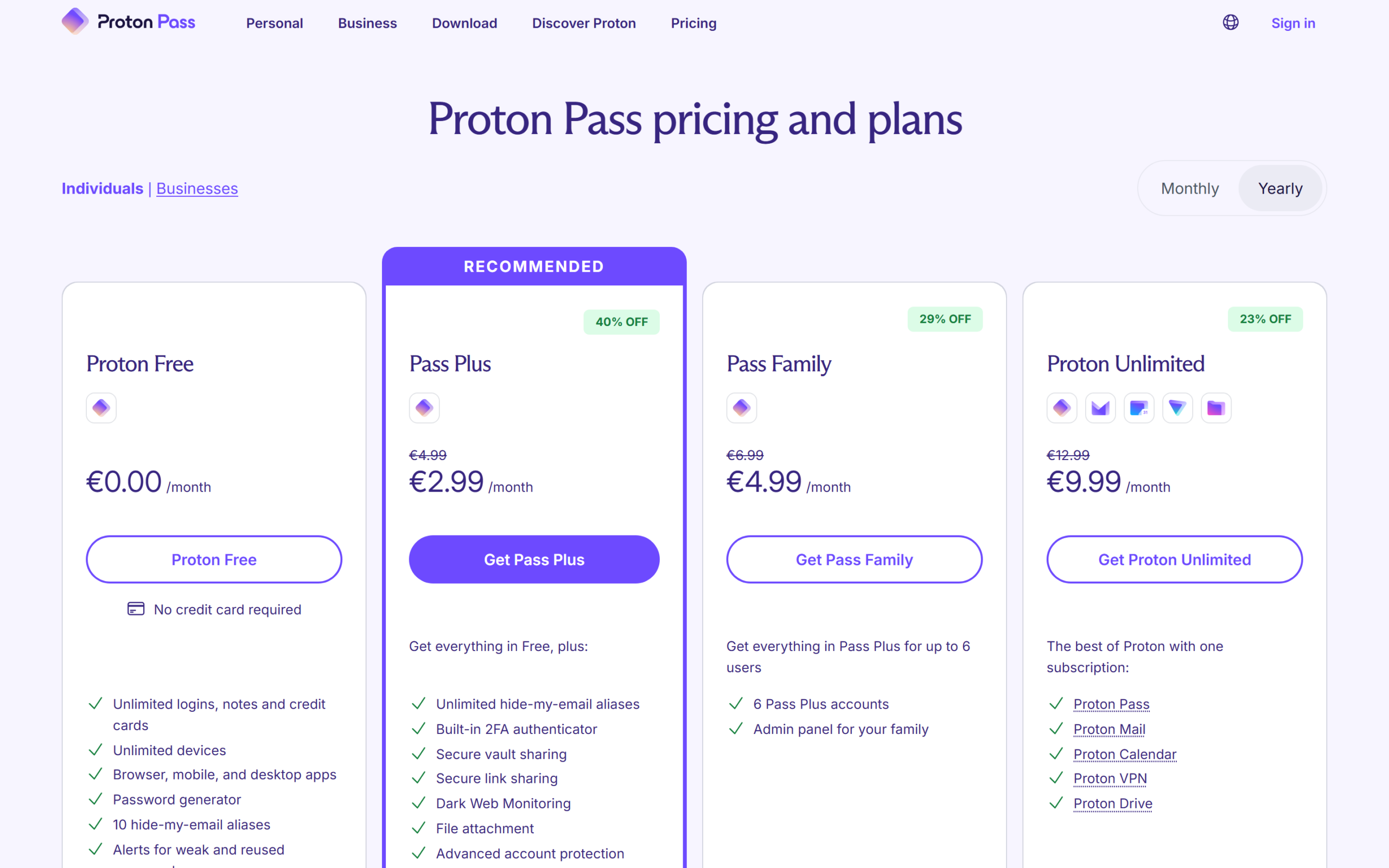
On a yearly plan, Pass Plus costs $16.08 a year more than Bitwarden Premium, about 1.8 times as much. For a family the gap is $12 a year. What the extra money buys on Proton’s side is unlimited aliases with custom domains, extra mailboxes for aliases, the ability to send an email from an alias, item history, a command line tool, Dark Web Monitoring and Proton Sentinel account protection, the same high-security program Proton uses for its mail accounts. Bitwarden Premium adds the integrated authenticator, encrypted file attachments with 5 GB of storage, vault health reports, Emergency Access and priority support.
Over three years on yearly billing, at today’s prices, Pass Plus totals $107.64 against $59.40 for Bitwarden Premium, and Pass Family totals $179.64 against $143.64 for Bitwarden Families, so the gap is real but modest for what most people spend on software each year. The bundle changes the maths for some buyers. If you already pay for Proton Mail Plus or Proton VPN Plus, moving to Proton Unlimited at $119.88 a year adds Pass Plus without a separate subscription. If you only want a password manager, Bitwarden is the cheaper paid option. To see Proton’s current offer, compare Proton Pass plans.
The feature that decides it: email aliases
A hide-my-email alias is a forwarding address you give to a website instead of your real one. If that site leaks its database or starts sending spam, you switch the alias off and nothing reaches your inbox. Password managers are a natural home for aliases, because the moment you create a login is the moment you need a new address.
Proton Pass builds this in. The free plan includes 10 aliases, and Pass Plus makes them unlimited, adds your own custom domain for aliases, extra mailboxes for them to forward to, and the ability to start an email from an alias so you can reply without revealing your real address. Proton’s pricing page describes the feature in one line: when you sign up for a new account, Proton Pass “can automatically create an alias.”
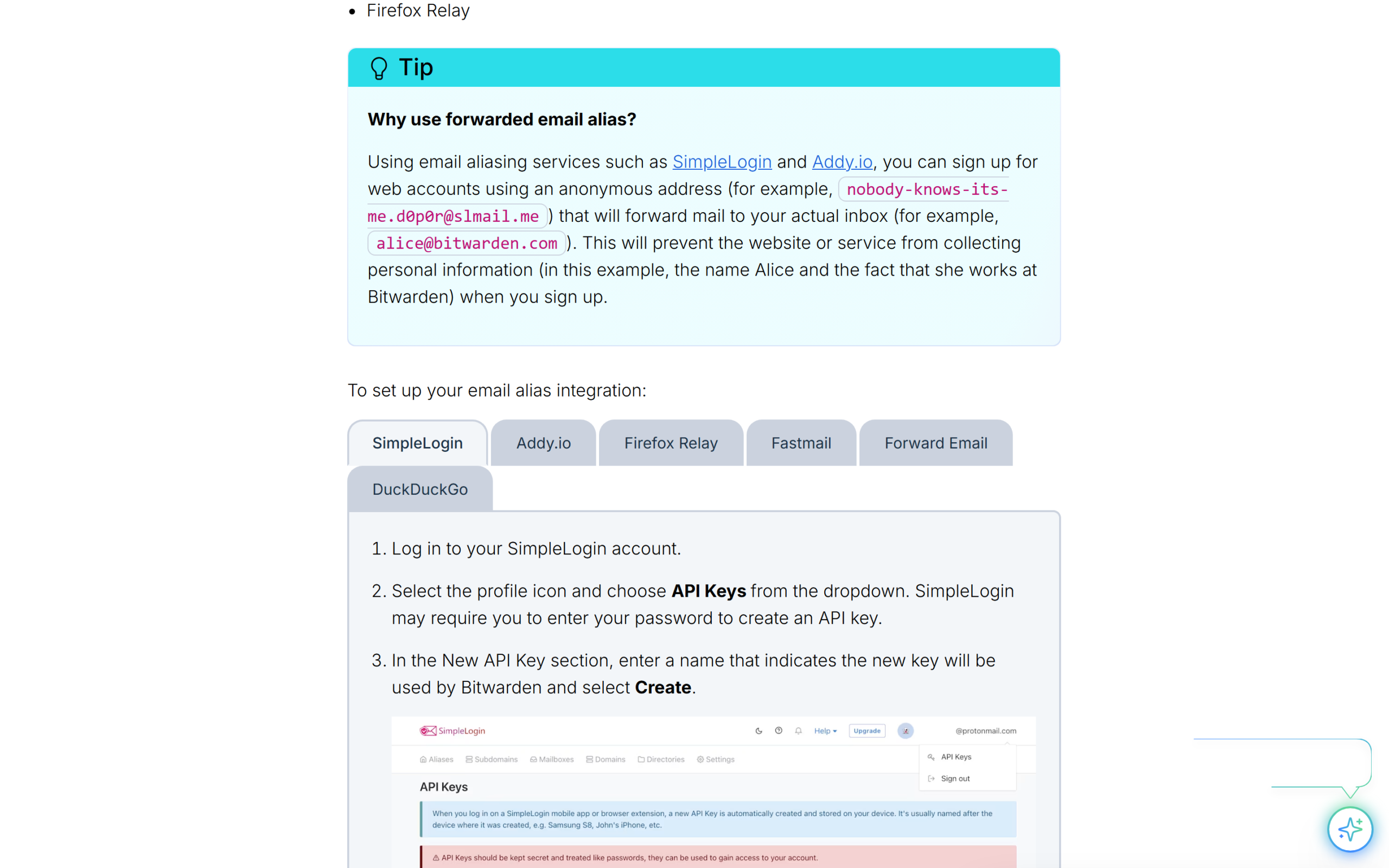
Bitwarden takes a different route. Its username generator documentation describes a “forwarded email alias” option that connects to an outside service through an API key. On the web app, browser extension and desktop app it supports SimpleLogin, Addy.io, Firefox Relay, Fastmail, Forward Email and DuckDuckGo, and on mobile it supports SimpleLogin, Addy.io, Forward Email and Firefox Relay. That works well, but it means a second account, and often a second subscription, to get the same result. One footnote worth knowing: SimpleLogin, the first service on Bitwarden’s list, is itself a Proton product, listed among Proton’s apps in its site footer.
This is the single capability that genuinely separates the two. If you would use aliases for every new sign-up, Proton Pass does it natively and Bitwarden needs help. If you never would, the decision falls back to price, where Bitwarden wins.
Security: encryption, audits and open source
On security the two are closer than on any other dimension. Proton’s Pass security page says vault items are encrypted with 256-bit AES-GCM using a 32-byte random vault key, that all Proton Pass apps are open source, that it has been audited by independent third parties with reports published, and that it runs a public bug bounty program. It also makes a claim Bitwarden’s page does not make in the same words: not only usernames and passwords are encrypted, but “all metadata is also secure,” so not even Proton can see it.
Bitwarden’s compliance page lists zero-knowledge, end-to-end encryption, annual source code audits and penetration tests for each client including web, browser extension and desktop, annual network security assessments, and a bug bounty on HackerOne. Its code is public on GitHub. Bitwarden also offers multifactor encryption as an extra layer, according to the same page.
The honest conclusion is that both meet the bar a careful buyer should demand: open source code, published third-party audits, a bug bounty and zero-knowledge design. Proton’s metadata claim and Swiss jurisdiction appeal to people who want the strictest privacy story, while Bitwarden’s long record of annual audits across every client is its strongest argument.
Where Bitwarden pulls ahead: self-hosting and price
Self-hosting is a real differentiator for a specific audience. Bitwarden’s documentation explains how to install and deploy the Bitwarden server with Docker on Linux and Windows machines and point every Bitwarden client at it, and the compliance page lists self-hosting as an option for deploying on-premises. Proton Pass has no equivalent: your vault lives on Proton’s infrastructure in Switzerland.
For most people self-hosting is a burden rather than a benefit, since you become responsible for updates, backups and uptime. For small businesses with strict data residency rules, or technical users who simply want full control, it is the deciding factor, and it puts Bitwarden in a category of its own.
Price is the other area where Bitwarden leads plainly. Premium at $19.80 a year is one of the cheapest paid plans from any audited password manager, and Families at $47.88 for six people works out to under $8 a person each year.
Sharing and family plans
Sharing is where everyday use differs most, because a password manager that a partner or parent will not use is only half useful. On Proton Pass, the free plan lets you share a vault with two other people, and Pass Plus raises that to ten and adds sharing of individual items and secure link sharing with anyone, even people who do not use Proton Pass. Pass Family gives six people their own Pass Plus accounts plus an admin panel for the family.
Bitwarden’s free plan shares with one other existing Bitwarden user through a free organization. Its Families plan gives six people premium accounts with unlimited sharing, unlimited collections and organization storage, and every plan can use Bitwarden Send to pass text or files to anyone, including non-users, through an end-to-end encrypted link. In practice Bitwarden’s collections are the more structured system for a household that wants shared folders for streaming logins, bills and the router, while Proton’s link sharing is the simpler way to hand one password to a visitor or contractor.
For a couple on free plans, Proton Pass is more comfortable, since two-person sharing works without paying. For a family of six willing to pay, Bitwarden Families is cheaper and its collections scale well, while Pass Family adds aliases for every member.
Apps, passkeys and everyday use
Both cover every platform that matters. Proton Pass has apps for Android, iOS, Windows, macOS and Linux, plus a web app and browser extensions for Chrome, Safari, Edge, Firefox, Brave and others, according to its pricing page. Bitwarden offers browser, mobile and desktop apps and a command line tool, and its generator documentation shows features available across the web app, browser extension, desktop and mobile apps. Both support passkeys.
Importing is straightforward in both directions, which matters because it lowers the cost of trying one and switching later. Proton lists “easy password import” on every plan. Bitwarden includes encrypted export on every plan, which is useful if you later want to leave.
Account security and support
A password manager is only as safe as the account that unlocks it, so login protection matters. Bitwarden’s pricing page lists two-step login with up to 10 hardware security keys, Yubico OTP, Duo, email and authenticator apps for Premium and Families users. Proton Pass relies on the same Proton account protections as Proton Mail, and its paid plans add Proton Sentinel, which Proton’s security page describes as AI systems working alongside human security analysts around the clock to block malicious logins even when an attacker has the right password.
Support follows a similar split. Bitwarden’s pricing page says 24/7 email support is available to everyone, with priority support for paid users. Proton lists customer support on every Pass plan, including Free, on its comparison table. Neither publishes response times on the pages checked here, so treat support quality as something to test during the free period rather than a deciding factor.
Both also make leaving straightforward. Proton offers password import on every plan, and Bitwarden includes encrypted export on every plan, so you are not locked into either choice.
What independent data shows
Both Android apps are well rated by large user bases. On October 13, 2026, Proton Pass showed 4.8 stars from about 60,400 reviews and more than 1 million downloads on Google Play. Bitwarden showed 4.7 stars from about 182,000 reviews and more than 5 million downloads. Bitwarden’s larger installed base reflects its longer history, while Proton Pass’s slightly higher rating suggests its newer apps are landing well with the people who use them.
| Google Play, October 13, 2026 | Proton Pass | Bitwarden |
|---|---|---|
| Rating | 4.8 | 4.7 |
| Reviews | About 60,400 | About 182,000 |
| Downloads | 1M+ | 5M+ |
Who should pick which
Pick Proton Pass if you want aliases built into your password manager, if you share passwords with two family members on a free plan, or if you already use Proton Mail or VPN and want everything under one account. It is also the better fit if you prefer monthly billing, which Bitwarden’s pricing page does not show.
Pick Bitwarden if price matters most, if you want to self-host, or if you value its long record of annual audits across every client. It is also the more established choice for teams, with organizations and a dedicated business offering.
In practice, many people would be well served by either. Because both free plans handle unlimited passwords on unlimited devices, the cheapest way to decide is to import your passwords into each and use them side by side for a week.
Frequently asked questions
Is Proton Pass better than Bitwarden?
For privacy-focused individuals who want built-in email aliases, yes. For the lowest price or self-hosting, Bitwarden is the better choice. Both are open source and independently audited.
Which is cheaper, Proton Pass or Bitwarden?
Bitwarden. Premium is $19.80 a year against $35.88 a year for Pass Plus, and Families is $47.88 a year against $59.88 for Pass Family.
Are the free plans really free?
Yes. Both offer unlimited passwords on unlimited devices for free. Proton Pass adds 10 aliases and sharing with two people; Bitwarden adds Send and sharing with one person.
Can I self-host Proton Pass?
No. Self-hosting is available for Bitwarden, which documents running its server with Docker on Linux and Windows.
Do both support passkeys?
Yes. Proton Pass supports passkeys on all devices, and Bitwarden includes passkey management in every account.
Is Proton Pass included in Proton Unlimited?
Yes. Proton Unlimited, at $119.88 a year, includes Pass Plus features along with Proton Mail, Calendar, Drive and VPN.
Proton Pass vs Bitwarden: the verdict
This Proton Pass vs Bitwarden comparison names Proton Pass the winner for most privacy-minded individuals: a slightly more generous free plan, metadata encryption, and native, unlimited email aliases on the paid plan, with the option to fold it into Proton Unlimited. Bitwarden is the better buy if price or self-hosting matters most, and it loses nothing on security.
If aliases and the Proton ecosystem appeal to you, start with Proton Pass free, import your passwords and upgrade once you know how many aliases you actually use.
8.6 Score
Pros
- Built-in hide-my-email aliases: 10 free, unlimited on Pass Plus with custom domains.
- Free plan shares vaults with two people and covers unlimited passwords on unlimited devices.
- Encrypts item metadata as well as passwords; open source and independently audited.
- Monthly billing available, and Pass Plus is included in Proton Unlimited.
Cons
- Pass Plus costs $35.88 a year against $19.80 for Bitwarden Premium.
- Pass Family is $12 a year more than Bitwarden Families for six people.
- No self-hosting option, unlike Bitwarden.
- Smaller installed base on Google Play than Bitwarden.
Final Verdict
Proton Pass wins for most privacy-minded individuals, thanks to native unlimited email aliases on Pass Plus, a slightly more generous free plan and metadata encryption, with the option to bundle it into Proton Unlimited. Bitwarden is cheaper, at $19.80 a year for Premium, and can be self-hosted, and it gives up nothing on security. Choose Proton Pass for aliases and the Proton ecosystem, Bitwarden for price and control.