


Proton Black Friday, until 30 November: 60% off Proton Drive Plus on the 12-month plan.
After the first term it renews at the regular price, shown on the offer page before you pay. See every Proton Black Friday deal.
Short answer: This Proton Drive review covers Proton’s end-to-end encrypted cloud storage, which hides not only your files but their names from Proton itself, gives every account 5 GB free, and sells 200 GB for $3.99 a month on a yearly plan. It is a strong choice for anyone who wants Dropbox-style storage without a provider that can read, scan or train AI on their files. The trade-offs are practical: desktop sync apps exist for Windows and macOS but Linux gets only a command line tool, the advertised 30-day money-back guarantee is a prorated refund of the unused portion, and the best price per gigabyte sits in the multi-user Duo and Family plans rather than Drive Plus.
- Start free with 5 GB, the online document and spreadsheet editor, and the same encryption as paid plans.
- Pick Drive Plus at $3.99 a month (yearly) for 200 GB and 10 years of file version recovery.
- Pick Proton Unlimited at $9.99 a month (yearly) for 500 GB plus Mail, VPN and Pass.
- Look elsewhere if you need a native Linux sync client or deep integration with an office suite.
Free: 5 GB. Drive Plus: $4.99/mo or $3.99/mo billed yearly ($47.88). Proton Unlimited: $12.99/mo or $9.99/mo yearly ($119.88). Proton Duo (2 TB, 2 users): $14.99/mo yearly. Proton Family (3 TB, 6 users): $23.99/mo yearly. Proton.me, checked October 14, 2026.
Table of contents
What is Proton Drive?
Proton Drive is cloud storage from Proton AG, the Swiss company behind Proton Mail and Proton VPN. It does what Google Drive, Dropbox or OneDrive do, storing files and photos, syncing them across devices and sharing them with other people, with one difference that defines it: everything is end-to-end encrypted before it leaves your device. Its homepage sums up the pitch in a single line: “no ads, no AI training, no scanning.”
The product has grown from a simple storage locker into a small suite. Alongside files and folders there are automatic photo backups, collaborative photo albums, and Proton Docs and Proton Sheets, an encrypted document editor and spreadsheet tool that live inside Drive. Proton says it is trusted by over 100,000 business users and 100 million accounts, figures from its own download page that this review treats as Proton’s claim.
This Proton Drive review reads the Drive homepage, the pricing page in US dollars on monthly and yearly billing, the security page, the download page, the support article on shareable links and the pricing FAQ, all on October 14, 2026, and checks the Android app’s public rating on Google Play. If you are weighing the wider Proton bundle, our Proton Mail review and Proton Pass vs Bitwarden comparison cover two of the other apps it includes.
How the encryption works
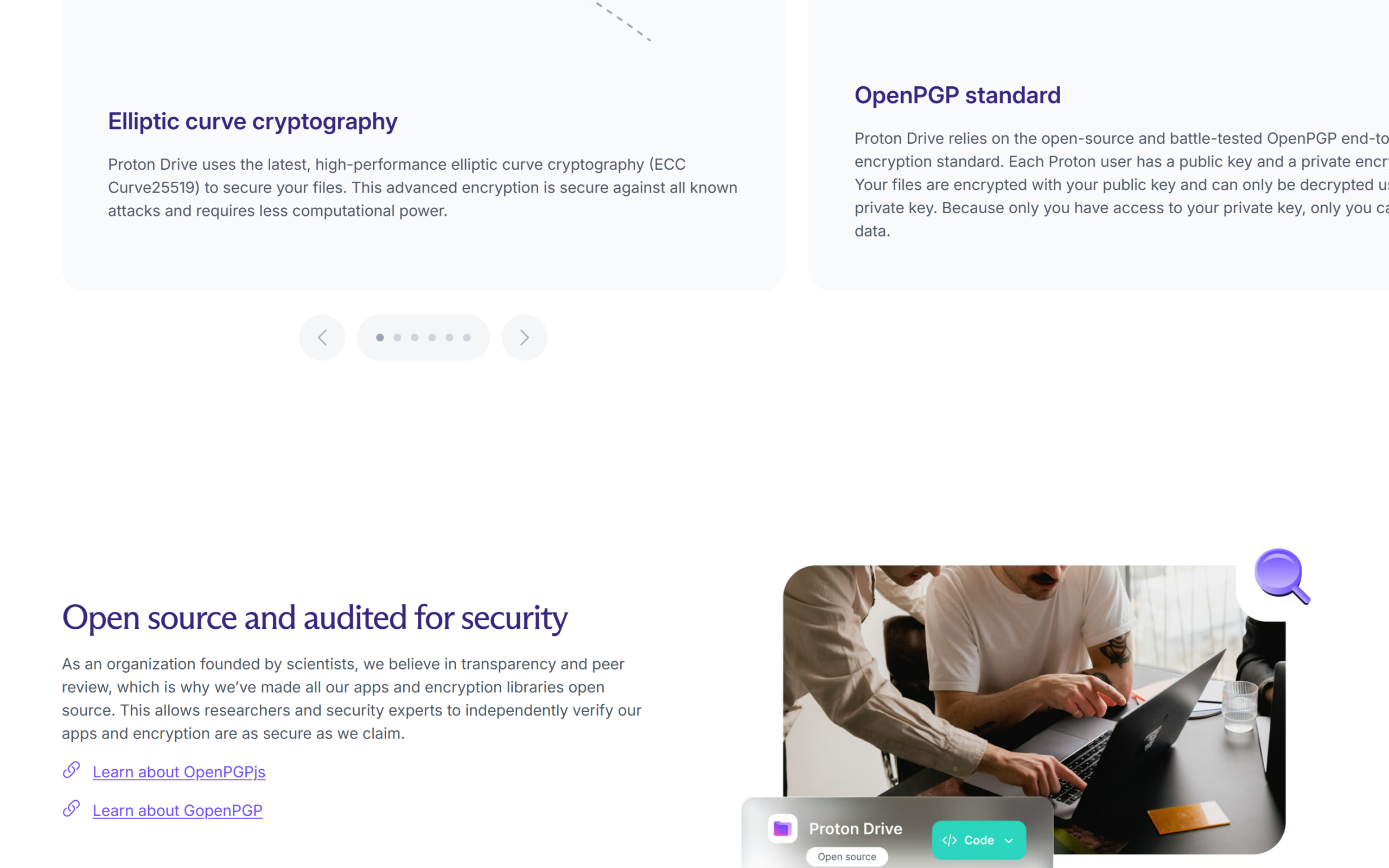
Proton’s security page is unusually specific about how Drive protects files. Encryption is end-to-end and zero-access, so no one, “not even Proton,” can access your files and folders “or see their names” without your permission. That second part matters: many services encrypt file contents but leave file and folder names readable on the server, which can reveal a surprising amount on its own.
Under the hood, Drive uses the OpenPGP standard with elliptic curve cryptography (Curve25519). Each user has a public key and a private key, files are encrypted with the public key, and only the private key, which only you hold, can decrypt them. Large files are split into 4 MB chunks, each signed with a hash so chunks cannot be removed or reordered, and digital signatures let you detect tampering with files and folders. All of it happens automatically: you do not manage keys yourself.
Two features address censorship rather than hacking. Alternative routing detects when your connection to Proton is being blocked and re-routes it so the account stays reachable, and a Tor onion site lets you reach Drive through the Tor network. Neither matters to most people, but they show that the threat model goes beyond keeping files away from advertisers. They also make Drive usable in countries where cloud services are routinely blocked.
Photos, sharing, Docs and Sheets
Photo backup is the feature most people will use daily. The Drive page describes automatic mobile backups and collaborative albums for sharing moments with others, which puts Proton Drive in the same role as the photo apps built into big-tech storage, without the scanning those services may do.
Sharing is flexible and well documented. Proton’s support article on shareable links explains that you can share a file or folder by public link or by email invitation. With a link, viewers can open and download, and editors can edit documents and spreadsheets and upload files to a shared folder, all without a Proton account. You can add a password and an expiry date and revoke access at any time. Two details are worth knowing: files uploaded to your shared folder by others count against your storage quota, and public links are not anonymous, because collaborators with editor access can see the email address of the person who shared the item.
Proton Docs and Sheets round out the suite. Docs is an online editor for writing and collaborating in real time, and Sheets adds encrypted spreadsheets with built-in formulas and charts. They are simpler than mature office suites, but they keep shared work inside the same encrypted space as your files, which is the point for privacy-sensitive teams.
Apps and syncing: the Linux gap
Proton Drive’s download page lists desktop apps for Windows and macOS, mobile apps for iOS and Android, with the Android app also available as a direct APK download, and a web app. The desktop apps sync files automatically between your computer and the cloud, so your latest work is available everywhere, according to the Drive homepage.
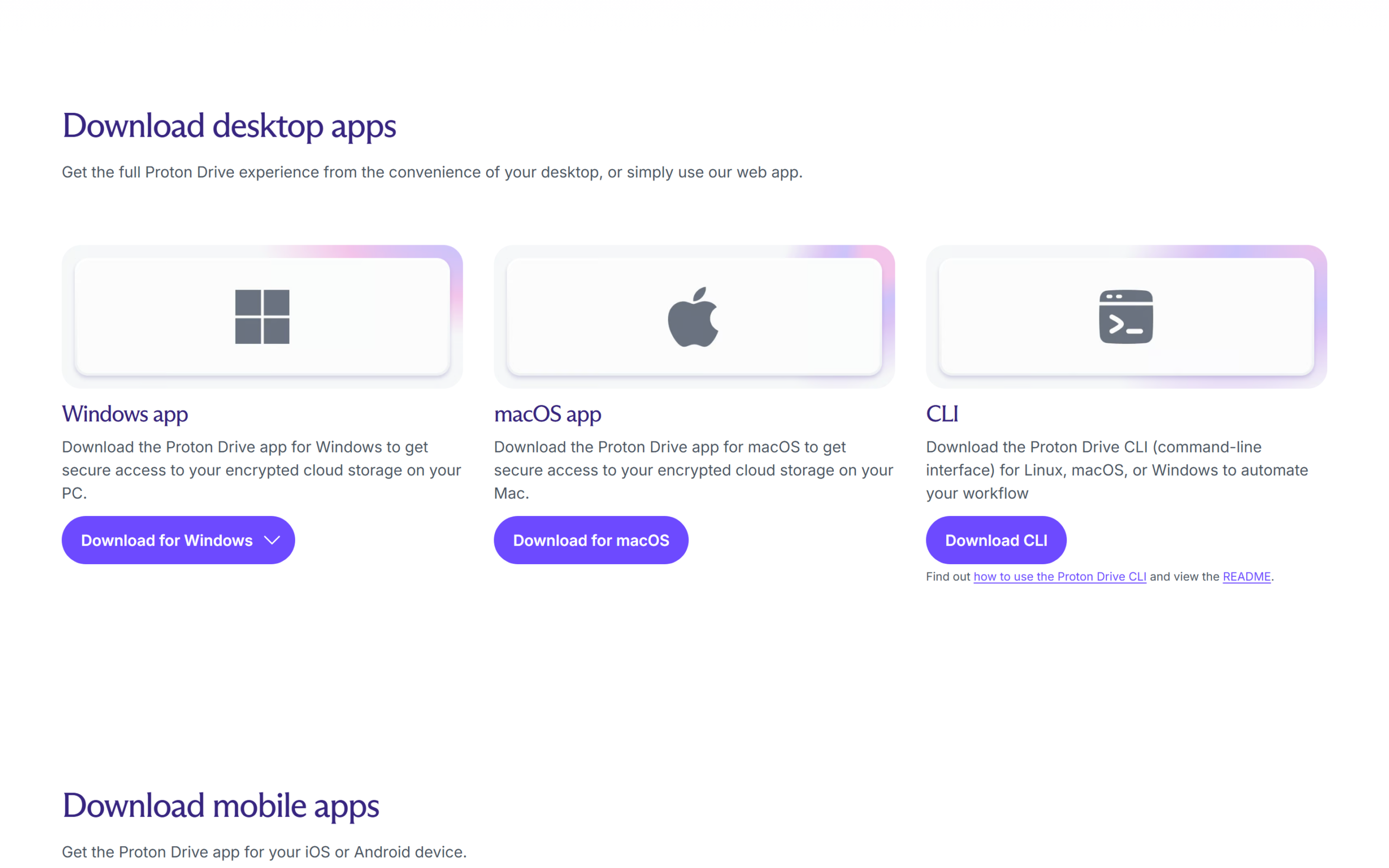
Linux is the gap. The download page offers a Proton Drive CLI, a command line tool for Linux, macOS or Windows “to automate your workflow,” but no Linux desktop sync app. For technical users that may be enough to script backups. For anyone who expects a folder that simply stays in sync on a Linux laptop, it is a real limitation, and it is worth noting that the Drive homepage lists Windows, macOS, Android, iOS and web, but not Linux, under everywhere access.
Proton Drive pricing
Proton prices Drive in US dollars, euros and Swiss francs, with identical dollar and euro figures on the day this review was checked. Here are the plans that include Drive storage, on monthly and yearly billing.
| Plan | Storage | Users | Monthly billing | Yearly billing |
|---|---|---|---|---|
| Proton Free | 5 GB | 1 | $0 | $0 |
| Drive Plus | 200 GB | 1 | $4.99/mo | $3.99/mo ($47.88/yr) |
| Proton Unlimited | 500 GB + VPN, Mail, Pass | 1 | $12.99/mo | $9.99/mo ($119.88/yr) |
| Proton Duo | 2 TB + all Proton apps | 2 | $19.99/mo | $14.99/mo ($179.88/yr) |
| Proton Family | 3 TB + all Proton apps | 6 | $29.99/mo | $23.99/mo ($287.88/yr) |
| Drive Professional | 1 TB per user | Per user | $9.99/user/mo | $7.99/user/mo |
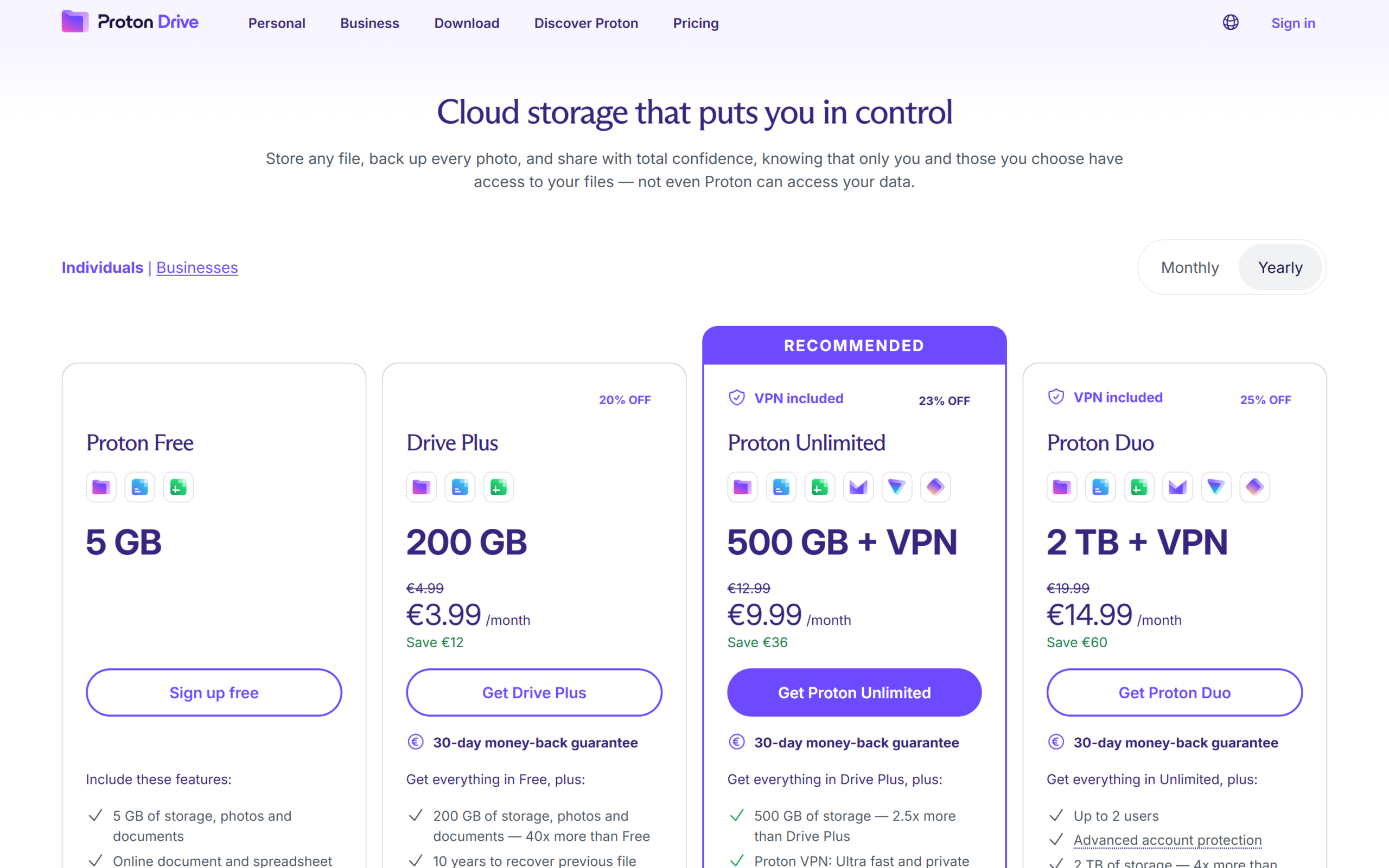
Drive Plus adds 200 GB, which Proton describes as 40 times the free allowance, and the ability to recover previous file versions for 10 years, a long version history that protects against accidental overwrites and ransomware. Proton Unlimited raises storage to 500 GB and adds Proton VPN, Mail, Calendar and Pass. The pricing FAQ says paid plans can take storage up to 3 TB, and that business customers can customise capacity. If the 200 GB tier fits your files, compare Proton Drive’s plans and start on the free tier first.
The price per gigabyte, plan by plan
Storage plans are easiest to compare by what each gigabyte costs a year. On yearly billing, Drive Plus costs $47.88 for 200 GB, about 24 cents per gigabyte per year. Proton Unlimited costs $119.88 for 500 GB, also about 24 cents per gigabyte, but with the VPN, Mail and Pass included. The multi-user plans are where storage gets cheap: Proton Duo is $179.88 for 2 TB, about 9 cents per gigabyte, and Proton Family is $287.88 for 3 TB, under 10 cents per gigabyte.
| Plan (yearly) | Price per year | Storage | Cost per GB per year |
|---|---|---|---|
| Drive Plus | $47.88 | 200 GB | $0.24 |
| Proton Unlimited | $119.88 | 500 GB | $0.24 |
| Proton Duo | $179.88 | 2 TB | $0.09 |
| Proton Family | $287.88 | 3 TB | $0.10 |
The practical reading: if you need more than 500 GB, or share storage with a partner, Duo is the better deal by a wide margin. If 200 GB is enough and you do not want the other apps, Drive Plus is the simplest buy. And if you would pay for a VPN or password manager anyway, Unlimited costs the same per gigabyte as Drive Plus while adding those apps. These figures are our arithmetic from the pricing page.
Refunds: what “30-day money-back” means
Every paid card on the pricing page carries a “30-day money-back guarantee.” The pricing FAQ adds the detail: if you cancel within the first 30 days of the initial purchase, you receive “a refund of the unused portion of the service,” calculated on a prorated basis, and refund requests after 30 days are handled at the company’s discretion. In other words, if you cancel a yearly plan on day 20, expect the unused part of the year back rather than every cent. That is a fair policy, but it is narrower than the headline suggests, so read the terms before you buy a two-person or family plan to test it. The cheaper way to test is the free plan: 5 GB is enough to try the desktop sync, photo backup and sharing for a week or two without paying anything, and you can upgrade from inside the app once you are sure.
What independent data shows
The Proton Drive app on Google Play showed a 4.4 star rating from about 8,900 reviews and more than 1 million downloads on October 14, 2026. That is a good rating, but from a much smaller base than Proton Mail or Proton VPN, and slightly lower than both, which fits a product that is younger and still adding core features such as better desktop support. Because ratings on a mobile listing mostly reflect photo backup and file browsing on phones, they say little about desktop sync, which is where Linux users will notice the gap.
Proton’s security claims rest on its open-source approach and published audits across its products, covered in our other Proton reviews. This Proton Drive review did not find a Drive-specific independent audit on the pages checked, so it relies on Proton’s published cryptographic design, which is detailed and uses established standards, rather than an outside report.
Where Proton Drive is less strong
The missing Linux desktop app is the clearest gap for technical users. The CLI is useful for scripted backups, but it is not the same as a folder that stays in sync.
Collaboration is privacy-first rather than feature-first. Docs and Sheets cover the essentials, but teams that rely on advanced office features, add-ons or deep integrations with other business software will find less here than in big-tech suites. Shared folders also count uploads from collaborators against your quota.
Finally, pricing nudges you toward bundles. Drive Plus and Unlimited cost the same per gigabyte, and the cheapest storage per gigabyte is in Duo and Family. That is good value if the bundle fits your life, and less helpful if you simply want a large single-user storage plan without the other apps.
Drive for teams and moving in
For small businesses, Proton sells Drive Professional at $9.99 per user a month, or $7.99 per user a month on yearly billing, with 1 TB of storage per user. The pricing page lists file sharing and collaboration, user access management and syncing files across devices and users, and the FAQ says Proton for Business can customise storage capacity. For a five-person team on yearly billing that is $39.95 a month, which buys 5 TB of encrypted storage and a shared workspace in which Proton cannot read client files.
Moving in from another service is a manual job rather than a one-click import. The practical route is to download your existing files from the old provider, let the Windows or macOS desktop app sync them into Proton Drive, and turn on mobile photo backup on your phone. Start with the folders you care most about, check that everything opens on a second device, and only then close the old account. Because the free plan gives 5 GB, you can test the whole workflow with a sample folder before paying.
A simple worked example helps with budgeting. A household with a 150 GB photo library fits comfortably inside Drive Plus at $47.88 a year, or $143.64 over three years at today’s yearly price. The same household storing 1 TB would need Duo, at $179.88 a year, which also covers two people and every other Proton app.
Who Proton Drive is for
Proton Drive suits anyone who wants their files and photos out of reach of their storage provider: people storing identity documents, contracts or medical records, freelancers sharing work with clients, couples and families who want private photo backups, and small teams that need encrypted file sharing with link passwords and expiry dates. It is especially good value for people who already pay for Proton Mail or Proton VPN, since moving to Unlimited or Duo bundles storage in.
It is a weaker fit for Linux desktop users who need native sync, for teams that live inside a big-tech office suite, and for anyone whose only priority is the cheapest possible storage regardless of privacy.
Proton Drive pros and cons
In this Proton Drive review the clearest advantages are encryption that hides file and folder names as well as contents, a published cryptographic design built on OpenPGP, a 5 GB free tier, 10 years of version recovery on Drive Plus, flexible link sharing with passwords and expiry dates, and storage that becomes very cheap per gigabyte on the Duo and Family plans.
Against that: no Linux desktop sync app, a refund policy that is prorated rather than full, basic document and spreadsheet tools, and a price structure that steers single users toward bundles. None of these is a dealbreaker for most people, but each is worth checking against how you work.
Frequently asked questions
How much free storage does Proton Drive give?
5 GB, which Proton says is enough for more than 1,000 high-resolution photos, with the same encryption as paid plans.
How much does Proton Drive cost?
Drive Plus is $4.99 a month or $3.99 a month billed yearly for 200 GB. Proton Unlimited is $12.99 a month or $9.99 a month yearly for 500 GB plus Proton’s other apps.
Can Proton see my files?
Proton says no. Files and folder names are end-to-end encrypted with zero-access encryption, so not even Proton can read them.
Does Proton Drive work on Linux?
There is a command line tool for Linux, macOS and Windows, and the web app works in a browser, but no Linux desktop sync app is listed on the download page.
Can I share files with people who don’t use Proton?
Yes. Public links let recipients view, download, edit documents or upload to a shared folder without a Proton account, and you can add a password and an expiry date.
Can I get a refund?
Within the first 30 days you get a prorated refund of the unused portion, according to the pricing FAQ. After that, refunds are at Proton’s discretion.
Is Proton Drive worth it?
This Proton Drive review finds a genuinely private cloud storage service with a clear, well-documented encryption model, a usable 5 GB free tier, sensible paid plans and useful extras in photo backup, link sharing, Docs and Sheets. The trade-offs are the missing Linux sync app, a prorated refund rather than a full one, and pricing that rewards bundles over standalone storage.
If you want your files out of reach of your storage provider, check Proton Drive’s current plans, start with the free 5 GB and move up once you know how much space and which other Proton apps you need.
8.1 Score
Pros
- End-to-end, zero-access encryption that hides file and folder names, not just contents.
- 5 GB free, and 200 GB for $3.99 a month on Drive Plus with 10 years of version recovery.
- Flexible link sharing with passwords, expiry dates and no account needed for recipients.
- Photo backup, Docs and Sheets included, with cheap storage per GB on Duo and Family.
Cons
- No Linux desktop sync app, only a command line tool.
- The 30-day money-back guarantee is a prorated refund of the unused portion.
- Docs and Sheets are basic next to mature office suites.
- Collaborator uploads to shared folders count against your quota.
Final Verdict
Proton Drive is genuinely private cloud storage with a clear, well-documented encryption model that hides even file names, a usable 5 GB free tier and 200 GB for $3.99 a month. Linux users get only a command line tool, refunds are prorated, and the best price per gigabyte sits in the multi-user bundles. For anyone who wants files out of reach of their provider, it is an easy recommendation.