


Short answer: This InboxAlly review covers an email deliverability service that tries to pull your emails out of spam by having a network of “seed” mailboxes open, scroll, click, reply to and rescue your messages, teaching Gmail, Yahoo and Outlook that your mail is wanted. It can genuinely help a sender whose domain reputation has slipped, and it needs no access to your email accounts or DNS. But it is expensive, starting at $149 a month and reaching $1,190 a month for Premium, its own pages disagree on how fast results come and what support each plan includes, and it treats a symptom: engineered engagement does not fix a dirty list, missing authentication or content your real readers ignore.
- Consider it if you send at volume, your inbox placement has dropped, and you have already fixed SPF, DKIM, DMARC and list hygiene.
- Start with the 10-day free trial, which needs no card, but expect it to show fit rather than full results.
- Budget realistically: InboxAlly’s own FAQ says improvements take 2 to 4 weeks, and 4 to 8 for damaged domains.
- Skip it if you run a small newsletter; the cheapest plan costs more than many email platforms.
Starter: $149/mo (100 seeds a day). Plus: $645/mo (500 seeds). Premium: $1,190/mo (1,000 seeds). Enterprise: custom. Billed monthly in USD. 10-day free trial, no card. Inboxally.com, checked October 17, 2026.
Table of contents
What is InboxAlly?
InboxAlly is a deliverability tool for people who send a lot of email and have started losing it to the spam folder. Its homepage calls it “the most powerful email deliverability tool” and promises it “teaches inbox providers (e.g., Gmail, Yahoo Mail, etc.) to understand that the emails you send from your domain are important and valued by your recipients.” It is aimed at four groups: mailing list owners, deliverability experts, agencies and email service providers.
The company says it is based in New York City and was founded in 2019. Its pricing page claims it is trusted by more than 20,000 brands and describes the platform as “SOC 2 aligned,” a phrase that suggests following the SOC 2 framework rather than holding a SOC 2 report, so treat it as a description rather than a certification. You do not have to move your sending to InboxAlly: it works alongside whatever platform you already use, from MailerLite or Klaviyo to a cold email tool or your own SMTP server.
This InboxAlly review reads the homepage, the pricing page and its FAQ, the features page and the knowledge base article on how the service works, all on October 17, 2026, and then checks InboxAlly’s public profile on Trustpilot. If you are still choosing an email platform rather than fixing one, our MailerLite review is a better starting point; if you send cold outreach, our Woodpecker review covers a tool built for that.
How it works: seed emails and engagement
The mechanism is simple to describe. InboxAlly gives you a set of “seed” email addresses, mailboxes it controls at Gmail, Yahoo, Outlook and other providers. You add them to your sends, either to your normal campaigns or to warmup sends InboxAlly generates for you. When your email arrives in those mailboxes, InboxAlly’s system engages with it the way an interested reader would.
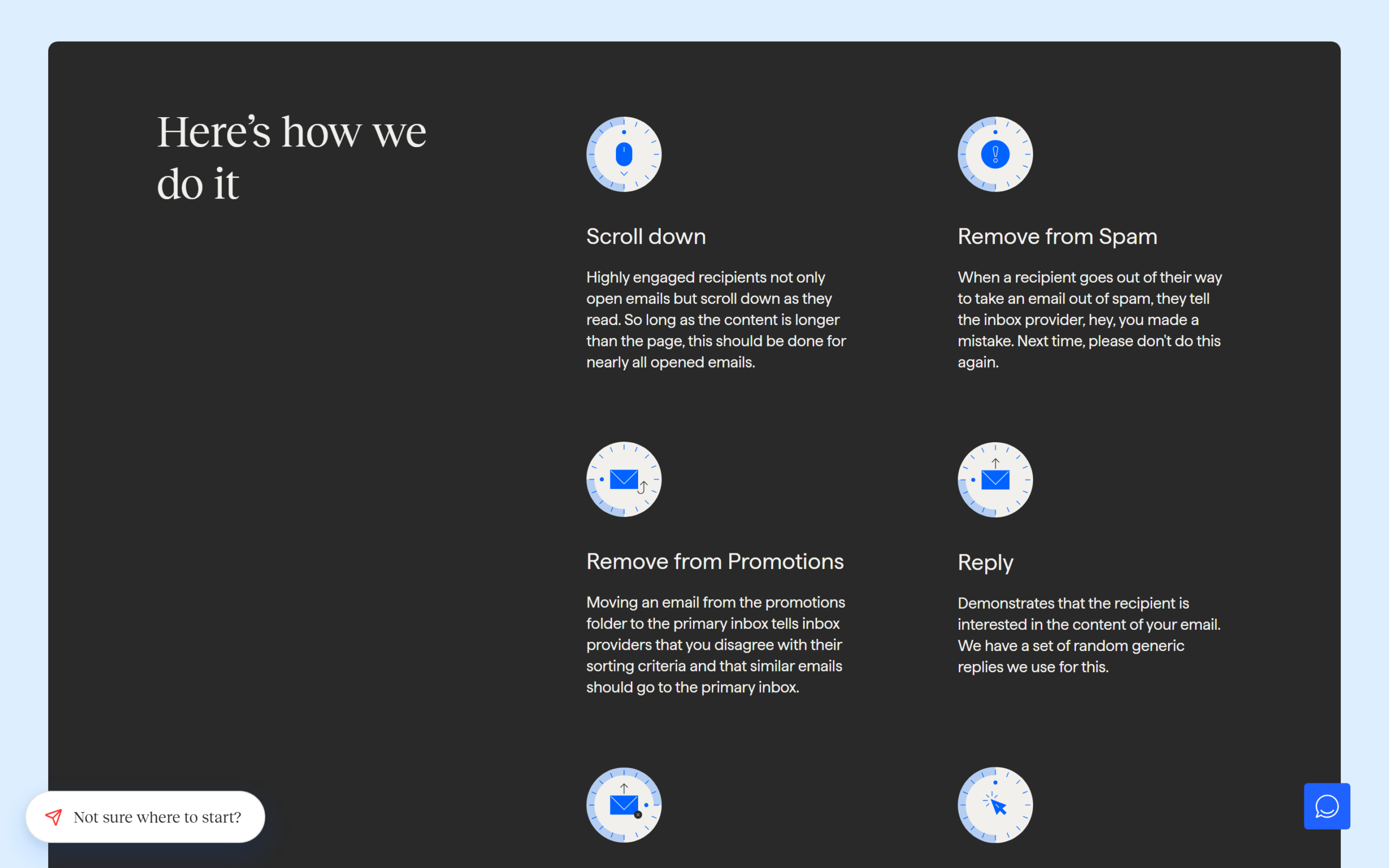
Its knowledge base article on how InboxAlly works lists the actions: removing your email from spam and moving it to the primary inbox, moving it out of the promotions or updates tabs, marking it as important, opening it, scrolling through it, clicking its links and replying. The features page adds that replies come from “a set of random generic replies,” and that emails are opened “from different machines with different IPs in different US locations.” The pricing page counts seven distinct engagement actions “executed at human cadence.”
The detail that matters most is how this is done. InboxAlly says its AI interacts with each seed mailbox “using the native user interface for the platform” rather than through an API, so that inbox providers “see these interactions as valuable user feedback, and not some automated computer script.” In plain terms, it is automated engagement designed to look like a person’s. That is the product working as intended, and it is also the reason to understand its limits, covered further down.
Features: scoring, autowarmup, testing and the API
Around the seed network, InboxAlly has built a set of tools that the pricing FAQ says come with every plan. IA Score uses a machine learning model to predict your inbox placement, and IA Reputation rates each domain LOW, MED or HIGH, which InboxAlly describes as “the Google-Postmaster equivalent.” Adaptive Autowarmup generates and runs a whole warmup sequence on autopilot, adjusting to your domain’s signals. The IA Assistant is an in-app AI that answers questions using your own dashboard and sending history.
The rest is the plumbing you would expect: inbox placement testing with a breakdown by provider, live blacklist monitoring, DMARC reporting, multiple sender profiles for different domains or IP addresses, Workspaces for agencies managing several clients, broadcast auto-detection, and a dashboard that tracks where your emails have landed over the last 30 days. A full REST API is documented and, according to the FAQ, available on every plan, with native integrations for HubSpot, Klaviyo and others.
One practical advantage is what InboxAlly does not need. The FAQ is explicit: “InboxAlly never requires access to your email accounts, your sending platform, or your domain DNS.” You add seed addresses to your sends and nothing else. For an agency or a company with strict security rules, that removes a common objection to deliverability services.
The company also publishes a free toolkit, available without an account: an email spam checker, an email content tester, a spam database lookup, email list verification, a warmup planner, and DMARC and SPF record generators, alongside a knowledge base that covers authentication, list hygiene and provider-specific guides.
InboxAlly pricing
InboxAlly sells four plans, priced by how many seed addresses you can send to each day and how many sender profiles you can run. All prices are in US dollars and billed monthly, and every plan starts with a 10-day free trial that needs no credit card.
| Plan | Price per month | Seed emails per day | Sender profiles | Support listed on the plan card |
|---|---|---|---|---|
| Starter | $149 | 100 | 1 | |
| Plus | $645 | 500 | 5 | Email and live chat |
| Premium | $1,190 | 1,000 | 10 | Email, live chat and phone, plus setup and weekly sessions |
| Enterprise | Contact sales | Thousands | Unlimited | Email, live chat and phone |
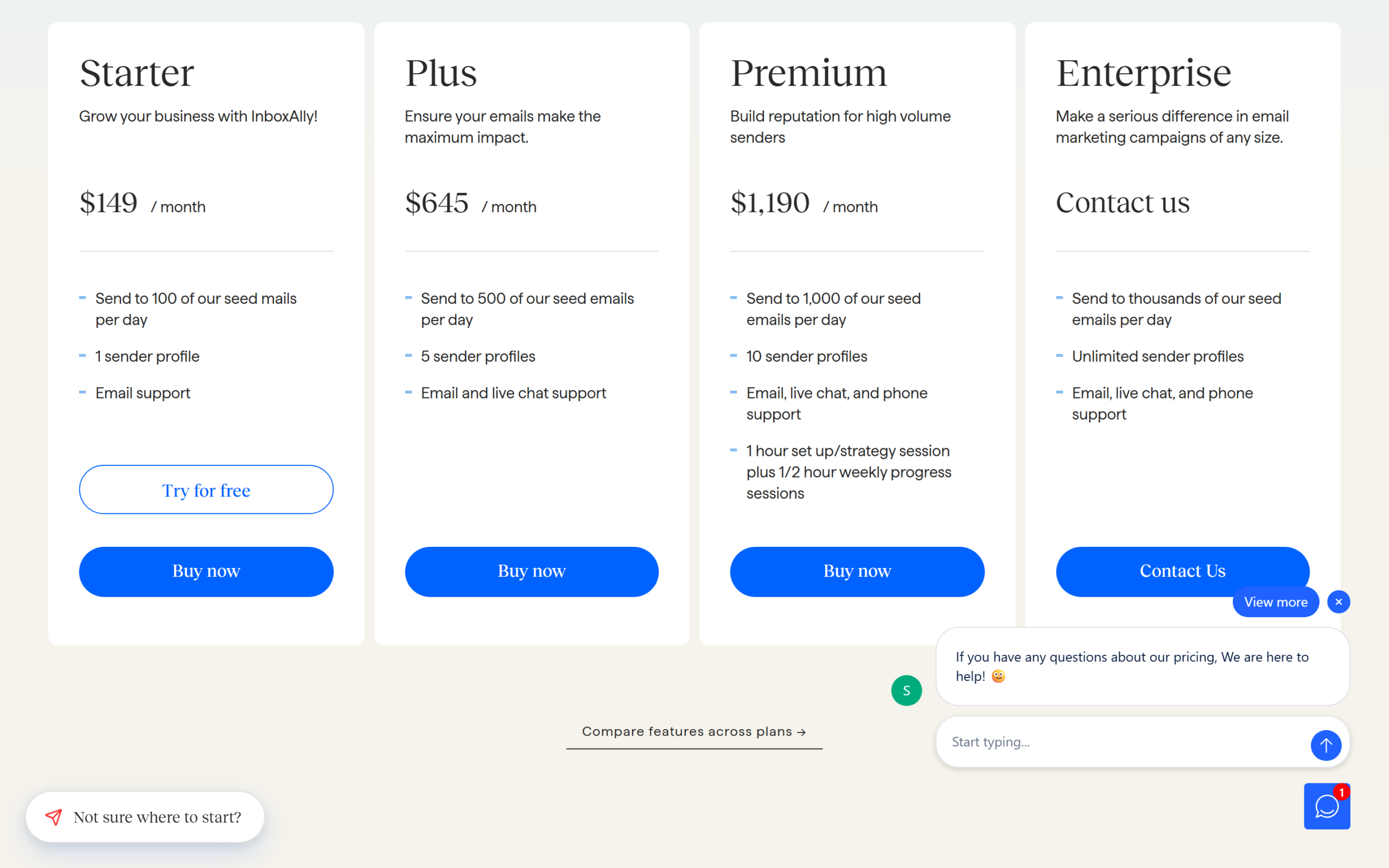
By seed, Starter works out to $1.49 per daily seed per month, Plus to $1.29 and Premium to $1.19, so the larger plans are only modestly cheaper per seed. The jump between tiers is the bigger story: going from Starter to Plus multiplies the bill by more than four for five times the seeds. Premium adds a one-hour setup and strategy session and weekly 30-minute progress sessions, which is real human time and may matter more than the extra seeds for a team without deliverability expertise. There is no annual discount shown on the pricing page, so the monthly price is the price. If the numbers fit your situation, start InboxAlly’s free trial and use it to judge fit before committing.
How many seeds do you actually need?
InboxAlly’s pricing page recommends a 5 percent “seed-to-send ratio,” roughly five seed engagements per 100 emails sent, and says 100 seeds support more than 2,000 daily sends. The FAQ adds an important nuance: you are not meant to apply the ratio to your whole volume. Most customers target the specific domains or segments that need repair, then move the same seeds to other domains once each recovers.
| Daily sends needing repair | Seeds at 5% | Smallest plan that covers it | Monthly cost |
|---|---|---|---|
| 2,000 | 100 | Starter | $149 |
| 10,000 | 500 | Plus | $645 |
| 20,000 | 1,000 | Premium | $1,190 |
Those figures are our arithmetic from InboxAlly’s stated ratio. In practice, a sender with one problem domain and a few thousand daily sends fits Starter, while a sender with several damaged domains, or a single very large list, quickly reaches Plus. InboxAlly says its sales team will size a plan to the actual repair work rather than total send count, which is worth taking up before you jump a tier.
Claims that do not line up
Several of InboxAlly’s own statements disagree with each other, and they matter because they set expectations for a tool that costs at least $149 a month.
Speed is the first. The homepage promises “Double your open rates within 1-2 weeks!” The pricing FAQ is more cautious: “Most domains see measurable inbox placement improvements within 2 to 4 weeks of consistent warmup. Damaged or new domains may take 4 to 8 weeks.” It also warns that the 10-day trial “is best used to evaluate fit, not as a complete warmup cycle.” Plan for the FAQ’s timeline, not the headline.
Support is the second. The plan cards list email only for Starter, email and live chat for Plus, and phone only from Premium. The FAQ and the pricing page’s own feature section say the opposite: every customer gets a dedicated Customer Success Manager, and “Email, live chat, phone, and Zoom support are all standard.” Ask which applies to your plan before you buy.
The third is a guarantee. InboxAlly’s company description on Trustpilot says “Never land in spam. Guaranteed inbox placement.” No deliverability service can guarantee placement, because inbox providers decide, and InboxAlly’s own FAQ talks in weeks and probabilities rather than guarantees. A smaller inconsistency: the homepage says it has been relied on “since 2020,” while the FAQ says the company was founded in 2019.
What engineered engagement cannot fix
InboxAlly’s own knowledge base lists the usual causes of deliverability problems: poor list hygiene, authentication issues and spammy sending practices. Seed engagement does not address any of them directly. If your list is full of old or purchased addresses, if SPF, DKIM and DMARC are not set up, or if real recipients ignore your emails, mailbox providers will keep seeing those signals from everyone who is not a seed.
The honest way to use a tool like this is as a lever on top of good practice, not a substitute for it. Fix authentication first; InboxAlly’s own documentation and free generators help with SPF and DMARC. Clean your list. Look at what your real readers open. Then use seeds to speed up recovery for a domain that has been misjudged, which is the situation InboxAlly says it was “engineered” for.
There is also a policy question worth knowing about. Engagement that is generated rather than earned is, by design, invisible to the inbox provider as such. Providers continually change how they weigh signals, so results that work today are not guaranteed to work the same way next year. That is not a reason to rule InboxAlly out, but it is a reason to measure your real-recipient open and click rates alongside the dashboard.
A sensible way to test it
Because results take weeks and the trial lasts 10 days, it pays to prepare before you start the clock. First, confirm that SPF, DKIM and DMARC are in place for the domain you want to repair; InboxAlly’s free SPF and DMARC generators and its authentication guides cover the setup. Second, clean the list you will send to, removing hard bounces and long-inactive addresses, so you are not asking seeds to compensate for addresses that will never engage.
Third, get a baseline. InboxAlly’s knowledge base documents a Google Postmaster Tools integration, and Postmaster Tools is Google’s own view of your domain’s reputation, so connecting it gives you a reference that does not come from InboxAlly. Note your current open and click rates from your email platform too.
Then use the trial to judge fit rather than to finish the job: add seeds to one domain or one segment, let Autowarmup or your normal campaigns run, and watch whether the dashboard, Postmaster Tools and your real-recipient metrics start moving in the same direction. If they do, a paid month or two at the smallest plan that covers that domain is the low-risk next step. If only InboxAlly’s own scores move, that is a reason to look again at the list, authentication and content.
What independent data shows
InboxAlly’s profile on Trustpilot showed a 4.8 TrustScore from 64 reviews on October 17, 2026, with 14 of those reviews posted in the last 12 months. Trustpilot labels the profile as claimed in April 2022 and notes that InboxAlly has a paid Trustpilot subscription and invites its customers to review it. Recent reviews praise individual support staff by name and the strategy help during setup.
That is a positive signal, but a modest one: 64 reviews is a small sample, and reviews requested by the company tend to skew positive. The customer stories on InboxAlly’s own site, such as a cold email agency CEO crediting it with raising open rates “from 30% to 70%+,” are selected by the vendor. This InboxAlly review found no independent benchmark of its inbox placement results on the pages checked.
Who InboxAlly is for
InboxAlly fits senders for whom inbox placement is directly worth money and who have already done the basics: e-commerce brands whose campaigns have slid into Gmail’s promotions tab or spam, agencies managing deliverability for several clients, email service providers protecting their customers’ open rates, and cold email operators who need to recover a domain. For them, a few hundred dollars a month can be small next to lost revenue.
It is a poor fit for a small newsletter, a creator with a few thousand subscribers or anyone whose deliverability problem is a missing DMARC record. For those readers, fixing authentication and list hygiene, which costs nothing, is the first step, and the cheapest InboxAlly plan costs more than many full email marketing platforms.
InboxAlly pros and cons
In this InboxAlly review the clearest advantages are a seed network that performs the full range of engagement actions, including rescuing mail from spam and promotions, no need to share account or DNS access, every capability on every plan, a documented REST API, a useful free toolkit and knowledge base, a 10-day free trial without a card, and hands-on setup help on Premium.
Against that: pricing that starts at $149 a month and jumps steeply between tiers, a homepage promise of results in one to two weeks against an FAQ that says two to eight, conflicting statements about which support each plan includes, a “guaranteed inbox placement” claim no tool can honour, and an approach that treats reputation signals rather than the underlying causes.
Frequently asked questions
How much does InboxAlly cost?
Starter is $149 a month for 100 seed emails a day, Plus $645 for 500, Premium $1,190 for 1,000, and Enterprise is priced on request. All plans are billed monthly in US dollars.
Does InboxAlly have a free trial?
Yes, 10 days with no credit card. InboxAlly says the trial is best for judging fit, because full reputation repair usually takes longer.
How long does InboxAlly take to work?
The FAQ says most domains improve within 2 to 4 weeks of consistent warmup, and damaged or new domains may take 4 to 8 weeks.
Does InboxAlly need access to my email account?
No. You add its seed addresses to your sends; it never needs access to your email accounts, sending platform or DNS, according to its FAQ.
Does InboxAlly work with Mailchimp, Klaviyo or HubSpot?
It works with any platform that can send to a list, and lists native integrations with HubSpot and Klaviyo plus a REST API.
Can InboxAlly guarantee inbox placement?
No tool can. InboxAlly’s Trustpilot description uses the word “guaranteed,” but its own FAQ describes improvements over weeks, not a guarantee.
Is InboxAlly worth it?
This InboxAlly review finds a capable, well-documented deliverability service that can help a high-volume sender recover a damaged domain without handing over account or DNS access. It is also expensive, its own pages overpromise on speed and disagree on support, and it works on reputation signals rather than the list, authentication and content problems that usually cause them.
If you send at volume and have already done the basics, check InboxAlly’s current plans, use the 10-day trial to judge fit, and measure real-recipient engagement alongside its dashboard.
7.1 Score
Pros
- Seed network performs the full set of engagement actions, including rescuing mail from spam and promotions.
- Needs no access to your email accounts, sending platform or DNS.
- Every capability on every plan, with a documented REST API and HubSpot and Klaviyo integrations.
- 10-day free trial without a card, plus a free deliverability toolkit and knowledge base.
Cons
- Starts at $149 a month and jumps to $645 for the next tier.
- Homepage promises results in 1 to 2 weeks; the FAQ says 2 to 8 weeks.
- Plan cards and FAQ disagree on which support each plan includes.
- Works on reputation signals, not the list, authentication or content problems behind them.
Final Verdict
InboxAlly is a capable, well-documented deliverability service that can help a high-volume sender recover a damaged domain without account or DNS access. It is expensive, from $149 a month, its pages overpromise on speed and disagree on support, and seed engagement does not fix list, authentication or content problems. Worth a trial for serious senders who have already done the basics.