


Short answer: This Weglot review finds the fastest way to make an existing website multilingual without rebuilding it: you connect the site, pick languages, and Weglot detects, machine translates and serves the translated pages under their own URLs, with hreflang tags handled for you. The catch is the business model. You pay by translated words and languages every month or year, your translations live on Weglot’s servers rather than in your own database, and if you stop paying, the translated pages stop showing.
- Choose Weglot if you want a multilingual site live in an afternoon, run more than one platform (WordPress, Shopify, Webflow), or have nobody to maintain a translation plugin.
- Count your words first. Translated words are your original word count multiplied by the number of languages, and SEO metadata counts too.
- Look at WPML or TranslatePress instead if you run a large WordPress site, want to own the translations outright, or need many languages on a small budget.
Free: 2,000 translated words, 1 language. Starter: $17/mo (10,000 words, 1 language). Business: $32/mo (50,000 words, 3 languages). Pro: $87/mo (200,000 words, 5 languages, 3 sites). Advanced: $329/mo. Extended: $769/mo. Yearly billing costs 10 months’ price. Prices are Weglot’s USD estimate; it bills in euros (Starter €15/mo), VAT excluded. 14-day free trial, no card. Free plan: yes. Weglot.com, checked October 15, 2026.
Table of contents
What Weglot is and how it translates a website
Weglot is a website translation service from Weglot SAS, a French company headquartered in Paris. It is not a translation plugin in the traditional WordPress sense but a hosted service between your website and your foreign language visitors: it reads the content your site already produces, translates it, stores the translations in its own database, and serves each translated page under a language specific address such as yoursite.com/fr/.
The workflow on Weglot’s features page has three steps. You connect your website and choose from more than 110 languages. AI generates the translated pages while you keep control through glossary rules and an optional custom language model. Then the site goes live with a language switcher and separate URLs per language. New content is detected and translated as it appears, so next week’s blog post needs no separate translation job.
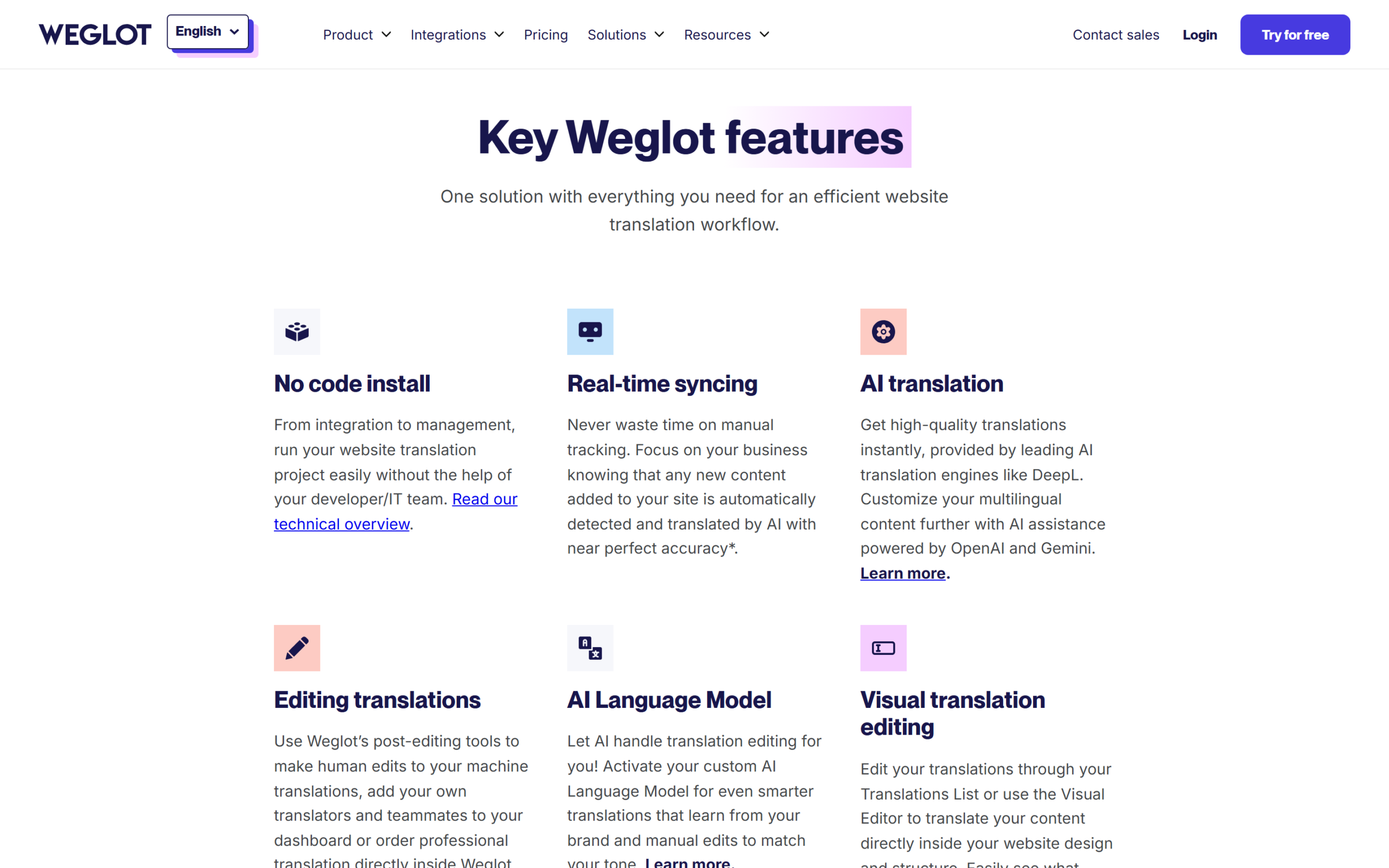
There are two delivery methods, and the difference matters for search. Weglot’s technical presentation describes a reverse proxy: when a visitor asks for the French version, Weglot’s server fetches your original page, swaps in the stored translations and returns a complete translated page that search engines and AI crawlers can read. The alternative is a JavaScript integration that swaps text in the visitor’s browser, which Weglot’s own help centre says “does not offer SEO benefits.” The WordPress plugin translates server side, so WordPress sites get the indexable version by default.
For machine translation, Weglot uses DeepL, Google Translate and Microsoft Bing Translator, picking the best one for each language pair automatically, and an optional AI Language Model uses OpenAI or Gemini to adapt translations to your tone and earlier edits.
This Weglot review is based on Weglot’s pricing page, its features and technical pages, its terms and more than fifteen help centre articles, all read on October 15, 2026, plus the WordPress.org listings and the public pricing pages of WPML and TranslatePress. Where Weglot’s own pages disagree, we say so.
Setting up Weglot on WordPress
WordPress is where most readers will meet Weglot, and the setup is genuinely short. Weglot’s WordPress integration guide lists six steps: create a Weglot account and a project with the WordPress integration, which gives you an API key; in your WordPress dashboard go to Plugins and Add New; search for Weglot; install and activate the plugin; open the new Weglot tab; and enter the API key, your original language and the destination languages. The same process applies to a WooCommerce store.
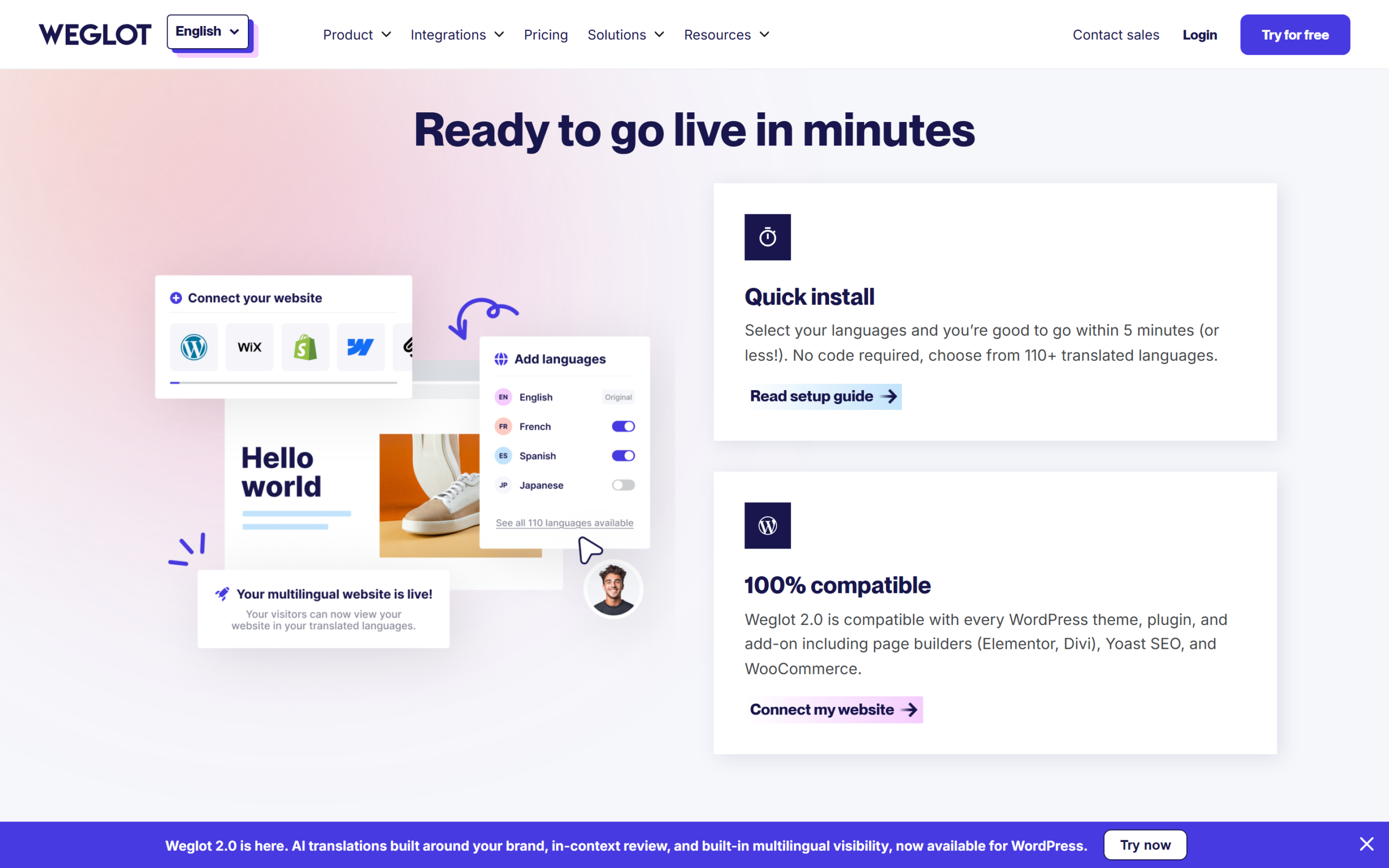
Weglot’s integration page promises you can be “good to go within 5 minutes (or less!)” and says the plugin is compatible with every theme and with page builders such as Elementor and Divi, Yoast SEO and WooCommerce. If you want to try it on your own WordPress site, create a Weglot account for WordPress here; the API key is shown once the project exists. One technical footnote from the guide: accounts on Weglot’s US environment (dashboard.weglot.us) need a single line added to wp-config.php before the key is accepted.
On WordPress.org, the plugin, now branded Weglot 2.0, showed version 6.4.3, more than 50,000 active installations and a 4.8 out of 5 star rating on October 15, 2026. Weglot’s own figure of more than 110,000 websites covers every platform. The 2.0 release adds a Brand Profile and Translation Guidelines that steer the AI, translation of text inside images, and Weglot MCP for connecting an AI assistant.
One thing to understand early: Weglot does not translate the whole site the moment you connect it. Translations are generated progressively as visitors, you or search engine bots open translated pages, unless you sync them with the Manage URLs feature. Your word count grows as pages are discovered.
On search, Weglot’s WordPress help article lists what it handles automatically: a subdirectory per language (yoursite.com/de/), hreflang tags so Google knows which pages are translations of each other, translated content in the source code, and translated meta descriptions and image alt text. It does not add an x-default hreflang tag by default; a PHP filter covers that. Google’s own guidance on telling Google about localized versions of a page explains why these tags matter. If you run an SEO plugin, Weglot says it also translates the SEO tags your plugins add; our Rank Math review covers that side of a WordPress SEO setup.
Translation quality and editing control
Machine translation is the starting point, not the end point, and Weglot gives you several ways to correct it. Its help centre lists them: the Translations List, where you search and edit any string and the change goes live immediately; the Visual Editor, where you edit text in context on a live preview of your page; Glossary rules that force certain words to always or never be translated, which is how you protect brand and product names; the AI Language Model; professional translations; and assigning translations to team members.
The Visual Editor is the feature most people buy Weglot for: you see the translated page as a visitor would, click a sentence and fix it, which beats editing a spreadsheet of fragments when a headline has to fit a button.
Professional translation is ordered inside the dashboard on Starter and higher, at extra cost depending on the language pair, with delivery in about 48 hours (two business days) and the result dropped straight into your Translations List. Useful for a checkout page or legal text you do not want to leave to a machine.
Some editing tools are tied to higher plans. Translated URLs, so a French page can have a French slug, and statistics start at Pro. Tone of voice, custom languages and bulk export and import start at Advanced. Translation memory needs Extended. Weglot’s editing article also says assigning translations to a team member is a Pro feature, although the plan table lists five team members from Free upward; ask support before relying on team workflows on a cheaper plan.
Weglot’s public reputation is strong: its Trustpilot profile showed a 4.9 rating from 1,716 reviews on October 15, 2026, with recent reviewers praising support and quick setup. That says nothing about your language pair, so have a native speaker read your key pages before you promote them.
Weglot pricing: every plan limit
Weglot prices are set in euros. The pricing page has a currency switch, and in US dollars it adds a note that the USD price “is an estimate” and that the final price depends on the EUR/USD rate on your subscription date. The pricing FAQ adds that all standard plans are charged in euros and that your bank converts the amount if your card is in another currency. VAT is excluded and added for EU customers without a valid VAT number. For this Weglot review we recorded the dollar figures shown on October 15, 2026, with euros alongside.
| Plan | Monthly (USD est. / EUR) | Yearly (USD est. / EUR) | Translated words | Languages | Translation requests per month | Websites | Team members | Support |
|---|---|---|---|---|---|---|---|---|
| Free | $0 | $0 | 2,000 | 1 | 2,000 | 1 | 5 | Limited |
| Starter | $17 / €15 | $170 / €150 | 10,000 | 1 | 20,000 | 1 | 5 | Basic |
| Business | $32 / €29 | $320 / €290 | 50,000 | 3 | 50,000 | 1 | 5 | Basic |
| Pro | $87 / €79 | $870 / €790 | 200,000 | 5 | 200,000 | 3 | 10 | Premium |
| Advanced | $329 / €299 | $3,290 / €2,990 | 1,000,000 | 10 | 1,000,000 | 10 | 25 | Premium |
| Extended | $769 / €699 | $7,690 / €6,990 | 5,000,000 | 20 | 5,000,000 | 20 | 50 | Premium |
| Enterprise | On request | On request | Custom | Custom | Custom | Custom | Custom | Dedicated |
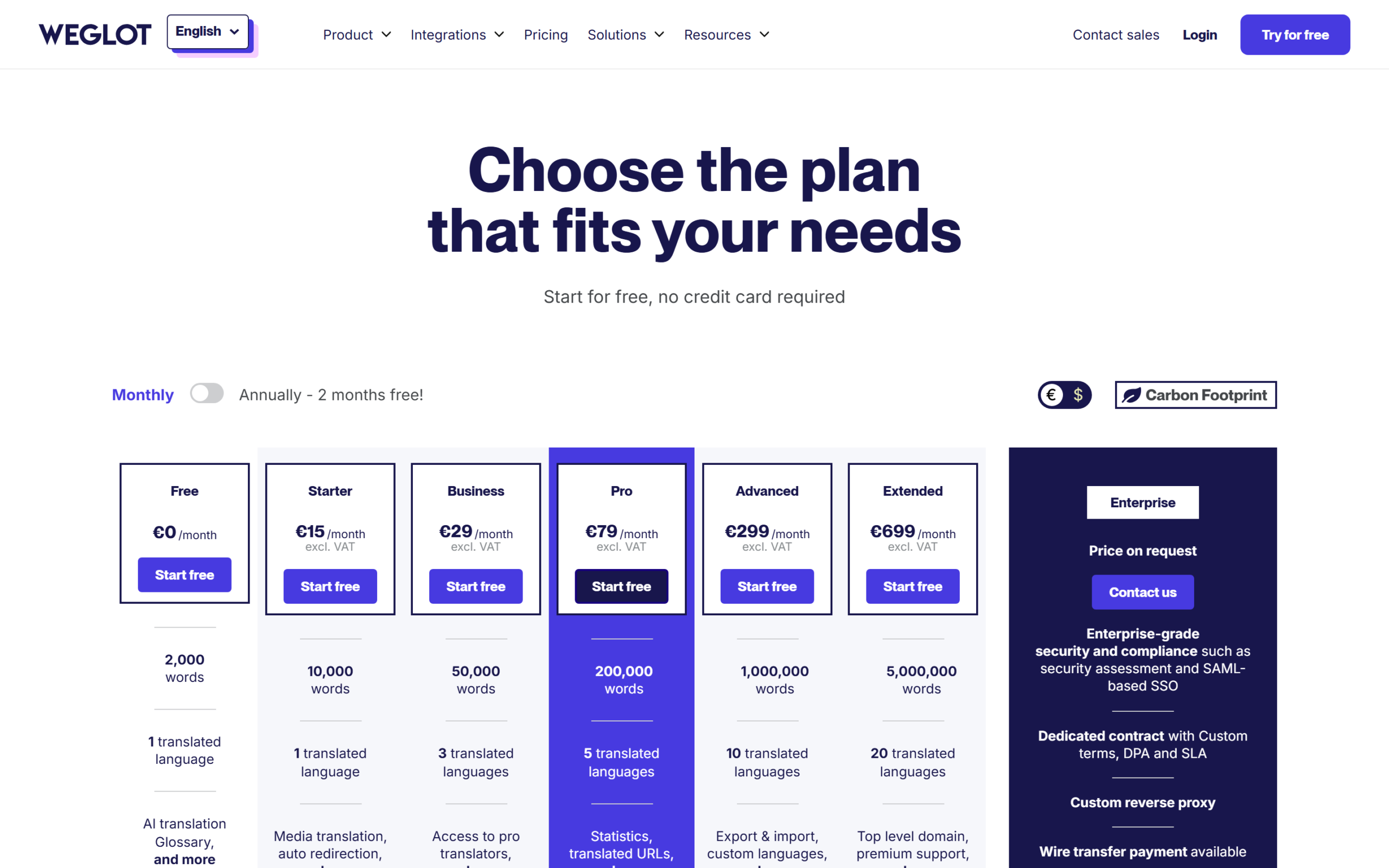
Yearly billing is labelled “2 months free,” and the arithmetic matches: every yearly price is exactly ten times the monthly one. Paying yearly saves $34 on Starter, $64 on Business, $174 on Pro, $658 on Advanced and $1,538 on Extended compared with twelve monthly payments. There is no separate introductory price: the yearly figure is the list price, not a first-year promotion.
Does it renew at the same price? Weglot’s terms say a subscription is “tacitly renewed” for the same monthly or yearly period until you cancel, and that Weglot may change its prices, with new prices applying “from the Subscription renewal date.” So you renew at whatever the list price is on your renewal date, not at a locked rate, and the dollar amount will also move with the exchange rate because the charge is in euros. Weglot’s help centre says it accepts only credit cards for standard plans; wire transfer is an Enterprise option.
The free options are generous for testing. Every plan starts with a 14-day trial with no card needed, and Weglot’s help article says the trial allows up to 10,000 translated words and 1 language. When it ends, a site under 2,000 translated words in one language drops to the Free plan automatically and keeps working. Above 2,000 words you have to upgrade or cut back. The Free plan also keeps the “By Weglot” badge, which every paid plan can remove. Agencies get no separate price list, but Weglot offers 3 months of extended free usage on each new client workspace and a 15% lifetime discount for the client.
Upgrades are prorated: you pay only the difference for the rest of the billing period. Downgrades leave a credit on future invoices. Refunds are available for 15 days after the original purchase, but Weglot’s terms and help centre both say refunds do not apply to renewals or plan upgrades. If the numbers suit your site, see Weglot’s current plans and start the trial, and use the trial to measure your real word count before you pick a tier.
How many translated words you really need
Almost every Weglot pricing surprise comes from misreading the word limit. Weglot counts translated words, not words on your site. Its help centre gives the formula: your original word count multiplied by the number of languages. A site with 8,000 words translated into French, German and Arabic uses about 24,000 translated words. The count includes invisible content such as meta titles, meta descriptions and image alt text, and it covers every word translated at least once. It is cumulative: translations are kept until you delete them, so old pages, retired products and one-off pop-ups keep counting. Weglot’s help article on how translated words are calculated is worth reading before you buy.
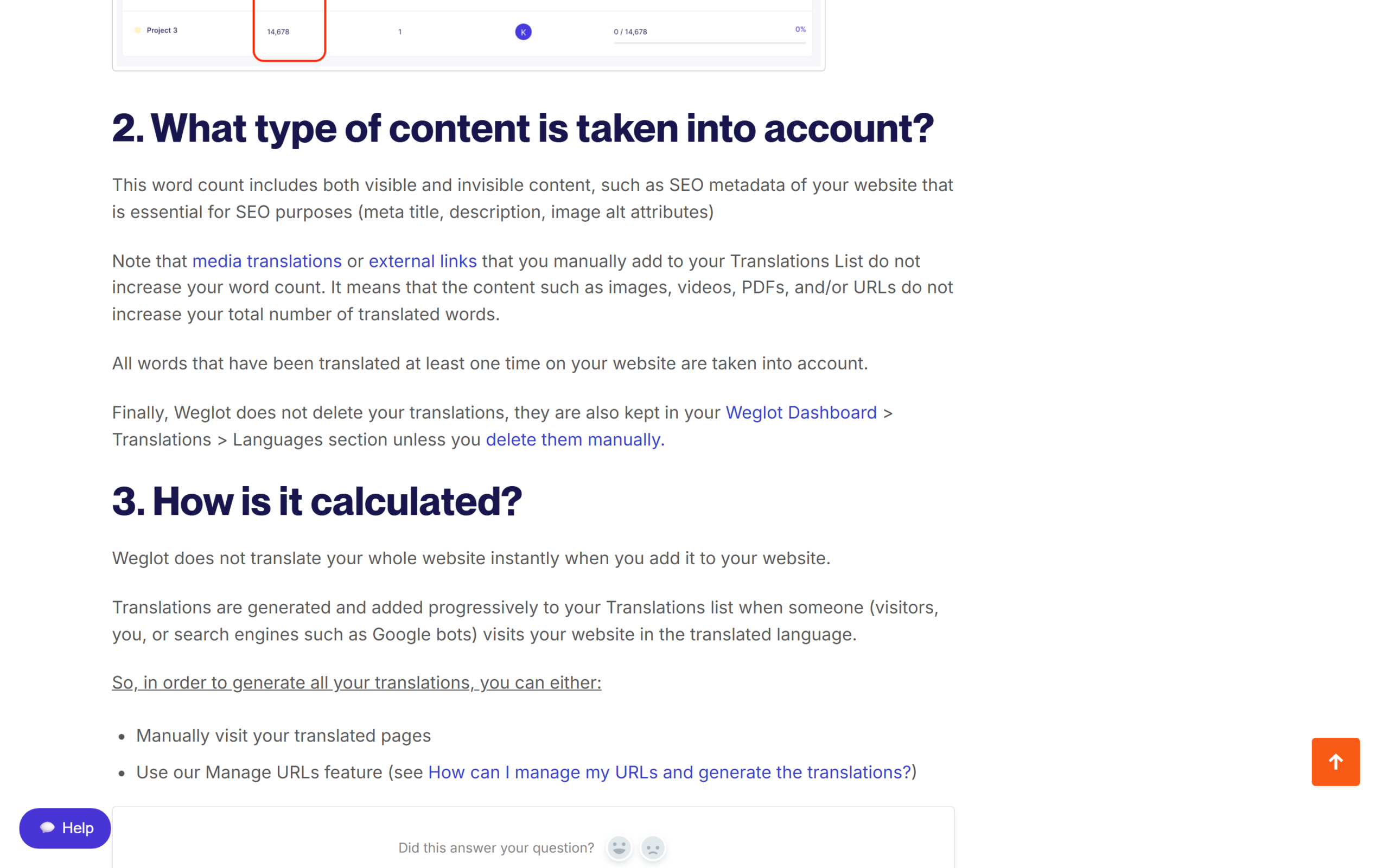
Two details soften this. A word is counted once, not each time a visitor views the page, and Weglot says the count “is not related to your website traffic.” Media translations and external links you add manually do not count. Traffic is measured separately, as translation requests, which we cover in the next section.
Here is how four typical sites land, using Weglot’s formula and its plan limits. The word counts are illustrative; your own will differ, which is why Weglot’s free Word Count Tool exists.
| Site | Original words | Languages | Translated words | Smallest plan that fits | Yearly cost (USD est.) |
|---|---|---|---|---|---|
| Local business site, 15 pages of about 400 words | 6,000 | 1 | 6,000 | Starter (10,000) | $170 |
| The same site in three languages | 6,000 | 3 | 18,000 | Business (50,000, 3 languages) | $320 |
| WooCommerce store, 300 products of about 250 words plus 20 pages of about 500 words | 85,000 | 2 | 170,000 | Pro (200,000) | $870 |
| Content site, 600 posts of about 1,000 words | 600,000 | 2 | 1,200,000 | Extended (5,000,000) | $7,690 |
The table shows the shape of Weglot’s pricing. Small brochure sites are cheap. A mid-sized store crosses the 50,000 word ceiling of Business quickly and lands on Pro. A large archive of articles is where Weglot gets expensive: the content site above misses Advanced by 200,000 words and is pushed to Extended. Before paying for that, use Weglot’s exclusion rules to leave old or low-value URLs untranslated, which keeps them out of the count entirely.
Remember the margin. Weglot’s help centre says the Word Count Tool estimates from public pages and their HTML, and that the dashboard count may come out higher once dynamic content or private pages are detected. Budget a plan with headroom rather than one that fits to the last word.
Where Weglot stops: limits, overages and lock-in
Every service has edges. These are Weglot’s, taken from its own documentation.
Going over the word limit. On a paid plan, Weglot stops generating new translations once you hit the limit. Words already translated stay translated, but new pages and edits are not, which leaves a mix of translated and untranslated text on the same page. On the Free plan the effect is harsher: translations stop being displayed until you are back under the limit. An optional auto-upgrade avoids the gap. With it on, Weglot emails you and moves you to the next plan two days later. It does not apply on Extended or higher, and if you are upgraded without noticing, Weglot says support can downgrade you and refund the charge.
Translation requests. Each plan also has a monthly limit on translation requests, which Weglot defines as calls from your site to its translation API, roughly equal to monthly translated page views. A visitor who opens five translated pages makes five requests, and bots and crawlers count too. On Starter that is 20,000 a month. Weglot’s pages define the limit but we found no published rule for what happens when a site exceeds it, so ask before you launch a high traffic translated campaign on a small plan. Request statistics are only visible from Pro upward.
Several websites. The word limit on Pro and above is shared across all your websites, while languages and team members apply per project.
Stopping payment. This is the biggest difference from a WordPress plugin. Weglot’s help centre warns that if you cancel or pause, “the translations won’t be active anymore,” your translated pages will not appear and they will be “progressively removed from search engines.” Your translations are stored in Weglot’s database, which its technical page says is hosted in AWS Frankfurt and backed up daily. You can pause a monthly plan, once a year, instead of cancelling, but yearly plans cannot be paused.
Getting your translations out. Bulk export and import is an Advanced feature. On Starter, Business and Pro, the help centre says you edit translations one by one in the Translations List. So a Pro customer who pays for professional translations has no bulk export of them on that plan. That is a real switching cost.
Deleted data and uptime. The cancellation article says a project is deleted after 3 months of inactivity, while the technical page says data is removed after 180 days; plan on the shorter window. The technical page also mentions a 99% uptime SLA, yet the plan table lists an SLA only for Enterprise, so treat it as a target below that tier.
Weglot vs WPML vs TranslatePress
On WordPress, Weglot’s two most common alternatives are WPML and TranslatePress. Both are plugins that store translations in your own WordPress database, and both are sold as yearly licences per site rather than by translated words. The table compares them on the points this Weglot review found decide most purchases. WPML and TranslatePress prices are in euros as their pricing pages showed them on October 15, 2026.
| Weglot | WPML | TranslatePress | |
|---|---|---|---|
| How it works | Hosted service; plugin connects WordPress to Weglot’s servers | WordPress plugin | WordPress plugin, self hosted |
| Where translations live | Weglot’s database | On your WordPress site | Your server’s database |
| Free option | Free plan, 2,000 translated words, 1 language | No free plan listed | Free plugin on WordPress.org with 2,000 AI words |
| Entry paid price | €15/mo or €150/yr (Starter, 1 language) | €39/yr (Multilingual Blog) | €99/yr (Personal, 1 site, 50K AI words) |
| Priced by | Translated words and languages | Plan and number of sites; AI words included on CMS (22,500) and Agency (45,000) | Plan and number of sites; AI words included |
| If you stop paying | Translations stop showing | “WPML will continue to work on your site”; no updates | Translations stay in your database |
| Refund window | 15 days, not on renewals | 30 days | 15 days |
| Works beyond WordPress | Yes (Shopify, Webflow, Squarespace and more) | No | No |
WPML is the long-standing heavyweight. Multilingual CMS, €99 a year for up to 3 production sites, includes string translation, page builder and WooCommerce support and 22,500 AI words, topped up at each renewal. It takes more setup and WordPress knowledge than Weglot, but on a large site the yearly cost does not grow with every new post.
TranslatePress is closer to Weglot in feel: you translate visually from the front end. The free WordPress.org plugin showed more than 400,000 active installations on October 15, 2026, includes 2,000 AI words and can use your own Google Translate API key. Paid plans run from €99 a year for one site with 50,000 AI words to €349 for unlimited sites with 500,000.
Where Weglot wins: the fastest setup of the three, translation on Weglot’s infrastructure rather than your hosting, and one account for Shopify, Webflow or any other platform. Where it loses: on a large WordPress site the word based price grows with your content while plugin licences do not, and with WPML or TranslatePress the translations stay yours when you stop paying.
Who should use Weglot, and who should not
The short version of this Weglot review: it fits best when speed and simplicity matter more than the long-term cost per word. That describes a small business site going into one or two new markets, a Shopify or Webflow store where WordPress plugins are not an option, an agency that wants one workflow for clients on different platforms, and a marketing team without a developer who needs to edit translations visually and order professional ones from the same screen. For those buyers, Starter or Business is inexpensive and the Free plan is enough to judge the result.
It fits poorly in three cases. First, large content sites, where translated words multiply quickly: a blog with hundreds of long posts in two or three languages ends up on Advanced or Extended. Second, sites that must own their translations, for example where a client contract or a compliance policy requires the content to stay on your own infrastructure. Third, anyone who expects to stop paying one day and keep the translated pages, because with Weglot they disappear and drop out of search.
If you do choose Weglot, exclude URLs that do not need translating before launch, generate translations deliberately with Manage URLs, and check the word count weekly in the first month.
Frequently asked questions
How much does Weglot cost?
On October 15, 2026, Weglot showed Starter at $17 a month, Business $32, Pro $87, Advanced $329 and Extended $769, with yearly billing at ten times the monthly price. Weglot charges in euros (Starter €15 a month) and calls the dollar figures an estimate. VAT is extra.
Is Weglot free?
Yes, for small sites. The Free plan covers 2,000 translated words in one language on one website, with the “By Weglot” badge. Every plan also starts with a 14-day free trial that needs no card.
How does Weglot count words?
It multiplies your original words by the number of languages, includes SEO metadata and alt text, and keeps counting translations until you delete them. Traffic does not add to the word count.
What happens if I go over my word limit?
On a paid plan, new content stops being translated until you upgrade or reduce your count. On the Free plan, translations stop showing. Auto-upgrade, if you switch it on, moves you to the next plan two days after the warning email.
Does the yearly plan renew at the same price?
It renews automatically at the list price in force on your renewal date. Weglot’s terms allow price changes, which apply from renewal, and the USD amount follows the exchange rate.
Is Weglot good for SEO?
With the WordPress plugin or a subdomain or subdirectory setup, yes: own URLs, hreflang tags and translated metadata in the page source. The JavaScript integration does not help SEO.
What happens to my translations if I cancel?
They stop showing on your site and the translated pages gradually drop out of search results. Bulk export is only available from the Advanced plan.
Is Weglot worth it?
This Weglot review comes down to one trade. Weglot is the quickest, least technical way to make an existing website multilingual, with good SEO handling, a visual editor that non-technical teams can use, and a free plan and trial that let you see the result before paying. In exchange, you rent your translations: you pay by translated words and languages, the price climbs steeply for large sites, and the translated pages vanish if you stop paying.
For a small or mid-sized site, a store on a platform other than WordPress, or an agency that values speed, that trade is a good one. For a large WordPress site you plan to run for years, WPML or TranslatePress will usually cost less and leave the translations in your hands. Count your words, then test Weglot on your own site with the free trial and decide with real numbers.
8.0 Score
Pros
- Fastest setup of any website translation option: plugin, API key, languages, done.
- Translated pages get their own URLs, hreflang tags and translated metadata in the page source.
- Visual Editor, glossary rules and in-dashboard professional translation give real editing control.
- Free plan for small sites and a 14-day trial with no card; works on WordPress, Shopify, Webflow and more.
Cons
- Priced by translated words times languages, so large content sites land on expensive plans.
- Translations live on Weglot's servers and stop showing if you cancel; bulk export only from Advanced.
- Billed in euros, renews at the list price on the renewal date, and refunds exclude renewals and upgrades.
- Translated URLs need Pro; tone of voice and custom languages need Advanced.
Final Verdict
Weglot is the quickest and least technical way to make an existing website multilingual, with solid SEO handling and a visual editor anyone can use. You pay by translated words and languages, which gets expensive on large sites, and your translations stop showing if you stop paying. Excellent for small and mid-sized sites and mixed platform agencies; large WordPress sites usually do better with WPML or TranslatePress.