


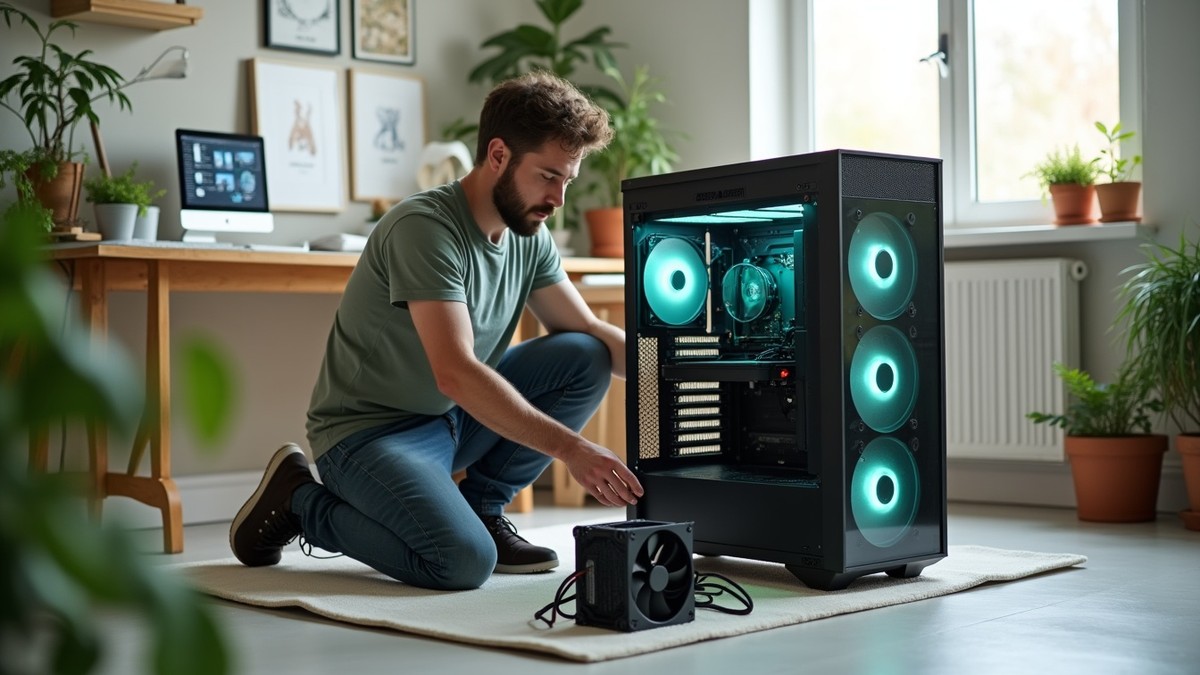
Short answer: In the A70 Vision vs O11 Vision decision, the Thermalright A70 Vision is the easier case for a typical single radiator showcase build, because it ships with an adjustable anti-sag GPU bracket, supports ASUS and MSI back-connect ATX boards and adds a 9.16 inch front screen, while the Lian Li O11 Vision is the better chassis for builders who want 140 mm fans, a third radiator, an E-ATX board or a vertical GPU.
- Pick the Thermalright A70 Vision if you are building around one 360 mm AIO and a long graphics card, want the sag bracket and a system monitor screen in the box, or own an ASUS BTF or MSI Project Zero board.
- Pick the Lian Li O11 Vision if you plan two 360 mm radiators plus a 240 mm, a push-pull side radiator, 140 mm bottom fans, an E-ATX board up to 280 mm wide or a vertically mounted card.
- Skip both if you want fans in the box or a case that hides dust: neither spec sheet lists included fans, and three glass sides show every speck.
This article contains Amazon affiliate links; TruePick may earn a commission at no extra cost to you. Ratings and specs checked October 11, 2026; check the current price on Amazon.
Table of contents
How do the two pillarless cases compare on paper?
On paper the two cases are close cousins with different priorities: the Lian Li O11 Vision is the bigger, more modular cooling platform, and the Thermalright A70 Vision is the slightly smaller box that puts its effort into a screen, a sag bracket and back-connect support. Both are dual-chamber towers with tempered glass on the front, the side and the top, and no pillar where the front and side panels meet, so the components look as if they float in an open box. Both put the power supply and the cables behind the motherboard tray, which is the layout the O11 family made popular.
We already covered the Thermalright on its own in our Thermalright A70 Vision review, which looks at the screen, the six variants and what owners report. This piece does something different: it plans a build in each case. Which fan layout to use, where the radiators go, how to keep a heavy graphics card straight, how cables and drives are routed, and whether the screen earns its place. Every figure comes from the two manufacturers’ own specification pages and support downloads, read on October 11, 2026, plus the Amazon listing for the rating counts. We did not build in either case ourselves, and we say so where it matters.
The O11 Vision named here is the full-size model, Lian Li’s O11VX in black and O11VW in white, with a mirror-finish Chrome version as well. It is not the O11 Vision Compact, which is a separate, smaller case that our earlier review used as its price comparison.
| Thermalright A70 Vision | Lian Li O11 Vision | |
|---|---|---|
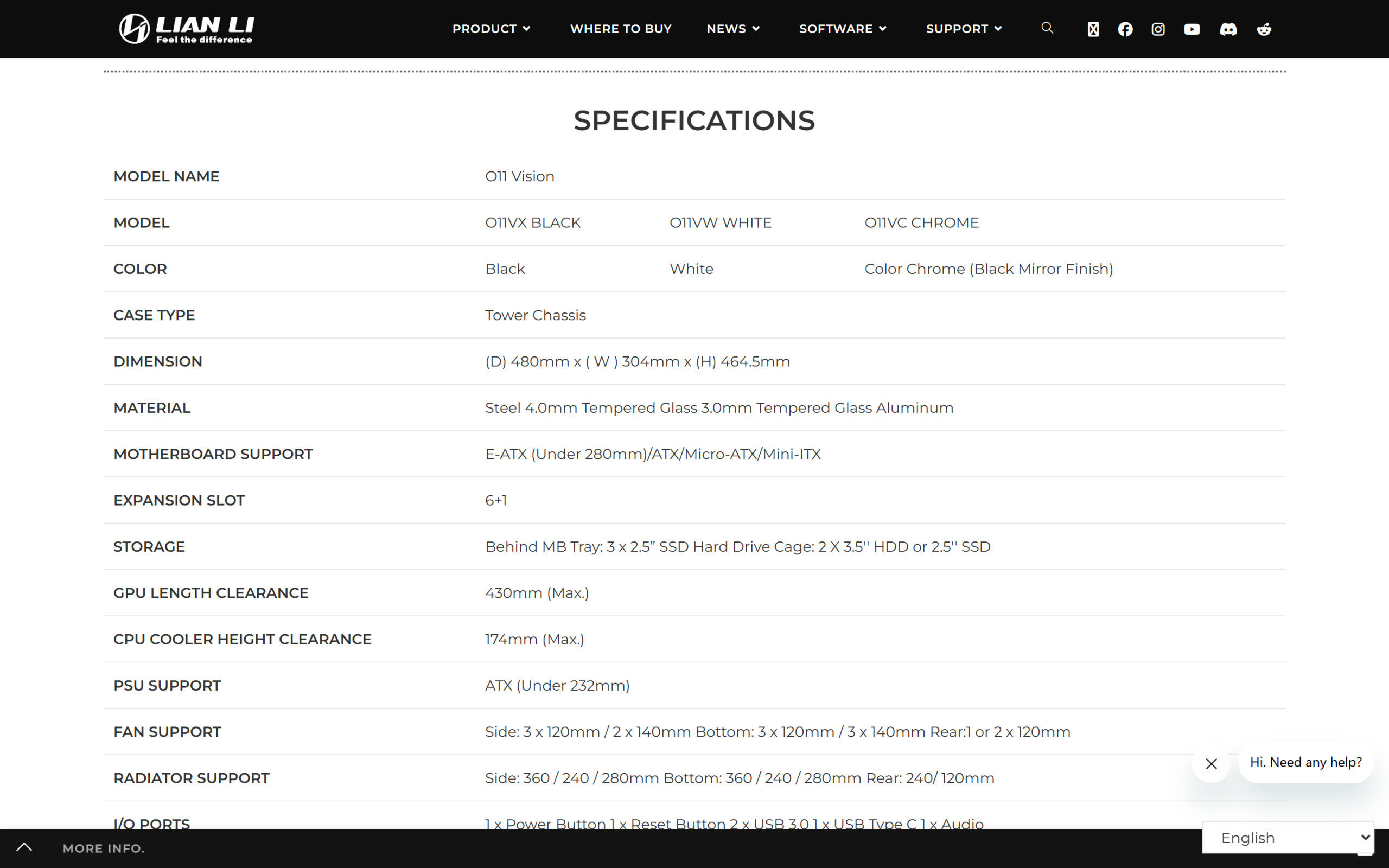
| Dimensions | 450.8 x 289.5 x 477 mm (L x W x H) | 480 x 304 x 464.5 mm (D x W x H) |
| Materials | ABS, SPCC steel, tempered glass | Steel, aluminium, 4 mm and 3 mm tempered glass |
| Motherboards | ATX, Micro-ATX, Mini-ITX; back-connect for ASUS and MSI ATX | E-ATX under 280 mm, ATX, Micro-ATX, Mini-ITX |
| GPU length | 420 mm | 430 mm |
| CPU cooler height | 168.4 mm | 174 mm |
| Power supply | ATX up to 200 mm, bottom | ATX under 232 mm, one PSU |
| Fan positions | 8 x 120 mm: bottom 3, side 3, rear 2 | Side 3 x 120 or 2 x 140, bottom 3 x 120 or 3 x 140, rear 1 or 2 x 120; up to 11 fans in push-pull |
| Radiators | Bottom and side, up to 360 mm each | Side and bottom up to 360 mm, rear up to 240 mm |
| Drive bays | 1 x 3.5 in, 2 x 2.5 in | 3 x 2.5 in behind the tray, plus a cage for 2 x 3.5 in or 2.5 in |
| Expansion slots | 7 | 6+1 |
| Front I/O | Power, headset jack, 2 x USB-A, 1 x USB-C | Power, reset, 2 x USB 3.0, 1 x USB-C, audio |
| Built-in screen | 9.16 in, 1920 x 480, TRCC software | None |
| Included fans | None (spec sheet says NA) | None listed in the specification table |
| Warranty | 1 year | 1 year |
The table already tells you who each case is for. The Lian Li has more of everything that matters to a cooling enthusiast: three radiator spaces instead of two, 140 mm fan support on two sides, room for an E-ATX board and a longer power supply. The Thermalright answers with things the Lian Li leaves out of the box, which are the screen and a sag bracket, and with an explicit promise about back-connect boards that the Lian Li specification does not make.
Which case fits your desk and your parts list?
The A70 Vision is the smaller case on the desk, but the O11 Vision fits more hardware inside. That trade is worth checking with a tape measure before anything else, because a showcase case is usually placed where people can see it, which means on the desk, not under it.
Footprint and volume
Thermalright gives the A70 Vision as 450.8 mm long, 289.5 mm wide and 477 mm high. Lian Li gives the O11 Vision as 480 mm deep, 304 mm wide and 464.5 mm high. So the Lian Li is 29.2 mm deeper and 14.5 mm wider, while the Thermalright is 12.5 mm taller. On the desk surface, the A70 Vision covers about 1,305 square centimetres and the O11 Vision about 1,459, roughly 154 square centimetres more. In total volume the A70 is about 62.3 litres and the O11 Vision about 67.8, so the Lian Li is close to 9 percent bigger overall. If your desk is shallow, or the case sits between a monitor arm and a wall, those 29 mm of depth are the number to measure.
The O11 Vision also sits higher than the outline suggests in one respect: Lian Li fits 27 mm tall feet and a hollowed bottom fan bracket raised 13 mm, so the bottom fans can breathe from a desk surface. That is a strength on a hard desk and a weakness on carpet, which no glass showcase case should sit on anyway.
Clearances for the parts you already own
| Part | A70 Vision limit | O11 Vision limit | What to check |
|---|---|---|---|
| Graphics card | 420 mm | 430 mm | Card length plus any front radiator or fan in its path |
| CPU air cooler | 168.4 mm | 174 mm | Total cooler height including the fan clip |
| Power supply | 200 mm ATX | Under 232 mm ATX | PSU length plus the depth of its modular cable plugs |
| Motherboard | ATX and smaller; back-connect ASUS and MSI ATX | E-ATX under 280 mm and smaller | Board width, and the position of rear connectors on back-connect boards |
| Storage | 3 drives in total | 5 drives in total | How many 3.5 inch hard drives you still run |
The graphics card gap is small: the O11 Vision allows 10 mm more. The cooler gap is 5.6 mm, which matters only for the tallest dual-tower air coolers. The power supply gap is the real one, 32 mm in the Lian Li’s favour. A long high-wattage unit with bulky modular plugs fits the O11 Vision with room to spare and may be tight in the A70 Vision, so check the PSU’s length on its own spec sheet. The motherboard row cuts both ways: the Lian Li takes E-ATX boards under 280 mm wide, while the Thermalright tops out at ATX but is the only one of the two whose specification promises back-connected boards, listed as ASUS and MSI ATX.
Which airflow layout works best in each case?
Both cases breathe the same way, cool air in through the bottom and the side next to the motherboard, warm air out through the rear, but the O11 Vision gives you more choice in fan size. Neither has front intake, because the front is glass, so the bottom and side fans do all the work.
Planning fans for the A70 Vision
The A70 Vision takes 120 mm fans only, in eight places: three on the bottom, three on the side and two at the rear. Thermalright describes a large mesh area on the side panel and a four-direction airflow design in the Amazon listing. With nothing pre-installed, the natural plan is three bottom intakes pushing cool air up into the graphics card, three side intakes feeding the CPU area, and one or two rear exhausts. Because the case uses one fan size, you can buy a single matched pack and keep the lighting and fan curves consistent, which is simpler than mixing sizes.
Planning fans for the O11 Vision
The O11 Vision takes three 120 mm or two 140 mm fans on the side, three 120 mm or three 140 mm on the bottom, and one or two 120 mm at the rear. Lian Li’s own recommended setup is a side intake with a push-pull 360 mm radiator and six 120 mm fans, one 120 mm rear exhaust, and three 140 mm fans or a radiator on the bottom as intake. Larger 140 mm fans move the same air at lower speed, so a quiet build favours the Lian Li’s bottom position. Lian Li quotes a maximum of 8 fans, or 11 with a push-pull setup, against the A70 Vision’s 8.
| Build goal | A70 Vision fan plan | O11 Vision fan plan |
|---|---|---|
| Air-cooled CPU, quiet | 3 x 120 bottom intake, 3 x 120 side intake, 1 x 120 rear exhaust | 3 x 140 bottom intake, 2 x 140 side intake, 1 x 120 rear exhaust |
| One 360 mm AIO | AIO on the side as intake, 3 x 120 bottom intake, 2 x 120 rear exhaust | AIO on the side as intake, 3 x 140 bottom intake, 1 x 120 rear exhaust |
| Maximum cooling | 360 mm on the side and 360 mm on the bottom, rear exhaust | Push-pull 360 mm on the side, 360 mm bottom, 240 mm rear |
One planning trap applies to both: all of these fans are extra. Neither specification lists included fans, so count seven or eight fans into the parts list from the start. Keep a slight positive pressure, a little more intake than exhaust, so dust enters through the filtered bottom rather than through every gap. Lian Li lists one bottom dust filter on the O11 Vision; Thermalright’s sheet does not list filters at all, so plan to clean the A70’s side mesh more often.
How many radiators can each case run, and where?
The O11 Vision runs up to three radiators, two 360 mm and one 240 mm, while the A70 Vision runs two 360 mm units, one on the bottom and one on the side. For an all-in-one cooler builder that difference rarely matters; for a custom loop it often decides the case.
Side mounting and push-pull
The Lian Li’s side fan bracket is reversible in two ways, which Lian Li calls the inner and outer scenarios. The inner position leaves 75 mm of space in the main chamber for a radiator and fans, and the outer position is optimised for a push-pull configuration, a radiator sandwiched between two sets of fans. Push-pull is the main reason enthusiasts chose the O11 layout in the first place, and it is the reason the O11 Vision’s maximum fan count rises from 8 to 11. The A70 Vision supports a side radiator up to 360 mm, but neither its spec sheet nor its listing mentions a push-pull side option, so plan for a single set of side fans.
The bottom and the rear
Both cases take a 360 mm radiator on the bottom. The O11 Vision also accepts 280 mm radiators on the side and bottom, which suits 140 mm fan coolers, and a 120 mm or 240 mm radiator at the rear. The A70 Vision’s rear holds two 120 mm fans, not a radiator. Thermalright’s listing does add a useful detail for AIO buyers: concealed routing paths for liquid cooler tubing, and support for AIO tubing up to 400 mm long.
Motherboard height and radiator thickness
Lian Li gives the O11 Vision an adjustable motherboard tray with a high mode and a low mode. Low mode makes room for thicker radiators and fans on the bottom; high mode is for looks, and Lian Li includes two silicone covers for the low mode configuration to hide the gaps it opens. Lian Li even suggests mounting the motherboard, CPU pump and graphics card outside the case first, then sliding the tray in. The A70 Vision has no adjustable tray in its specification, so its radiator thickness is fixed by the case.
A sensible rule: if your plan has one AIO, either case works and the A70 Vision’s bracket and screen tip the balance. If your plan has a loop with two radiators plus a reservoir and pump, or push-pull anywhere, start with the O11 Vision.
How do you handle GPU sag or a vertical card?
The A70 Vision solves GPU sag in the box, while the O11 Vision offers a vertical mount as an optional kit. Modern high-end cards are long and heavy, and in a case that shows the card through three glass panels, a drooping card is the first thing a visitor notices.
The A70 Vision’s bracket
Thermalright’s listing describes a pre-installed, detachable GPU bracket for cards longer than 420 mm, with its height adjusted by screws behind the motherboard tray. That design matters for planning: you set the support height from the back, after the card is in, without reaching around the card and the cables in the main chamber. For a horizontal card in a standard slot it is the simplest anti-sag answer either case offers. Thermalright’s spec sheet and listing do not mention a vertical GPU mount, so treat the A70 Vision as a horizontal-card case.
The O11 Vision’s vertical kit
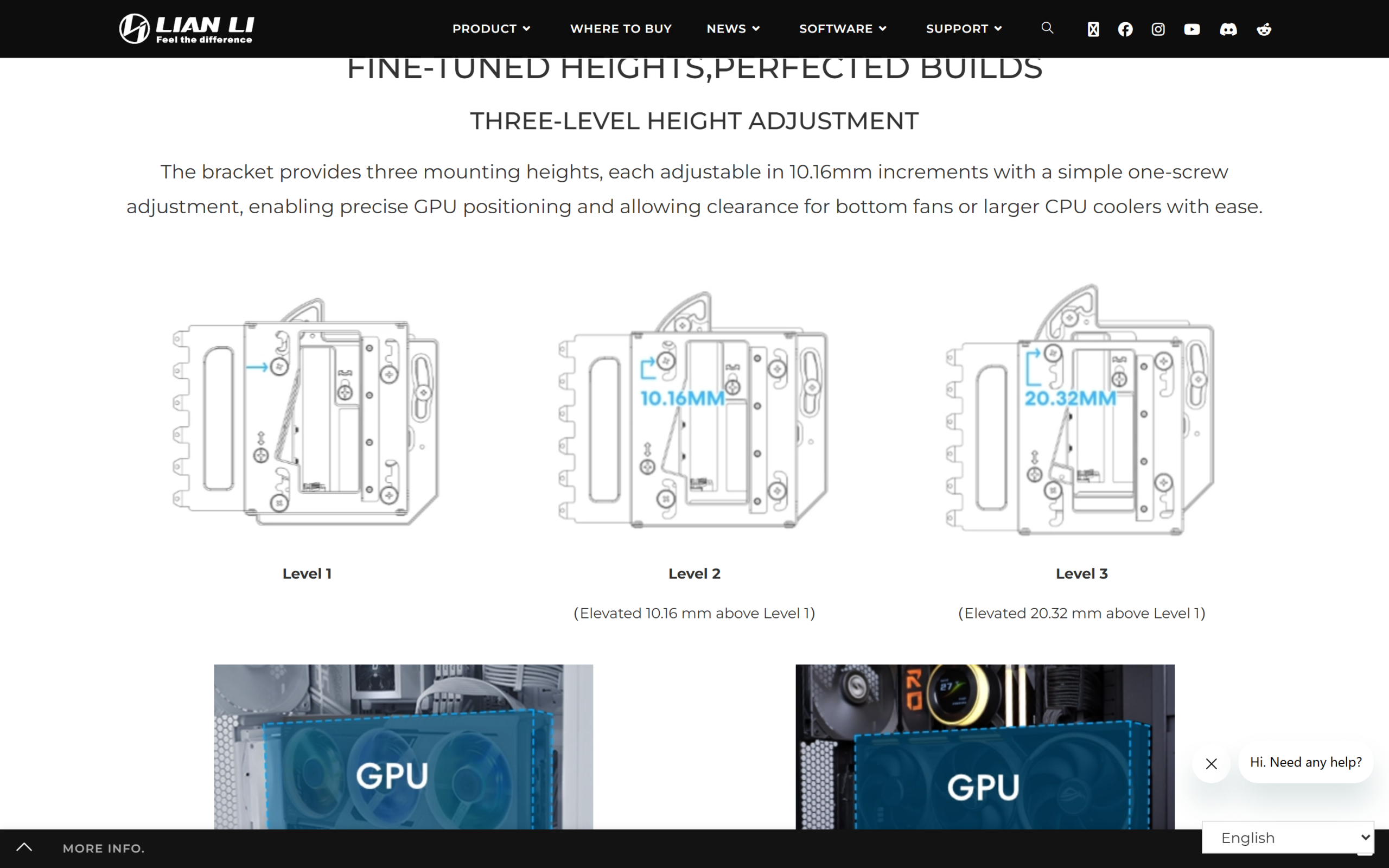
Lian Li’s O11 Vision page offers an optional vertical GPU accessory, listed as VG4-5-V4X in black and VG4-5-V4W in white, supporting cards up to 4 slots thick and including a PCIe 5.0 riser cable. The kit’s own page, for the 4 Slots Vertical GPU Kit (VG4v4), adds the details a builder needs: a 200 mm PCIe 5.0 riser, three mounting heights in 10.16 mm steps so the card can clear bottom fans or a radiator, forward, neutral and backward tilt, and an anti-sag arm rated up to 10 kg that mounts to the motherboard standoffs. Lian Li notes that the arm is not compatible with GPU brackets installed in slots 3 to 8, and that E-ATX boards need its extension arm.
Two trade-offs come with a vertical card. It sits closer to the side glass, and in the O11 Vision the side is also where Lian Li recommends the main radiator and fans, so a vertical card and a side intake radiator compete for the same air. And it adds a part to the bill. If you want the card face-on to the glass, the O11 Vision is the case to choose; if you want it straight and horizontal with nothing extra to buy, the A70 Vision is ready as delivered.
Which one is easier to build in and keep tidy?
The O11 Vision is the more modular build, with toolless panels and brackets, while the A70 Vision is the simpler one, with fixed channels and one big extra: support for boards whose connectors live on the back.
Cable management in the O11 Vision
Lian Li designed the second chamber around cables. It has two dual-layer cable clips that can be mounted anywhere along the vertical grommets, a cable holder for bulky leads and Velcro straps for thin ones. The power supply bracket protrudes 15 mm from the rear of the case to give extra room behind the tray, and a cable tie point on the rear keeps the rear I/O cables tidy. A multi-function storage bracket doubles as a cable management bar or as a mount for three 2.5 inch SSDs, and each drive cage can be removed for more routing space. Lian Li says every bracket and panel is designed for modular, toolless removal, and the glass is held by keys rated for 35 kg of force. One caution from Lian Li itself: the front glass is removable, but it does not suggest removing it during a normal build.
Cable management in the A70 Vision
Thermalright’s listing points to dedicated internal routing channels, the concealed tubing paths mentioned above, and pre-drilled holes for the screen’s USB cable so that the display does not leave a visible lead. The bigger difference is back-connect support. Thermalright lists back-connected motherboards as supported, specifically ASUS and MSI ATX boards, the families sold as BTF and Project Zero. With those boards, the power and fan connectors sit on the back of the board, so the main chamber shows almost no cables at all. Our earlier A70 Vision review noted one owner with a Gigabyte Aorus back-connect board who had to file the cut-out; the lesson for planning is to check the connector layout of any other brand against Thermalright’s A70 Vision installation manual before ordering.
Front I/O and the desk
Lian Li places the O11 Vision’s front ports at the bottom of the chassis, which it says keeps them reachable when the case sits on a table. It also has a reset button, which the A70 Vision does not list. Thermalright’s front panel has a power button, a headset jack, two USB Type-A ports and one USB Type-C, rated at up to 10 Gbps in the Amazon listing. Lian Li lists two USB 3.0 ports and one Type-C without a speed figure.
Is the A70’s screen a feature or an extra?
The A70 Vision’s screen is a real feature for a build you want to look at, and an extra you can ignore for one you mostly use. It is the one thing the O11 Vision has no answer to out of the box, so it deserves a clear-eyed look in the plan.
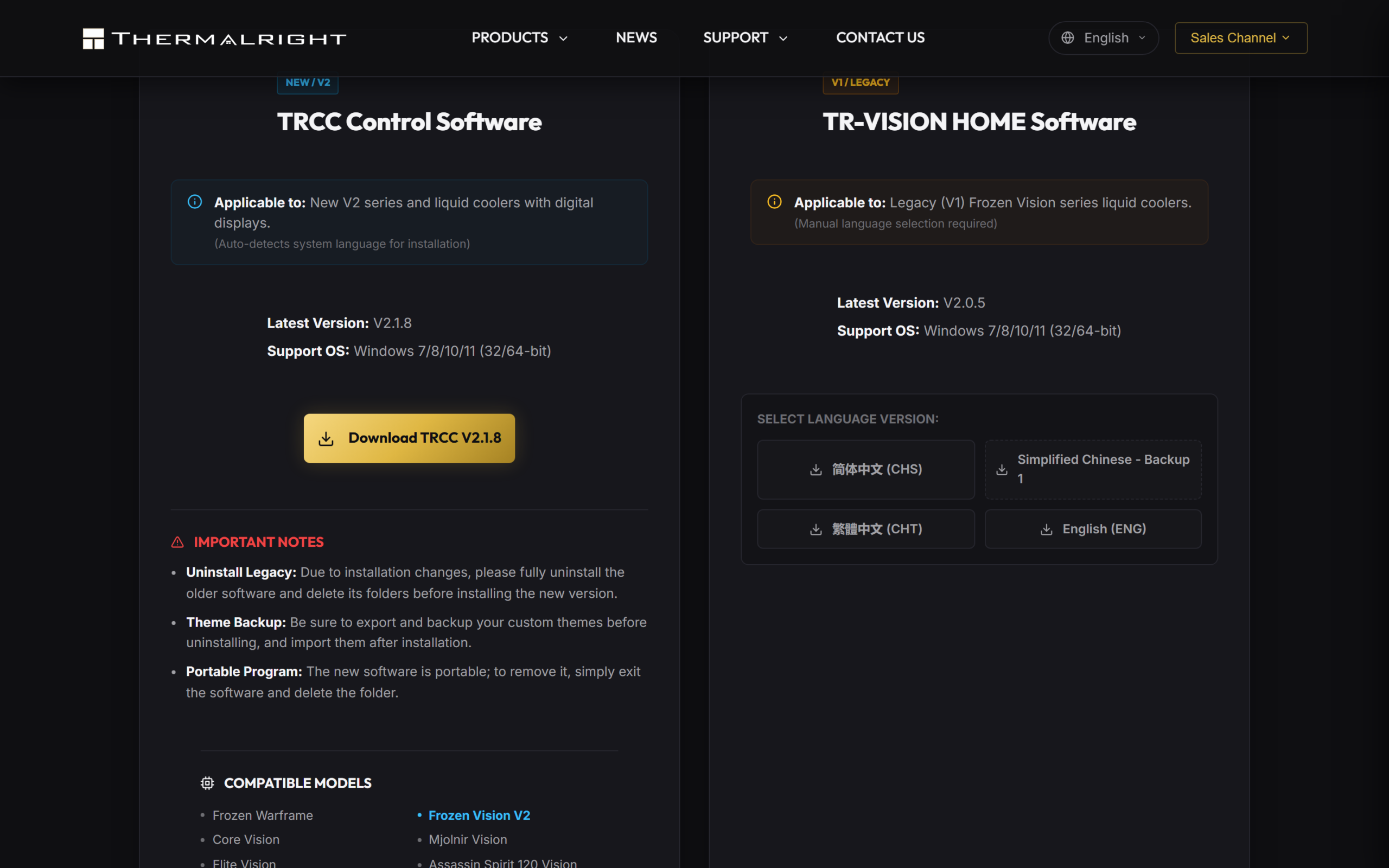
Thermalright specifies a 9.16 inch panel at 1920 by 480, magnetically mounted across the front, connected internally to a 9-pin USB 2.0 header. The Amazon listing says it supports customisable themes, image and video display and screen mirroring through Thermalright’s TRCC software. Three planning points follow from that.
- It uses a motherboard header. A 9-pin USB 2.0 header is the same type many AIO pumps, RGB controllers and internal Bluetooth cards use. Count your board’s USB 2.0 headers before you plan the screen, a pump display and a lighting hub on one board.
- It needs Windows. Thermalright’s download page lists the TR-A70 Vision among the models for TRCC, latest version V2.1.8, for Windows 7, 8, 10 and 11. A Linux build will most likely leave the screen idle unless you find a community tool, and that is not something we could verify.
- It is not a touchscreen. It shows temperatures, images or video; it does not take input. Owners in the existing review’s sample were split on its brightness, so look at it in daylight in the first week.
If you would never look at a status display, the screen is an extra, and Thermalright sells the same chassis without it as the plain A70, covered in the review. If you planned to add a separate display or a pump with an LCD to show temperatures, the A70 Vision’s screen may replace that purchase. We checked the official Thermalright TRCC download page for software support; it is also where the latest version lives.
Which case fits your build?
The right case depends on the parts list, not on the glass, which both cases share. Here are five common plans and the pick for each.
A gaming build with one 360 mm AIO and a long card. The A70 Vision. Put the AIO on the side as intake, three 120 mm fans on the bottom and two at the rear. The pre-installed bracket holds the card straight, the screen shows CPU and GPU temperatures, and the case has 420 mm of card length. If that is your plan, see the A70 Vision listing and its current rating before you buy fans.
A custom water loop with two radiators and a distro plate. The Lian Li O11 Vision. It runs two 360 mm radiators plus a 240 mm, offers push-pull on the side and lets you drop the motherboard tray to low mode for thicker radiators. The A70 Vision’s two radiator spaces are enough for one loop, but the Lian Li gives more room for fittings and future changes.
A clean back-connect build with no visible cables. The A70 Vision, as long as the board is an ASUS or MSI ATX back-connect model. Thermalright names exactly those, and the O11 Vision’s specification does not mention back-connect support at all. Check the manual’s cut-out drawing first if your board is another brand.
A workstation with an E-ATX board and several drives. The O11 Vision. It takes E-ATX boards under 280 mm, holds five drives against three, and fits power supplies up to 232 mm, which suits the longer high-wattage units these builds use.
A vertical card shown face-on behind the glass. The O11 Vision with Lian Li’s 4-slot vertical kit. The A70 Vision documents no vertical mount, so it is the wrong case for this look.
Common planning mistakes
The first mistake is budgeting for the case and forgetting seven or eight fans. The second is choosing the O11 Vision for an E-ATX board without measuring the board’s width against Lian Li’s 280 mm limit. The third is buying a back-connect board from a brand Thermalright does not name and assuming it fits the A70 Vision. The fourth is planning a vertical card and a side radiator in the O11 Vision without thinking about how the card will get cool air. The fifth is treating the A70’s screen as a reason to buy on its own; it is a pleasant addition, not a chassis.
Where does each case fall short?
Thermalright A70 Vision
The A70 Vision is a 120 mm only case with two radiator spaces, which caps how far a loop can grow. It takes ATX boards at most, its power supply limit is 200 mm, and it holds three drives. Back-connect support is limited to the brands Thermalright names. The screen needs a USB 2.0 header and Windows software. And it is still early: the Amazon listing showed 4.4 stars from only 29 ratings when we checked on October 11, 2026, too few to judge long-term reliability.
- Pros: pre-installed adjustable GPU bracket, 9.16 inch 1920 by 480 screen, back-connect support for ASUS and MSI ATX boards, smaller footprint, USB-C rated at 10 Gbps, tubing routes for AIOs up to 400 mm.
- Cons: no 140 mm fan support, two radiator spaces, no fans included, ATX maximum, 200 mm PSU limit, only 29 ratings so far.
Lian Li O11 Vision
The O11 Vision is larger, so it needs a deeper desk. It has no screen and no GPU bracket in its specification, so a vertical card or an anti-sag arm is an extra purchase. Its specification does not promise back-connect board support. No fans are listed as included, and with up to 11 positions in push-pull the fan bill can climb high. Lian Li also notes that a small number of units shipped without the silicone grommet set for low mode, which it will replace on request. On the other hand, it has a longer track record: the white O11 Vision listing showed 4.8 stars from 204 ratings on Amazon.com when we checked on October 11, 2026.
- Pros: three radiator spaces, push-pull side bracket, 140 mm fan support, E-ATX and 232 mm PSU support, five drives, toolless modular brackets, adjustable motherboard tray, reset button.
- Cons: bigger footprint, no screen, vertical GPU kit sold separately, no back-connect promise, no fans included.
Frequently asked questions
Is the Thermalright A70 Vision a copy of the Lian Li O11 Vision?
It follows the same idea: a dual-chamber tower with glass on the front, side and top and no corner pillar. The details differ. The A70 Vision adds a 9.16 inch screen, a pre-installed GPU bracket and back-connect support for ASUS and MSI ATX boards, while the O11 Vision adds 140 mm fan support, a third radiator space, E-ATX support and an adjustable motherboard tray.
Which case has better cooling?
The O11 Vision has more cooling capacity: up to two 360 mm radiators plus a 240 mm, push-pull on the side and 140 mm fans on the bottom and side. The A70 Vision supports two 360 mm radiators and eight 120 mm fans. For one AIO and a single graphics card, both have enough; for a custom loop, the Lian Li has more room.
Do either of these cases come with fans?
Thermalright’s specification lists the A70 Vision’s pre-installed fans as NA, meaning none, and Lian Li’s specification table for the O11 Vision lists no included fans. Plan to buy seven or eight fans for either case. The A70 Vision uses 120 mm fans only; the O11 Vision also takes 140 mm fans on the side and bottom.
Which case is better for a back-connect motherboard?
The A70 Vision. Thermalright lists back-connected boards as supported, naming ASUS and MSI ATX models. Lian Li’s O11 Vision specification does not mention back-connect support. If your board is from another brand, compare its connector layout with the cut-outs in Thermalright’s installation manual before you buy.
Can I mount my graphics card vertically?
In the O11 Vision, yes, with Lian Li’s optional vertical GPU kit, which supports cards up to 4 slots thick and includes a PCIe 5.0 riser. Thermalright’s documents for the A70 Vision do not mention a vertical mount; its answer to a heavy card is a pre-installed bracket whose height you adjust from behind the motherboard tray.
Does the A70 Vision’s screen work on Linux or macOS?
Thermalright’s download page lists TRCC, the software that drives the A70 Vision’s screen, for Windows 7, 8, 10 and 11 only. We could not confirm any official support for Linux, so on a Linux build expect to rely on community tools or leave the screen unused. The screen connects through a 9-pin USB 2.0 header.
Which case is smaller?
The A70 Vision. It measures 450.8 by 289.5 by 477 mm, against the O11 Vision’s 480 by 304 by 464.5 mm. The Lian Li is 29.2 mm deeper and 14.5 mm wider, though 12.5 mm shorter, and about 9 percent larger in total volume by our arithmetic from the two spec sheets.
A70 Vision vs O11 Vision: which should you build in?
For the build most people plan in a pillarless glass case, one 360 mm AIO, a long graphics card and a clean interior, the Thermalright A70 Vision is the easier and more complete package: the sag bracket is already in place, the screen gives the build a live status display, and ASUS and MSI back-connect boards are supported by name. That makes it our pick in this A70 Vision vs O11 Vision comparison for a typical single radiator gaming build. Who should not buy it: anyone planning a custom loop with several radiators, a push-pull side, 140 mm fans, an E-ATX board or a vertical card, and anyone who wants proof of long-term reliability from hundreds of ratings.
The Lian Li O11 Vision is the better chassis for those builders. It is more modular, has more cooling room and more drive space, and its vertical GPU kit is the way to show a card face-on. Whichever you choose, add the fans to the budget before you add the case to the cart. If the A70 Vision matches your parts list, check the A70 Vision on Amazon and plan your fans around it.
8.1 Score
Pros
- A pre-installed, height-adjustable GPU bracket keeps long cards straight with nothing extra to buy.
- Back-connect support is promised for ASUS and MSI ATX boards; the O11 Vision's spec does not mention it.
- The 9.16 inch 1920 by 480 screen gives the build a live status display through TRCC.
- A smaller footprint than the O11 Vision: 29.2 mm shallower and 14.5 mm narrower.
Cons
- Only 120 mm fans and two radiator spaces, against the O11 Vision's 140 mm support and three radiators.
- ATX maximum, a 200 mm PSU limit and three drives, where the Lian Li takes E-ATX, 232 mm and five.
- No documented vertical GPU mount and no push-pull side option.
- Only 29 Amazon ratings so far, and the screen software is Windows only.
Final Verdict
For a typical showcase build with one 360 mm AIO and a long graphics card, the Thermalright A70 Vision is the more complete package: the anti-sag bracket comes installed, ASUS and MSI back-connect boards are supported by name, and the front screen adds a status display. The Lian Li O11 Vision remains the better chassis for custom loops, push-pull radiators, 140 mm fans, E-ATX boards and vertical cards, so choose by your parts list.