


Short answer: This QuickSigner review covers an ISO 27001 certified, PAdES sealed electronic signature tool built for small and mid sized businesses, priced from a permanently free plan up to $15 a month per user on the Professional tier, with a REST eSignature API on top for teams that want signing embedded in their own product. Every plan, including the free one, carries the same Adobe Approved Trust List (AATL) certificate seal that bigger rivals like DocuSign reserve for their paid tiers, and several of QuickSigner’s own published customer reviews describe switching away from DocuSign or PandaDoc specifically over price.
- Pick the Free plan if you only e-sign occasionally: 5 documents a month, PDF only, up to 3 signers per request, no trial to track.
- Pick Business at $5 a month per user if you sign every week and need unlimited documents, Word file support and 10 saved templates.
- Pick Professional at $15 a month per user if you need the eSignature API, OTP phone verification, or bulk sending.
- Run the 14-day trial on a real contract before committing; both paid tiers offer one, and it is the only way to test the signer experience end to end.
Free: $0/mo. Business: $5/mo per user ($48/yr annual). Professional: $15/mo per user ($144/yr annual). Enterprise: custom. QuickSigner.com, checked September 16, 2026.
Table of contents
What is QuickSigner and who is it for?
QuickSigner sells itself plainly on its own homepage: “Enterprise-grade security e-sign web software without the enterprise price tag.” Certified, legally binding, and ready in seconds, built for SMBs. Upload a document, mark where each signature goes, and send it to recipients, who sign with a typed name or a drawn digital signature, no account required on their end. Every document carries encryption and a full audit trail, and the site claims its signatures are legally valid under the same laws that cover the big legacy platforms.
The buyer this suits is a small or mid sized business or a solo professional, someone who currently either prints and scans contracts, or pays for a DocuSign or PandaDoc seat they only use a handful of times a month. This QuickSigner review reads the homepage, the FAQ page and the eSignature API page, all on September 16, 2026, checking every number stated against what the page itself actually shows.
The homepage names the document types this is built around directly in its own first step: “Upload a PDF or Word file, your contract, NDA, invoice, or any document that needs e-signing.” That is a narrower claim than “any file,” but it maps cleanly onto what a small business actually sends out for signature week to week, which is the audience this QuickSigner review keeps returning to when weighing whether a feature gap actually matters.
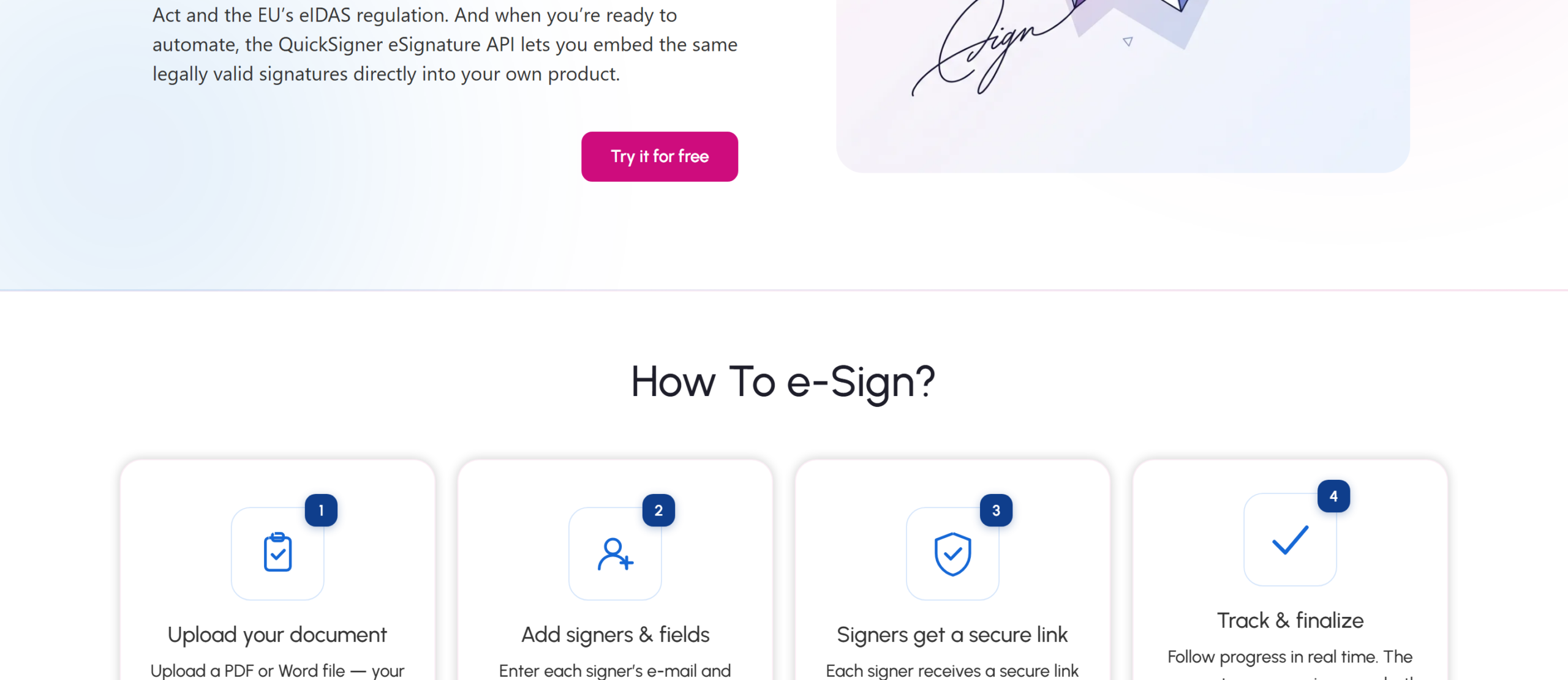
The signing flow itself is four steps, and QuickSigner spells out each one: upload a PDF or Word file, add each signer’s e-mail and drop signature, date, or text fields where needed, each signer gets a secure link by e-mail and signs from any device, then you track progress in real time until the finalized, AATL sealed document lands in both inboxes.
QuickSigner pricing: Free, Business and Professional
QuickSigner runs four tiers, and unlike some rivals the entry tier is not a time limited trial, it stays free indefinitely as long as usage stays inside its limits.
| Plan | Price | Documents/month | Signers per request | Max file size |
|---|---|---|---|---|
| Free (Personal) | $0 | 5 | 3 | 5 MB |
| Business | $5/mo per user | Unlimited | 10 | 10 MB |
| Professional | $15/mo per user | Unlimited | 50 | 15 MB |
| Enterprise | Custom | Custom | Custom | Custom |
Business adds what a team that signs weekly actually needs: 10 saved document templates, search and tagging across sent documents, checkbox and attachment fields, automatic reminders, Word file uploads, sequential signing order and a saved signature for the account holder. It also raises the per-request ceiling to 10 signers and 3 documents at once, against the Free plan’s 3 signers and single document.
Professional is aimed at higher volume and at teams that want to build on top of QuickSigner rather than just use its web app: up to 50 signers and 10 documents per request, OTP mobile phone verification for signers, the ability to edit a sign request after sending it, bulk sending, and the eSignature API itself, billed as 50 free credits then $0.30 per document once a workflow goes into production. Both Business and Professional list a 20 percent discount for annual billing, $48 a year for Business and $144 a year for Professional instead of paying monthly.
Is a QuickSigner signature legally binding?
QuickSigner’s plans all carry the same legal backing regardless of tier, which is worth noting since some rivals reserve certified sealing for their top plan. In the US, QuickSigner signatures are stated to be valid under the federal ESIGN Act and UETA. In the UK, documents are enforceable under the Electronic Communications Act 2000 and UK eIDAS. Across the EU, signatures comply with eIDAS, the standard recognized in every member state, so a document can move across borders inside the bloc without losing legal standing.
The mechanism behind that claim is PAdES, the ISO standard for Advanced Electronic Signatures embedded directly inside a PDF, combined with a seal from the Adobe Approved Trust List (AATL). That combination means a signed document shows a green “Signature is valid” check the moment it is opened in Adobe Acrobat or Reader, without the recipient installing anything or trusting a third party site to verify it. QuickSigner also states every signature carries a qualified timestamp for long-term validity, so the seal keeps verifying years after signing, not just at the moment of signature.
ISO/IEC 27001:2022 certification covers the security management system behind the whole platform, the same certification standard PandaDoc and DocuSign both also hold, so on paper this is not a security tier QuickSigner has that its bigger rivals lack, it is closer to table stakes for a business e-signature tool in 2026.
The eSignature API: two calls to a signed PDF
QuickSigner’s REST eSignature API is bundled into the Professional plan, and the vendor is direct about how little integration work it takes: upload a file, then send it for signature, and the API “takes care of all of it and hands back a signed PDF,” including a webhook fired on completion. The published example is genuinely two calls, a POST to /api/v1/files with the document, then a POST to /api/v1/requests naming recipients and where their signature field sits on the page. Authentication is a single API key in the Authorization header, no OAuth handshake required.
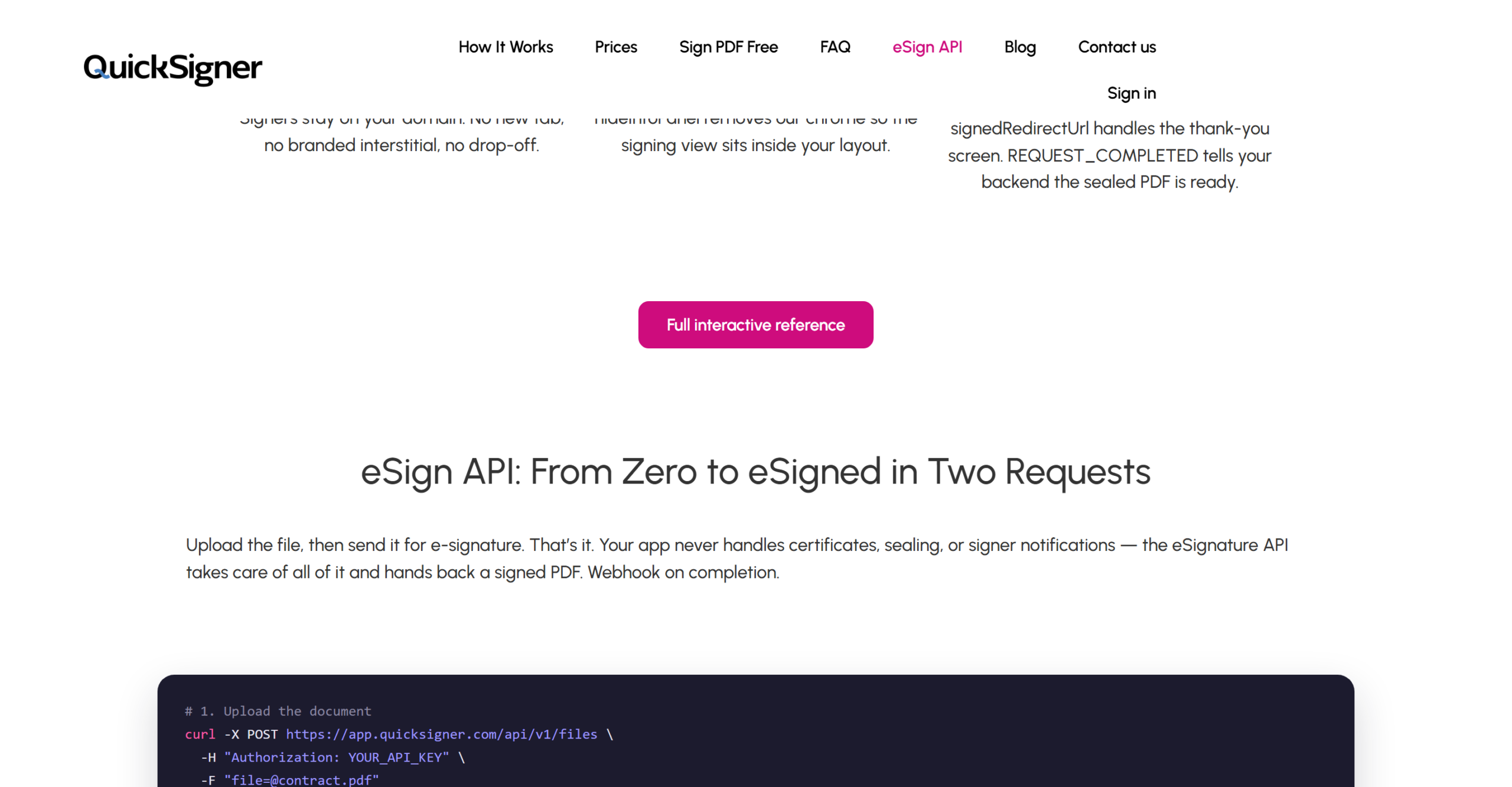
For a product that wants signing to happen without a redirect to QuickSigner’s own domain, three parameters do the work: hideInfoPanel strips QuickSigner’s own chrome so the signing view sits inside the host app’s layout, signedRedirectUrl sends the signer back to the host app’s own thank you screen, and disable_notifs stops QuickSigner emailing a signer who is already looking at the screen inside the host product. A full interactive API reference is hosted separately at QuickSigner’s Stoplight documentation, alongside an open example repository on GitHub.
Developers get a free account to build and test against with no credit card required; the $0.30 per document charge only starts once a workflow goes into production on a Professional or Enterprise plan, after the first 50 credits included free.
QuickSigner’s own API FAQ lists seven factors it says matter most once a signature workflow is running in production, not just on the pricing page: the cryptographic standard (PAdES with LTV timestamping), security and compliance certifications, the legal framework covering the signer’s region (eIDAS, ESIGN, UETA, GDPR), whether pricing is per-envelope or per-seat, integration features like templates and webhooks, how easily documents and audit trails export if a team later migrates providers, and signer experience and court-readiness through audit logs and certificate-based signatures. That list doubles as a reasonable checklist for evaluating any eSignature API, not only QuickSigner’s own.
What real QuickSigner users say
QuickSigner’s homepage publishes several named customer reviews rather than just star ratings, and this QuickSigner review reads them for two things specifically: whether they mention a real switch from a named rival, and whether they name a specific limitation rather than just praise. Alexandr Wang writes: “For a small team of 5-6 people, QuickSigner has replaced DocuSign Completely. We’re able to track who is sending what documents, and can have preset templates for them to use. Devs have been receptive to feedback and added a the missing ‘Initials’ feature recently.” A second reviewer, posting under the handle LawyersCoach, writes: “My PandaDoc up is in a few days, but I won’t be renewing. I’m happy to keep going with QuickSigner,” while noting in the same review that QuickSigner “is not as sophisticated as the more established services.”
A third reviewer, Aaron Fr, frames QuickSigner directly as “a solid choice for anyone looking for a reliable alternative to DocuSign, offering the core functionality plus a few extras,” while Gilbert A. singles out the API specifically: “the simple API access so that everything can be automated with a click of a button,” adding that support helped with setup “as newbie.” Andrew F. credits the flexible signing workflows and multi-device support, and calls the pricing “far more affordable than the bigger legacy platforms,” and Kendrek Moultry, describing a search across several affordable e-signature tools before choosing QuickSigner, singles out templates for cutting setup time on repeat contracts. None of these reviews are independently hosted, they are curated and published by QuickSigner itself, so treat them as directional rather than as a neutral third-party sample, the same caveat that applies to any vendor’s own homepage testimonials.
QuickSigner’s own site states two scale figures worth noting alongside the reviews: its homepage claims “9/10 Users would recommend us to a friend,” and its FAQ page separately claims “100.000 Documents signed weekly without delay” along with “9/10 Users rate signing experience.” Like the testimonials, these are self-reported figures rather than numbers this QuickSigner review could verify against an independent source, so they are worth reading as a directional signal of scale rather than an audited metric.
QuickSigner’s own cost comparison, and how to read it
QuickSigner’s FAQ page runs a cost calculator against three unnamed competitor pricing archetypes rather than naming DocuSign, PandaDoc or SignNow directly, likely to avoid a direct pricing claim about a named rival it cannot keep current. This QuickSigner review checked every figure on that calculator against the page itself rather than repeating it uncritically, since a vendor’s own comparison table is exactly the kind of claim a fact-check exists for.
| Plan archetype | Model | Cost per document | Cost per year (100 docs) |
|---|---|---|---|
| QuickSigner unlimited plan | Flat unlimited | $0.48 | $48.00 |
| “The budget challenger” | Invite caps | $0.96 | $96.00 |
| “The premium suite” | Flat plan | $1.80 | $180.00 |
| “The market leader” | Envelope caps | $3.00 | $300.00 |
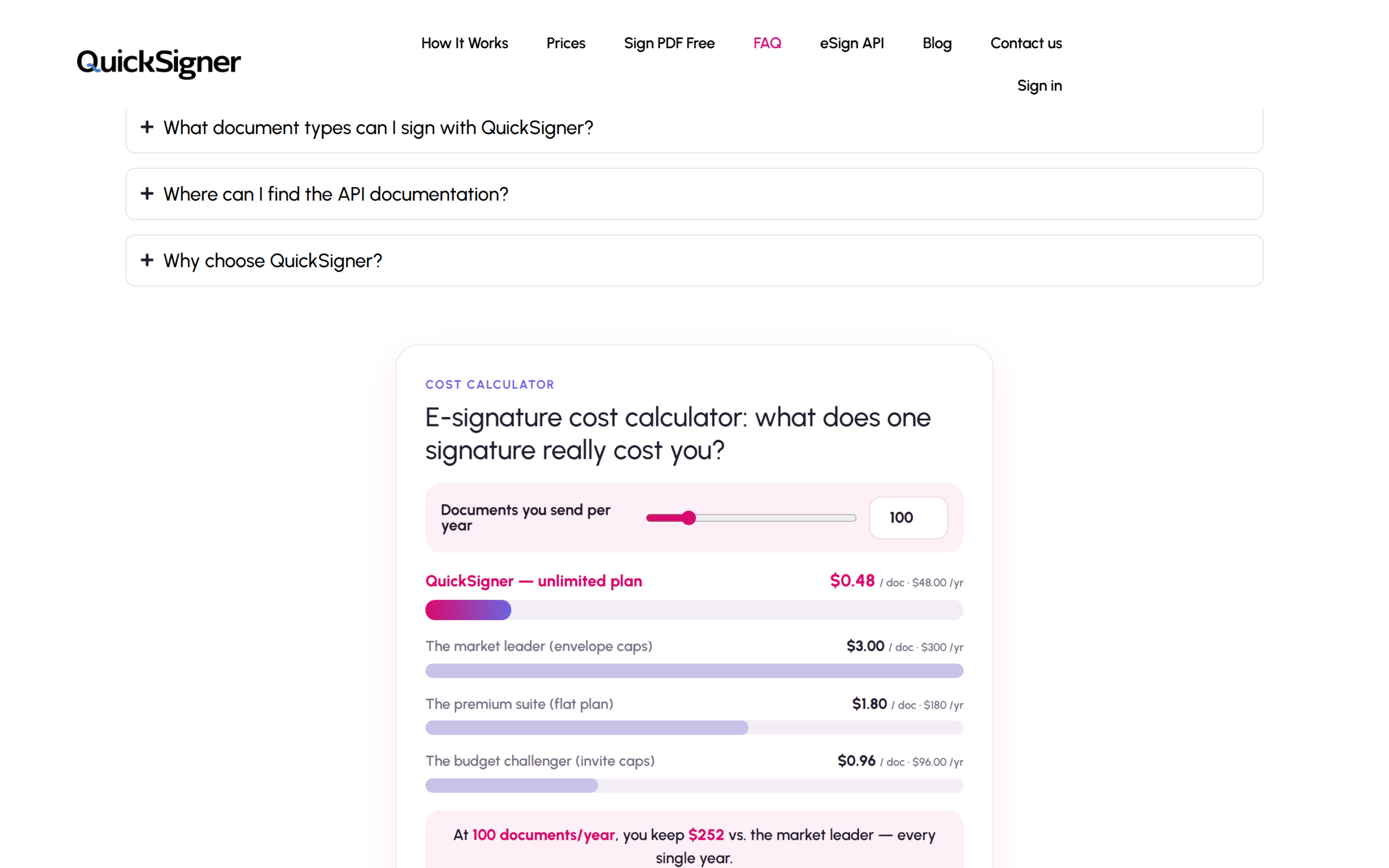
The page states plainly that the model is “modeled from public 2026 price lists” and that “competitor prices vary by plan and region,” which is an honest caveat worth taking at face value rather than treating the comparison as an audited number. The arithmetic on QuickSigner’s own two figures does check out: $3.00 minus $0.48 is $2.52 saved per document, and $2.52 multiplied by 100 documents a year is exactly the $252 annual saving the page claims against its “market leader” comparison point. At a smaller volume, 20 documents a year, the same per-document gap only amounts to about $50.40 saved, so the case for switching gets stronger the more a team actually signs.
Where QuickSigner is less clear
QuickSigner does not list a native app marketplace the way larger e-signature platforms do; every integration path runs through its own REST API rather than a directory of pre-built connectors to a CRM or a document management system, which means a non-technical team without developer time on hand gets less out of Professional’s headline API feature. The 50-signer, 10-document ceiling on Professional is generous for an SMB contract or an NDA, but it will not fit a high-volume enterprise onboarding workflow, which is presumably why Enterprise exists as a custom-priced tier without published limits.
File support is limited to PDF and Word documents; there is no mention of spreadsheet or presentation file signing that some broader document workflow tools support. And because the customer reviews on QuickSigner’s own homepage are self-selected and vendor-published rather than pulled live from an independent aggregator, this review could not independently verify review volume or rating on a neutral third-party site as part of its fact-check.
Who QuickSigner is for, and who it is not
QuickSigner fits a small business, agency, or solo professional that signs contracts, NDAs and invoices regularly but not at enterprise volume, and that wants Adobe-verified, legally backed signatures without paying a DocuSign or PandaDoc seat price for each user. It also fits a software team that wants to add e-signing to its own product without building signature infrastructure from scratch, since the API’s two-call integration and embeddable signing URL are built exactly for that.
It is a weaker fit for a large enterprise that needs a deep pre-built integration marketplace, advanced approval routing across many departments, or compliance features beyond PAdES and ISO 27001 that a regulated industry might specifically require. A team already deep inside a DocuSign or PandaDoc contract with heavy CRM integrations already wired up should weigh migration effort against the price difference before switching.
QuickSigner pros and cons
The clearest advantage is that the free tier is permanent, not a trial, and it still carries the same AATL certificate seal and PAdES sealing as the paid plans, a security baseline some rivals only extend to paying customers. The eSignature API ships with a genuinely short integration path, two REST calls and a webhook, and several of QuickSigner’s own published reviewers describe a full switch away from DocuSign or PandaDoc specifically because of price.
Set against that: integrations lean entirely on the API rather than a pre-built connector directory, the review volume this session could verify came only from QuickSigner’s own homepage rather than a neutral aggregator, and the 50-signer ceiling on its top self-serve plan will not suit the largest signing workflows. Those are trade-offs worth weighing against the price gap rather than reasons to rule QuickSigner out on their own.
Frequently asked questions
Is QuickSigner legally binding?
Yes, per its own published claim: valid under the US ESIGN Act and UETA, the UK’s Electronic Communications Act 2000 and UK eIDAS, and the EU’s eIDAS regulation, sealed with a PAdES, AATL-certified signature.
Does QuickSigner have a free plan?
Yes, permanently, not a time-limited trial: 5 documents a month, up to 3 signers per request, PDF only, 5 MB per file.
Does QuickSigner offer an API?
Yes, a REST eSignature API bundled into the Professional plan, with a free developer account, 50 free credits, then $0.30 per document in production.
Is QuickSigner a good DocuSign alternative?
QuickSigner explicitly positions itself that way, and multiple customer reviews published on its own site describe switching from DocuSign specifically, though this QuickSigner review could not independently verify those reviews on a neutral third-party site.
How much does QuickSigner cost?
Free for occasional use, $5 a month per user for Business, $15 a month per user for Professional, and custom pricing for Enterprise, with a 20 percent discount for annual billing on both paid tiers.
What file types does QuickSigner support?
PDF on every plan, plus Word documents from Business upward. There is no mention of spreadsheet or presentation file support on any tier as of this QuickSigner review.
Is QuickSigner worth it?
This QuickSigner review finds a straightforwardly priced e-signature tool that backs even its free plan with the same PAdES sealing and AATL certification that bigger, pricier rivals use to justify their cost, and layers a genuinely short REST API integration on top for teams that want signing built into their own product rather than a separate app. The trade-off is a thinner integration ecosystem and a review footprint this session could only verify on QuickSigner’s own site, not an independent one.
For a small business or solo professional signing contracts weekly, or a small dev team that wants e-signing without building it, check QuickSigner’s current plans against your own monthly document volume and signer count before choosing a tier.
7.5 Score
Pros
- Free tier is permanent, not a trial, and still carries AATL certification and PAdES sealing.
- REST eSignature API ships with a two-call integration, webhooks, and an embeddable signing URL.
- Multiple published customer reviews describe fully switching away from DocuSign or PandaDoc on price.
- Same legal backing (ESIGN, UETA, eIDAS, AATL) applies across every plan, including the free one.
Cons
- Integrations run entirely through the API; no pre-built connector directory like larger rivals offer.
- 50-signer, 10-document ceiling on Professional will not fit the largest enterprise workflows.
- Only PDF and Word files are supported; no spreadsheet or presentation signing.
- Customer reviews checked for this piece were vendor-published, not from an independent aggregator.
Final Verdict
QuickSigner backs even its permanent free plan with the same PAdES sealing and AATL certification that pricier rivals reserve for paid tiers, and its Professional plan adds a REST eSignature API that takes two calls to integrate. The trade-off is a thinner integration ecosystem than DocuSign or PandaDoc and a review footprint this session could only verify on QuickSigner's own site. For an SMB or a small dev team signing contracts weekly without enterprise volume, it is worth testing against a real document before committing to a tier.