


Short answer: This MalCare review covers a WordPress security plugin from BlogVault that scans a site for malware on its own servers instead of yours, puts a firewall in front of WordPress, and, on paid plans, removes an infection with one click. The free plan detects malware weekly and stops there, Protect prevents attacks, and cleanup starts at Repair, MalCare’s own summary being “Free detects, Protect prevents, Repair and Fortify fix.” Paid plans run from $59.40 a year for one site (after a 40 percent discount on a $99 list price) up to $899.40 a year for five sites on Fortify, and the biggest claim on the site, a 91 percent detection rate against 61 percent for Wordfence, comes from MalCare’s own test, not an independent benchmark.
- Start free if you only want to know whether a site is infected: weekly malware scans, vulnerability alerts, a basic firewall and login protection cost nothing.
- Pick Repair if you want one-click cleanup included, twice-daily scans and a 24-hour expert response.
- Pick Fortify for a store: hourly scans, a 6-hour expert response and unlimited manual security fixes.
- Read the fine print first: refunds stop once a cleanup has been run, and the free plan cannot remove malware.
Free: $0. Protect: $59.40/yr (list $99). Repair: $179.40/yr (list $299). Fortify: $299.40/yr (list $499). One site, billed annually, with 40% off applied on the day checked. MalCare.com, September 24, 2026.
Table of contents
What is MalCare and how does it work?
MalCare is a security service for WordPress sites, sold as a plugin plus a cloud dashboard and built by BlogVault. Its own footer describes it as “WordPress security that works before you wake up,” and the pricing page says it is trusted by more than 400,000 sites in 120 countries. Setup is short: you install the plugin, connect the site to a MalCare account, and the service starts scanning files, the database, users, plugins, themes and known vulnerabilities. The pricing page adds that there are “no DNS changes, no security expertise, no configuration.”
The design choice that defines the product is where the work happens. MalCare syncs your site’s data to its own infrastructure and runs the intensive analysis there, so your hosting keeps serving visitors while the scan runs. A firewall then sits in front of WordPress, and cleanup, on the plans that include it, is a button in the same dashboard. This MalCare review reads the pricing page, the scanner, firewall and removal pages, the documentation, and the plugin’s public WordPress.org listing, all on September 24, 2026, and separates what the vendor claims from what a neutral source can confirm.
That separation matters because security is a category where marketing numbers are easy to publish and hard to check. The rest of this piece starts with what MalCare says it does, then prices it, then looks at the independent evidence, which is thinner than the vendor pages suggest.
The malware scanner: three layers, checked off your server
MalCare’s scanner page argues that a healthy-looking site can still be infected, because malware often hides in the database, inside image files or in scheduled tasks that bring an infection back after a cleanup. To catch that, it describes three detection layers: signature matching against a continuously updated malware library, file integrity checks that compare code with official originals to expose injected lines in WordPress core, plugins and themes, and AI behavioral analysis that reads more than 100 signals to spot malicious behavior even when the code is unfamiliar or disguised.
It also lists where it looks: WordPress core files, every plugin and theme including free, premium, custom and fake ones, the uploads folder, the whole database and scheduled tasks. The documentation supports the basic mechanics. Its scanner section holds 13 help articles, and one states that the malware scan is available only on plans that include security, running every 24 hours or at whatever frequency your plan includes. The same section covers on-demand scans, custom scan schedules, marking a file as a false positive and reviewing hacked files before you clean them.
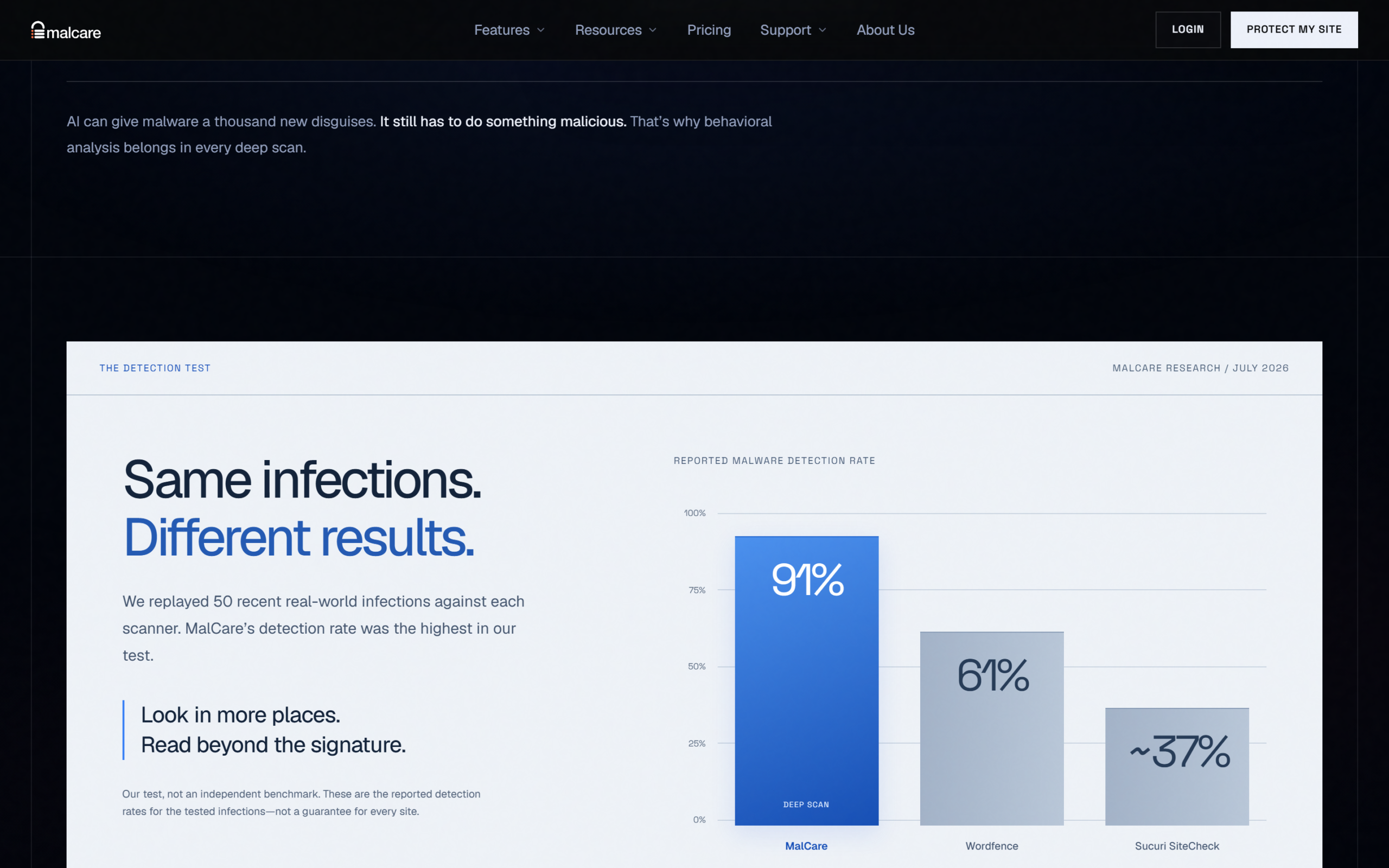
The most quoted number on the page is a detection test. MalCare says it replayed 50 recent real-world infections against each scanner in July 2026 and reports a 91 percent detection rate for itself, 61 percent for Wordfence and about 37 percent for Sucuri SiteCheck, alongside a 0.2 percent false-positive rate. The page is candid about the limit of that claim: “Our test, not an independent benchmark.” Treat it as a hypothesis worth testing on your own site rather than a ranking, because the vendor chose the infections, ran the tests and published the results.
The firewall and virtual patching
MalCare’s firewall page says every request is checked before WordPress executes anything, so an attack gets a 403 before a line of your site’s code runs. It reports blocking more than 2 billion attacks a month across the network and analysing more than 18 billion requests, and says it covers all ten OWASP Top 10 threat classes plus WordPress-specific rules for plugin and theme exploits, admin-ajax.php, the REST API and login floods.
The mechanism it stresses is shared learning: when an attack hits one of the 400,000-plus sites, MalCare’s servers turn it into a rule that reaches every other site, usually before the same attack arrives. The page illustrates this with a timeline in which a rule reaches your site about five hours before the attack does, and labels the times as illustrative, so do not read them as a promise. It also claims that 95 percent of hacked WordPress sites are compromised through a vulnerable plugin or theme, a figure the page does not source.
On the plan ladder, the free tier includes a basic firewall and login protection. Protect adds the advanced firewall, virtual patching, geo-blocking, bot protection, real-time IP blacklisting and custom rules, and Repair upgrades that to a real-time firewall. Virtual patching matters because it blocks exploitation of a known plugin flaw before you have updated the plugin, which is the window in which many sites are actually breached.
One-click malware cleanup
Cleanup is the feature that separates the paid plans from the free one. The removal page says MalCare pins each infection to a file, line, table or scheduled task, backs the site up first, removes only the injected code, and scans again, marking the site clean only when nothing is found. Its four steps are a pinpoint scan that it says takes under three minutes, a safety backup, removal and verification, and it says the same process cleaned more than 1,500 sites in the last month. Cleanups are described as unlimited at a flat price, including if an infection returns.
The page then makes several claims that deserve caution. It says a leading competitor charges $490 for every cleanup, without naming the competitor. It quotes 43.5 percent of hacks being found too late and an average of 180 days of hidden malware, and it shows an illustrative cost curve that reaches $11,544 by day 12 for a store that leaves an infection alone, compared with $18 if cleaned on day one. None of these is sourced on the page, and the last is labelled illustrative, so read them as motivation, not measurement.
What can be checked is the plan boundary. Cleanup is not on Free, and it is not on Protect: the pricing page lists instant malware cleanup as not included on Protect and included from Repair. If you are already infected, that is the plan you need, and a hosting suspension is a separate case, because WebHost suspension recovery is not on Repair either and only arrives with Fortify.
MalCare pricing: Free, Protect, Repair and Fortify
Plans differ on three things according to the pricing page: how often you are scanned, how fast an expert responds and how much remediation is included. The table shows each tier for one site, with the list price and the price shown with the 40 percent discount that the page says is applied automatically.
| Plan | List price (1 site) | Price shown (1 site) | Scans | Expert response | Remediation |
|---|---|---|---|---|---|
| Free | $0 | $0 | Weekly | Support on all plans | Detect only |
| Protect | $99 | $59.40 | Every 24 hours | Within 48 hours | Detect and alert, no cleanup |
| Repair | $299 | $179.40 | Every 12 hours | Within 24 hours | Cleanup plus post-cleanup report |
| Fortify | $499 | $299.40 | Every hour | Within 6 hours | Unlimited manual security fixes |
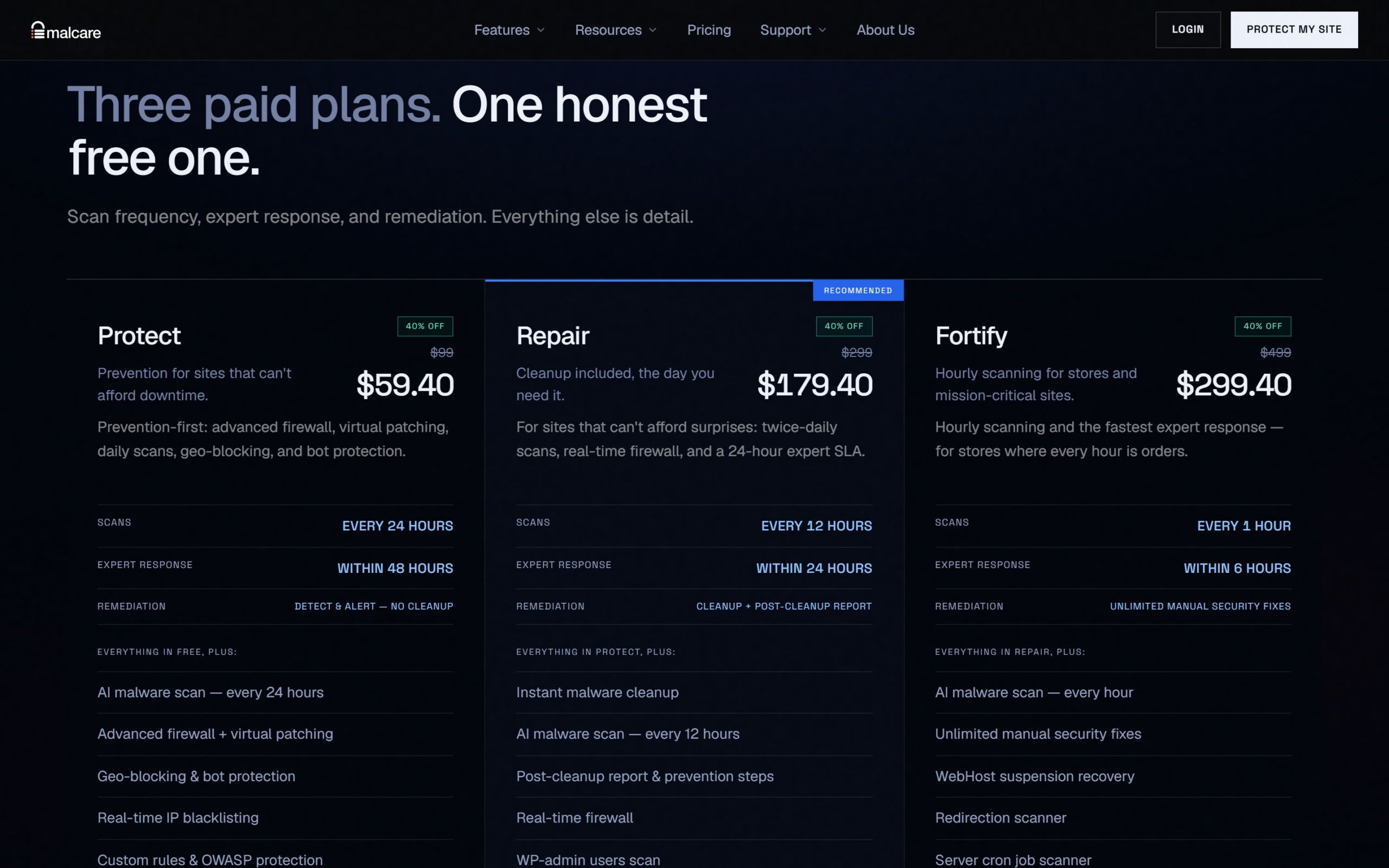
Five-site prices are $179.40 for Protect, $539.40 for Repair and $899.40 for Fortify after the discount, from list prices of $299, $899 and $1,499. That works out to $35.88, $107.88 and $179.88 per site, so the five-site bundle costs 40 percent less per site than buying five single-site plans, by our arithmetic. Plans renew annually, and you can cancel future renewals from the dashboard with no cancellation fee. The page also lets you put different plans on different sites in one account, and says agencies managing ten or more sites should ask about agency pricing.
The money-back terms are the part to read twice. Refunds are available within 14 days of purchase, with one exception: if malware has already been cleaned from your site in that time, no refund is issued, “because cleanup is irreversible work performed by our team.” Support from security experts is included on every plan, including Free, and payments are processed through Stripe, with PayPal available through support. If the plan structure fits your site, start with MalCare’s free plan to see what the scan finds before you choose a paid tier.
The free plan itself is generous for detection and deliberately limited for cure. It includes weekly malware scans, vulnerability alerts, a basic firewall, login protection, two-factor authentication for two users and SSL monitoring, and the page says so plainly: “Free detects malware; removal needs Repair or higher.” That honesty is worth noting, because the most recent negative reviews on the plugin’s WordPress.org page are about exactly this boundary.
What independent data shows
The neutral source available to this MalCare review is the plugin’s public listing on WordPress.org, which reports figures MalCare does not control. As of September 24, 2026, the plugin was at version 6.76, added to the directory on January 30, 2018, last updated on September 17, 2026 and tested up to WordPress 7.1.2, with 100,000 or more active installations. Its rating is 4.4 out of 5 across 552 ratings, of which 450 are five-star and 74 are one-star. For context, Wordfence, the plugin MalCare compares itself against, shows 5,000,000 or more active installations and a 4.7 rating across 5,008 ratings.
| Measure (WordPress.org, September 24, 2026) | MalCare | Wordfence |
|---|---|---|
| Active installations | 100,000+ | 5,000,000+ |
| Average rating | 4.4 of 5 | 4.7 of 5 |
| Number of ratings | 552 | 5,008 |
| Five-star share | 81.5% (450 ratings) | Not compared |
| One-star share | 13.4% (74 ratings) | Not compared |
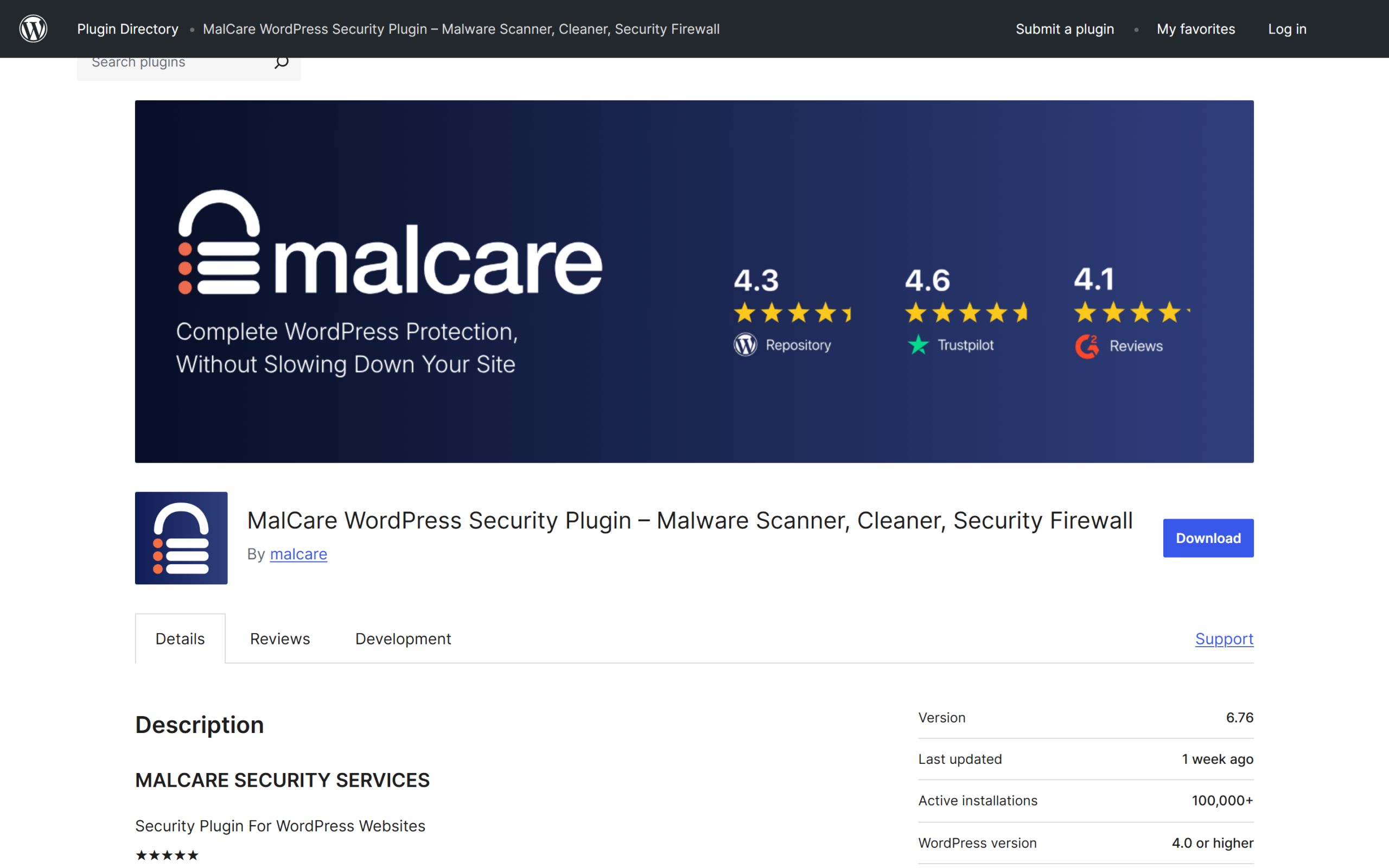
Two readings follow. First, MalCare is a much smaller installed base than the biggest free WordPress security plugin, which is a real point about track record and community scrutiny even though it says nothing about detection quality. Second, its ratings are strongly positive but not uniformly so, and the one-star reviews cluster around the free plan: recent titles include “They waste your time, collect your data, then hit you with a Paywall,” “Free malware scan is useless” and “Features not as free as the help says.” Those are complaints about what the free tier will not do, which MalCare’s own pricing page now states openly, and they are a reason to set expectations before you install. The WordPress.org listing is the best place to read recent reviews yourself.
One figure does not line up. The vendor says its plugin is trusted by 400,000-plus sites, while WordPress.org shows 100,000 or more active installations. These can both be true, since the directory shows a bucketed minimum and MalCare may count sites that connected another way, but a reader should not treat 400,000 as a WordPress.org install count.
Where MalCare is less clear
The company’s history is stated two ways. The footer says “Built by BlogVault, protecting WordPress since 2014,” while the scanner page says the team behind MalCare “has secured WordPress since 2011,” and the WordPress.org directory shows the plugin arriving in 2018. These can reflect different things, the team, the company and the plugin, but the pages do not explain the difference.
Price visibility is another point. The pricing page shows a discounted price with the list price crossed out and says the 40 percent is “applied automatically,” but it does not say how long the offer lasts, so the renewal price after year one is not visible in the pricing table itself. Everything is billed annually, with no monthly option shown, which suits a long-term site and is less friendly to someone who needs a one-off cleanup. Because refunds stop after a cleanup, the cheapest way to test whether the scanner finds anything is the free plan, not a paid one.
Finally, most of the strongest claims, the detection rates, the 1,500 cleanups a month, the 2 billion attacks blocked and the 95 percent of hacks via plugins, are self-reported. That is normal for security vendors, and it is why this MalCare review leans on the pricing table, the stated policies and the WordPress.org data, which can be checked.
Who MalCare is for, and who should look elsewhere
MalCare suits the owner of a WordPress site who wants security without configuration, especially one who would rather pay for cleanup than learn to do it. Small business sites, blogs and agencies with several client sites fit the model, and the per-site drop in five-site bundles helps an agency. A WooCommerce store is the intended buyer for Fortify, with hourly scans and a six-hour expert response.
It is a weaker fit for someone who wants a free security plugin that also removes malware, because the free plan does not clean. It is also a weaker fit for a site owner who wants a large public track record, since the installed base is smaller than Wordfence’s, and for anyone who needs monthly billing. If you are comparing security tools, MalCare’s own comparison pages list Wordfence, iThemes Security and Sucuri alternatives, which are vendor-written and worth reading with the same caution as the detection test.
MalCare pros and cons
In this MalCare review the clearest advantages are cloud scanning that does not load your server, a firewall that runs before WordPress, one-click cleanup on Repair and above, expert support on every plan including Free, and a free plan that at least tells you whether a site is infected. A 14-day refund window and pro-rata plan changes are fair terms for a service sold annually.
Against that: cleanup is not on Free or Protect, refunds stop once a cleanup is done, the strongest performance claims come from the vendor’s own test, the installed base and review count are much smaller than the market leader’s, and the free tier draws recurring complaints. None of these rule MalCare out. They are the points to check before you pay.
Frequently asked questions
Is MalCare free?
There is a free plan with weekly malware scans, vulnerability alerts, a basic firewall, login protection, two-factor authentication for two users and SSL monitoring. It detects malware but does not remove it.
How much does MalCare cost?
For one site, billed annually, Protect is $59.40, Repair $179.40 and Fortify $299.40 after a 40 percent discount, from list prices of $99, $299 and $499. Five-site plans are $179.40, $539.40 and $899.40.
Does MalCare remove malware?
Yes, from the Repair plan upward, with cleanups described as unlimited. Protect detects and alerts but does not clean, and the Free plan detects only.
Does MalCare offer refunds?
Within 14 days of purchase, except when malware has already been cleaned from your site in that period, because MalCare treats cleanup as irreversible work.
Will MalCare slow down my WordPress site?
MalCare says its scanning runs on its own servers, so your hosting keeps serving visitors, and its firewall is described as zero configuration with zero load on your server. Test it on your own site to confirm.
Is MalCare better than Wordfence?
MalCare’s own test says so, 91 percent to 61 percent on 50 infections, but that is a vendor test. Wordfence has about 50 times the active installations on WordPress.org and a slightly higher rating, so compare both on your own site before deciding.
Is MalCare worth it?
This MalCare review finds a well-defined WordPress security service: off-server scanning, a firewall that runs ahead of WordPress, one-click cleanup from the Repair plan, expert support on every plan and a free tier that at least reveals whether a site is infected. The trade-offs are that cleanup costs extra, refunds stop once it is used, the headline detection numbers come from the vendor’s own test and the public track record is smaller than the market leader’s.
For a site owner who wants protection without configuration, check MalCare’s current plans against how many sites you run and how quickly you would need an expert, then start with the free scan.
7.6 Score
Pros
- Scanning runs on MalCare's servers, so the analysis does not compete with your hosting.
- One-click cleanup with a backup first and a re-scan after, included from the Repair plan.
- Expert support is included on every plan, including the free one.
- The free plan reveals whether a site is infected without a card, and refunds run 14 days.
Cons
- Cleanup is not on Free or Protect, and refunds stop once a cleanup has been run.
- The 91% detection claim comes from MalCare's own 50-infection test, not an independent benchmark.
- WordPress.org shows 100,000+ installs and 552 ratings, far below Wordfence's 5,000,000+ and 5,008.
- Recent one-star reviews complain about what the free plan will not do.
Final Verdict
MalCare scans off your server, filters requests ahead of WordPress and removes malware with one click from the Repair plan, with expert support on every plan. Cleanup costs extra and refunds stop once it is used, the headline detection numbers come from the vendor's own test, and its public track record is smaller than the market leader's. It is worth testing on the free scan before paying for a tier.