


Short answer: This Vista Social review comes down to profile count: at $80 a month on annual billing for 15 social profiles and two users, with an inbox, reports, review management, a link-in-bio page, DM automations and an AI assistant in the base plan, Vista Social gives an agency or a multi-brand team more connected accounts per dollar than Hootsuite, Later or Buffer’s team tiers, and the trade is that approvals, integrations, competitor and custom reports live on the $160 Advanced plan, X costs $29 a month extra, and reviewers say the mobile app lags the desktop.
- Pick Vista Social Professional if you run up to 15 profiles for one or two brands with a two-person team and want publishing, inbox, reviews and reports without paying per user.
- Pick Vista Social Advanced if you need approval workflows, bulk and smart scheduling, competitor and custom reports, or Zapier, Make and MCP integrations, at $160 a month for 30 profiles and three users.
- Skip it if you manage one or two channels as a solo creator, where Buffer at $5 a channel is cheaper, or if X is central to your work and you do not want a $29 add-on for it.
From $80 per month billed annually ($99 monthly) for 15 profiles and 2 users · Free plan: no, 14-day trial with no card · Prices checked October 12, 2026.
Table of contents
What is Vista Social and who is it built for?
Vista Social is a social media management platform from Vista Social LLC that bundles the five things an agency or an in-house team otherwise buys separately: scheduling and publishing across Facebook, Instagram, LinkedIn, TikTok, YouTube, Threads, Snapchat, Reddit and X, a unified inbox with DM automations, analytics and reports, review management for Google, Yelp, TripAdvisor, OpenTable, Trustpilot and the app stores, and a link-in-bio page called Vista Page. Its own footer describes it as “the most complete social media management platform for teams who demand more”, and the plan structure says who those teams are: profiles are counted in fifteens and thirties, not in threes, and every plan ships with the inbox and reporting rather than holding them for a higher tier.
The social proof is strong for the category. G2 lists Vista Social at 4.8 out of 5 from 1,129 reviews as of September 4, 2026, which is a higher score on a larger base than most of the tools it competes with. A Vista Social review therefore has less to argue about on quality and more to work through on structure: which plan an agency actually lands on once approval workflows, integrations and X are counted, and what the credit and contact limits mean when a client base grows.
How much does Vista Social cost, and what do the add-ons add?
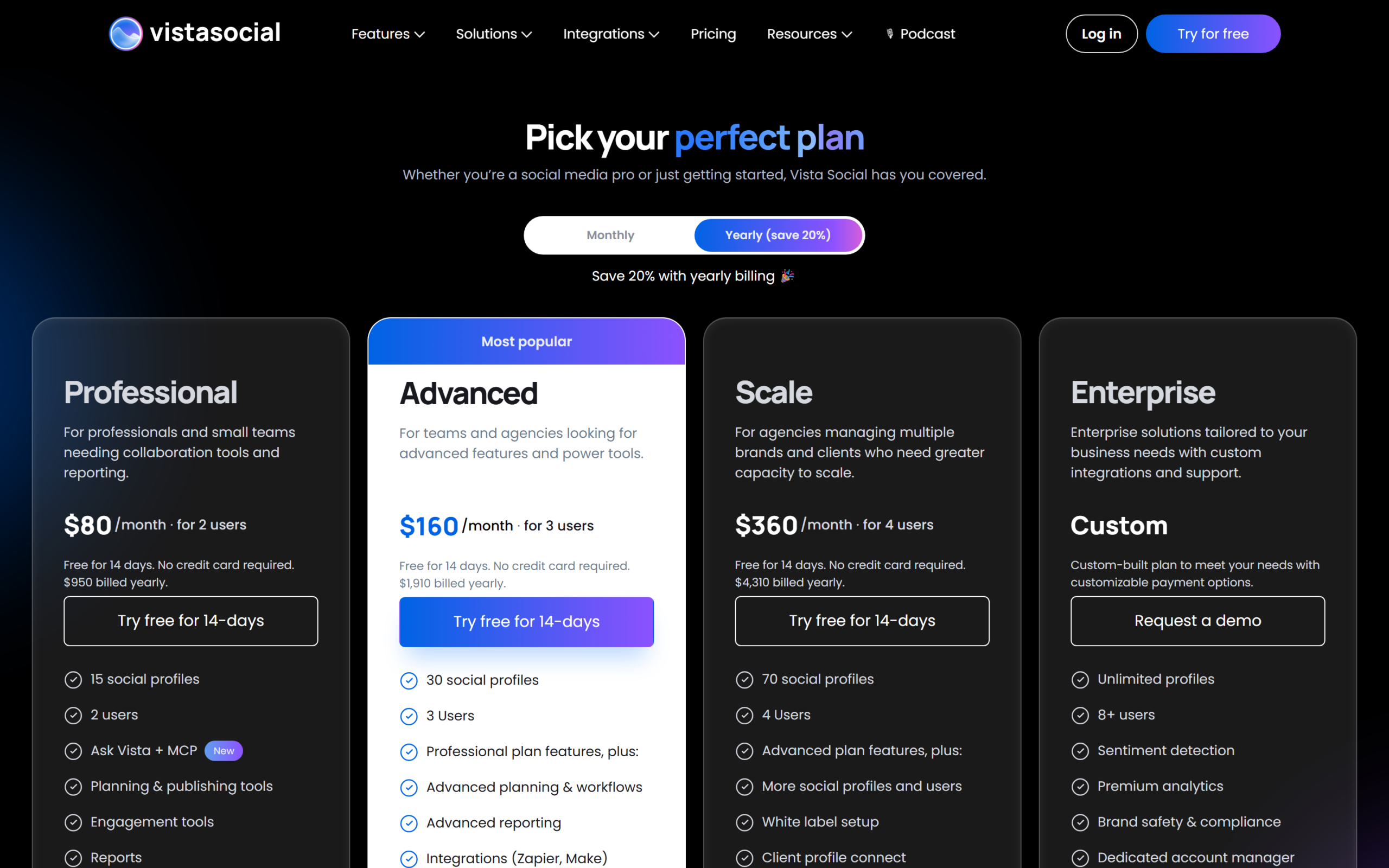
For this Vista Social review we read the pricing page in both billing modes and the comparison table beneath it on September 4, 2026, and again on October 12, 2026, after a price rise. There are three published plans and an Enterprise tier. Professional is $80 a month billed yearly, $950 a year, or $99 month to month, for 15 social profiles and two users. Advanced is $160 a month billed yearly, $1,910 a year, or $199 monthly, for 30 profiles and three users. Scale is $360 a month billed yearly, $4,310 a year, or $449 monthly, for 70 profiles and four users. Enterprise is custom, with unlimited profiles and eight or more users. Every plan starts with a 14-day trial, no card required, and annual billing saves 20 percent against monthly. US nonprofits get up to 50 percent off Professional and Advanced with registration documents.
| Plan | Annual (per month) | Monthly | Profiles | Users | DM contacts | AI credits per month | Ideas | Support |
|---|---|---|---|---|---|---|---|---|
| Professional | $80 ($950 a year) | $99 | 15 | 2 | 10,000 | 1,000 | 1,000 | Email, group training |
| Advanced | $160 ($1,910 a year) | $199 | 30 | 3 | 25,000 | 2,000 | 2,000 | Email and video call, group training |
| Scale | $360 ($4,310 a year) | $449 | 70 | 4 | 100,000 | 3,500 | 10,000 | Email and video call, group training |
| Enterprise | Custom | Custom | Unlimited | Unlimited | Custom | Unlimited | Unlimited | Priority, 1-on-1 training, account manager, quarterly reviews |
Prices in USD from the Vista Social pricing page and its comparison table on September 4, 2026.
The add-ons that change the bill
Three add-ons apply on every plan. X (Twitter) is not in the base price: publishing, boosting, automations and analytics for X cost $29 a month. Employee Advocacy is free to try and then $199 a month for 25 employees. Listening is free for your own profiles and $75 a month to listen across social, web and news. Extra profiles and extra users are available from Advanced upward, with Scale and Enterprise marked customisable; the page does not print the per-profile or per-user rate, so ask in the trial. For an agency running eight brands on Advanced with X, the real monthly figure is $199 plus $29, $228 on monthly billing, before any Listening.
The comparison table also carries a detail the FAQ has not caught up with: the FAQ still says Professional comes with three users and Advanced with six, while the plan cards and the table say two and three. Trust the cards, they are what the checkout uses, and check the current Vista Social pricing before quoting a client.
What separates Professional, Advanced, Scale and Enterprise?
Professional is not a starter plan in the usual sense. It includes unlimited post scheduling across the supported networks, a calendar, media library, drafts, per-profile customisation, tagging, optimal-time recommendations, labels, saved captions, hashtags and mentions, Canva and cloud-drive integrations, trending audio, a link shortener, first-comment and additional-comment scheduling, the social inbox with saved replies, labels, spam management and internal notes, DM automations, review monitoring and replies, listening on your own profiles, social media and post performance reports, Vista Page, two-factor authentication, user permissions and the Ask Vista AI assistant with 1,000 credits a month. Two users and 15 profiles is the constraint.
Advanced is the agency plan. It adds advanced planning and workflows, which on the comparison table means single- and multi-stage approvals, bulk scheduling, smart scheduling, country targeting and a shared calendar with ten seats, plus advanced reporting, which covers competitor, custom, scheduled, review, web analytics, sentiment and industry benchmark reports, task management in the inbox, advanced DM automations, advanced Vista Page features including a custom domain, the AI Training and Knowledge repository with website and Zendesk sync, and the data integrations: Zapier, Make, Slack, MCP and Looker Studio.
Scale is Advanced with capacity and white label: 70 profiles, four users, 100,000 DM contacts, 3,500 AI credits, 10,000 ideas, 25 shared calendars, white-label setup, a client profile connect link so clients authorise their own accounts, and premium AI training. Enterprise adds sentiment detection, premium analytics, brand safety and compliance, single sign-on, data migration, a dedicated account manager, onboarding and quarterly reviews.

How good are publishing, scheduling and the AI tools?
Publishing is the mature half of the product. The composer customises a post per network, tags users, products and collaborators, pulls trending audio for Reels and TikTok, and schedules a first comment. Unlimited scheduling is on every plan, though one G2 reviewer notes a practical cap of about 50 scheduled posts a day per platform for a heavy poster. Optimal-time recommendations and a per-profile posting schedule are standard; smart scheduling, bulk scheduling by CSV and country targeting are Advanced. The Ideas board, capped at 1,000 on Professional and 10,000 on Scale, holds drafts and inspiration, and the Find Content and hashtag suggestion tools feed it.
AI
Ask Vista, marked new on the pricing page, is the assistant layer, metered in credits: 1,000 a month on Professional, 2,000 on Advanced, 3,500 on Scale, unlimited on Enterprise, shared between publishing and the inbox. Advanced adds AI Training and Knowledge, a content repository with guidance and escalation rules, website sync, Zendesk sync and document upload, so the assistant drafts in your voice and knows your policies. That is the feature that separates Vista Social’s AI from a generic caption generator, and it is Advanced-only.
How do the inbox, DM automations and review management work?
The inbox unifies comments, mentions and direct messages across connected profiles, with saved replies, labels, spam filtering, internal notes and, on Advanced, task assignment and sentiment analysis. DM automations, keyword-triggered replies and flows in Instagram and Facebook messages, are on every plan with the basic version and expanded on Advanced; the DM contact cap is 10,000 on Professional, 25,000 on Advanced and 100,000 on Scale, which is the number a brand running comment-to-DM campaigns should watch. Review management pulls Google, Yelp, TripAdvisor, OpenTable, Trustpilot, App Store and Google Play reviews into the same queue with replies, which for a local-business agency is a feature usually sold as a separate product.
The G2 dislikes around this area are consistent: the platform packs a lot in and takes time to learn, especially jumping between client accounts, and the inbox occasionally opens Meta Business Suite in a new tab when pasting a message. A reviewer running client accounts reports the mobile app as buggy, with clients unable to see posts, and asks for parity with the desktop.

What do the reports and integrations cover?
Professional gets the social media report, the post performance report and downloads. Advanced adds the reports an agency sends to clients: competitor, custom, scheduled delivery, review reports, web analytics, sentiment and industry benchmarks. Enterprise adds premium analytics. On integrations, the split is the same: Professional connects Canva, Google Drive, OneDrive and Dropbox for media, while Zapier, Make, Slack, Looker Studio and an MCP server for AI assistants are Advanced. The vendor keeps a public changelog and roadmap; the Vista Social changelog is where new networks and features land first.
How does Vista Social compare with Buffer, Later and Hootsuite?
The comparison most people reading a Vista Social review are making is on cost per connected profile, so the table normalises for that.
| Tool | Entry paid plan (annual) | Profiles and users included | Cost per profile per month at entry | Approvals and client reports | Notes |
|---|---|---|---|---|---|
| Vista Social | Professional $80 a month | 15 profiles, 2 users | $5.33 | Advanced, $160 for 30 profiles and 3 users | Inbox, reviews, link in bio and DM automations included; X is $29 extra |
| Buffer | Essentials $5 a month per channel; Team $10 per channel | Per channel, 1 user on Essentials, unlimited on Team | $5 to $10 | Team plan | Cheapest for one to three channels; cost scales per channel |
| Later | Starter $18.75 a month; Growth $37.50 | Growth: 2 social sets (16 profiles), 2 users | $2.34 on Growth | Growth, with 180 posts per profile cap | Extra sets $11.25, extra users $3.75, extra AI credits $3.75 per 100 |
| Hootsuite | Standard EUR 99 a month per user | 10 accounts, 1 user | EUR 9.90 | Advanced EUR 399 per user | Per-user pricing; Professional EUR 199 for unlimited accounts |
Prices from each vendor’s pricing page on September 4, 2026; Hootsuite quoted euros to our location. Per-profile figures are our division.
Against Hootsuite, Vista Social is a fraction of the price for the same profile count and does not charge per user. Against Later, Later’s Growth plan now costs less per profile, but it caps scheduling at 180 posts per profile where Vista Social is unlimited; Later’s edge is its Instagram-first tooling and cheap add-on seats. Against Buffer, the answer depends on scale: three channels for a solo creator is $15 a month on Buffer and $80 on Vista Social; fifteen channels with an inbox, reviews and reports is where Vista Social pulls ahead. The honest summary is that Vista Social is priced for the agency and the multi-brand team, and nobody else in this group bundles review management and DM automation at the entry tier.
Where does Vista Social fall short?
The gaps this Vista Social review found are structural and small in number.
X is an add-on
$29 a month on every plan for publishing, boosting, automations and analytics on X. For a B2B team where X still matters, that is a 36 percent increase on Professional’s annual price.
Approvals and integrations start at Advanced
Single-stage approvals, bulk scheduling, competitor and custom reports, Zapier, Make, Slack, Looker Studio and MCP are all Advanced. An agency will almost always land on $160 a month rather than $80, and that is the price to compare with rivals.
The mobile app lags the desktop
The clearest recent G2 complaint: the app is buggy and clients could not see posts, with the reviewer asking for parity. If clients approve from phones, test the app in the trial.
Learning curve and account switching
Several reviewers say the breadth takes time to learn and that moving between client accounts is where they lose it. The shared calendar limits, ten on Advanced and 25 on Scale, are worth checking against your client count.
Documentation drift and unpublished add-on rates
The FAQ still quotes three and six users where the plans give two and three, and extra-profile and extra-user pricing is not printed on the page. Neither is a product flaw; both are things to confirm before signing an annual plan.
Who should buy Vista Social, and who should not?
Vista Social fits a team that manages many profiles for few people, and three cases show where the plans land.
Scenario one: a two-person agency with six local-business clients
Six clients with Facebook, Instagram and Google reviews each is 18 profiles, which already exceeds Professional’s 15, and the clients want to approve posts. That is Advanced at $160 a month annual, $1,910 a year, with 30 profiles, three users, approvals, competitor reports and the review queue. Hootsuite’s Advanced tier for one user is EUR 399 a month. This is the case where a Vista Social Advanced plan replaces a scheduler, a review tool and a reporting tool at once.
Scenario two: an in-house team for one brand on five networks
Five profiles, two people, no client approvals. Professional at $80 a month is the buy, with the inbox and reports included, and the only question is whether X matters enough to add $29.
Scenario three: a solo creator on Instagram and TikTok
Two channels, one person. Buffer Essentials at $10 a month for two channels or Later Starter at $18.75 is the sensible spend; Vista Social’s 15-profile plan is built for someone else.
Who should not buy
Do not buy Vista Social for one or two channels, if X is your primary network and the add-on offends, if your clients approve everything from a phone and the app fails your trial, or if you need a free tier.
Common buying mistakes
Choosing Professional for an agency and hitting the 15-profile and two-user wall in month one. Forgetting X is $29 extra. Counting DM contacts per client instead of per account. Trusting the FAQ’s user counts over the plan cards. Not testing the mobile app with a client before signing annual.
Vista Social pros and cons
Vista Social
- 15 profiles and two users for $80 a month annual, with unlimited scheduling, a unified inbox, review management, DM automations, reports, Vista Page and an AI assistant all in the base plan.
- G2 4.8 from 1,129 reviews, a 14-day trial with no card, and up to 50 percent off for US nonprofits on Professional and Advanced.
- Advanced at $160 for 30 profiles and three users adds approvals, bulk and smart scheduling, competitor and custom reports, Zapier, Make, Slack, Looker Studio and MCP.
- Review management across Google, Yelp, TripAdvisor, OpenTable, Trustpilot and the app stores in the same inbox, rarely bundled at this price.
- Scale at $360 brings white label, client profile connect and 70 profiles for agencies.
- X costs $29 a month extra on every plan.
- Approvals, integrations and client-grade reports start at Advanced, so agencies pay $160, not $80.
- Reviewers report a buggy mobile app that lags the desktop.
- Breadth brings a learning curve, and switching between client accounts is where reviewers stumble.
- Extra profile and user rates are not printed, and the FAQ’s user counts contradict the plan cards.
Frequently asked questions
How much does Vista Social cost?
Professional is $80 a month billed yearly ($950) or $99 monthly for 15 profiles and two users. Advanced is $160 yearly ($1,910) or $199 monthly for 30 profiles and three users. Scale is $360 yearly ($4,310) or $449 monthly for 70 profiles and four users. Enterprise is custom. Annual billing saves 20 percent.
Is there a free plan or trial?
There is no free plan. Every plan has a 14-day free trial with no credit card, and you can subscribe monthly or annually during or after it. US nonprofits can get up to 50 percent off Professional and Advanced with registration documents.
Does Vista Social support X (Twitter)?
Yes, as a paid add-on at $29 a month on every plan, covering publishing, boosting, automations and analytics. It is not included in the base price.
What counts as a social profile?
One connected account: a Facebook page or group, an Instagram business profile, a LinkedIn profile or company page, a TikTok, YouTube, Threads, Snapchat or Reddit account, or a review site listing such as Google, Yelp, TripAdvisor, OpenTable, Trustpilot, the App Store or Google Play. Professional includes 15, Advanced 30, Scale 70.
Which plan has approval workflows?
Advanced and above. Single- and multi-stage approvals, bulk and smart scheduling, country targeting, competitor and custom reports, task management and the Zapier, Make, Slack, Looker Studio and MCP integrations are all on Advanced at $160 a month annual.
What are AI credits and DM contacts?
AI credits meter the Ask Vista assistant across publishing and inbox: 1,000 a month on Professional, 2,000 on Advanced, 3,500 on Scale, unlimited on Enterprise. DM contacts cap the people your automations can message: 10,000, 25,000 and 100,000 respectively.
Is Vista Social good for agencies?
Yes, from Advanced upward. Profiles are counted generously, approvals and client reports are on Advanced, and Scale adds white label and a client connect link so clients authorise their own accounts. G2’s 4.8 from 1,129 reviews is dominated by agency and multi-brand users.
Does this Vista Social review cover the mobile app?
Briefly. There are mobile, desktop and browser-extension apps. The most specific recent complaint on G2 is that the mobile app is buggy and clients could not see posts in it. If client approval happens on phones, test the app during the trial before choosing annual billing.
Which should you choose?
The conclusion of this Vista Social review: choose it if you manage many profiles for few people, because no rival in its price range bundles publishing, a unified inbox, review management, DM automation and reporting for 15 profiles at $80 a month. Buy Professional for an in-house team on one or two brands, Advanced for an agency that needs approvals and client reports, and price X at $29 on top if you need it.
Do not choose it for one or two channels, where Buffer or Later cost less, and test the mobile app before committing if clients approve from their phones. For the agency with a dozen local clients and the marketing team running six networks, Vista Social is the most complete platform per dollar in the category today.
8.2 Score
Pros
- 15 profiles and two users for $80 a month annual, with unlimited scheduling, a unified inbox, review management, DM automations, reports, Vista Page and an AI assistant in the base plan.
- G2 4.8 from 1,129 reviews, a 14-day trial with no card, and up to 50 percent off for US nonprofits.
- Advanced at $160 for 30 profiles and three users adds approvals, bulk and smart scheduling, competitor and custom reports, Zapier, Make, Slack, Looker Studio and MCP.
- Review management across Google, Yelp, TripAdvisor, OpenTable, Trustpilot and the app stores in the same inbox.
Cons
- X costs $29 a month extra on every plan.
- Approvals, integrations and client-grade reports start at Advanced, so agencies pay $160, not $80.
- Reviewers report a buggy mobile app that lags the desktop.
- Extra profile and user rates are not printed, and the FAQ's user counts contradict the plan cards.
Final Verdict
Vista Social is the most complete social media platform per dollar for teams that manage many profiles: 15 profiles, an inbox, review management, DM automations and reports for $80 a month, and an Advanced plan at $160 that gives agencies approvals, client reports and integrations for 30 profiles. The costs are a $29 X add-on, a mobile app reviewers find buggy, a learning curve, and add-on rates the page does not print. Solo creators with two channels should look at Buffer or Later instead.