



Short answer: In the FlyingPress vs WP Rocket decision, FlyingPress is worth paying for if you want image optimization, free Cloudflare edge caching and Redis object caching inside one licence, while WP Rocket is the safer buy if you might stop paying one day, because WP Rocket keeps caching after a licence lapses and FlyingPress says most of its optimizations stop.
- Pick FlyingPress if you run more than three sites, use Cloudflare’s free plan, or would otherwise buy a separate image optimizer, and you will keep the licence active.
- Pick WP Rocket if you want the plugin to keep working without a renewal, a 14-day refund on every purchase including renewals, or a mature add-on set for Varnish and Sucuri.
- Skip both if your host already runs server caching and edge caching for you and you only need script control; a lighter script manager will do.
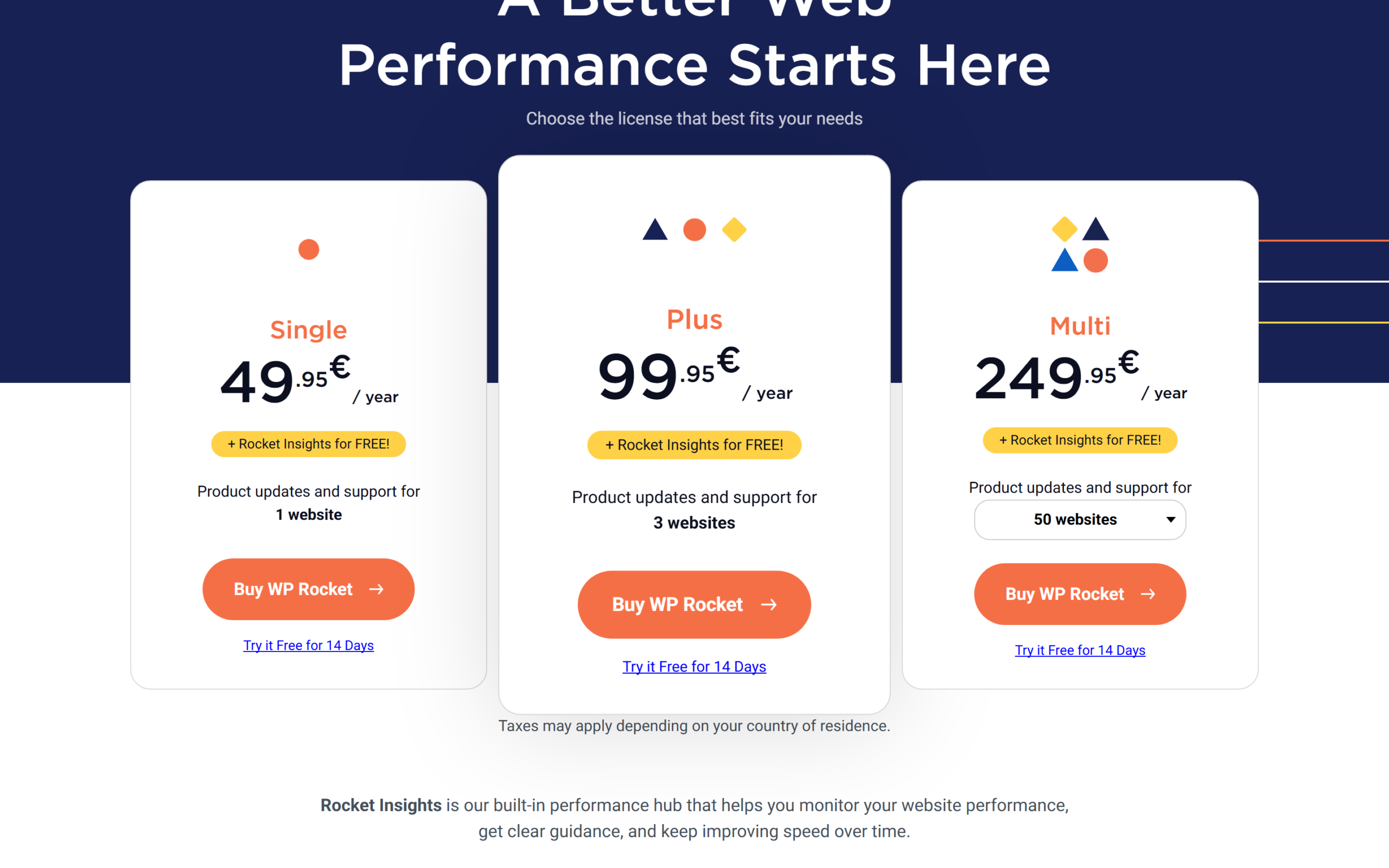
FlyingPress: $59/yr for 1 site, $109 for 3, $229 for 25, $279 unlimited; renews at the same price; 14-day free trial. WP Rocket: €49.95/yr for 1 site, €99.95 for 3, €249.95 for 50 (the storefront quoted euros to us; taxes may apply); 14-day free trial. Free plan: no on either. Prices checked October 11, 2026.
Table of contents
How do FlyingPress and WP Rocket compare at a glance?
On the core job, page caching plus CSS and JavaScript optimization, the two plugins do the same things; the FlyingPress vs WP Rocket decision is about what each bundles around that core and what happens to your site when the subscription ends. Both cache pages as static HTML, preload the cache, remove unused CSS, delay JavaScript until a visitor interacts, lazy load images and iframes, and clean the database on a schedule. Both offer a 14-day free trial now, and neither has a free version.
Our FlyingPress review already walks through the plugin’s settings, its release history, what breaks and its support record. This comparison does something different: it reads both vendors’ licence, renewal and refund documentation side by side, prices the add-ons each one needs to match the other, explains the Cloudflare difference in practical terms, and lays out a switch from WP Rocket to FlyingPress step by step. Every price and policy below comes from the vendors’ own pricing pages and documentation, read on October 11, 2026.
| FlyingPress | WP Rocket | |
|---|---|---|
| Entry licence | $59/yr, 1 site | €49.95/yr, 1 site |
| Top licence | $279/yr, unlimited sites | €249.95/yr, 50 sites |
| After the licence lapses | Most optimizations stop, per its docs | Keeps working; cloud features stop after 15 days |
| Image optimization | Included (WebP, AVIF or original format) | Separate Imagify subscription; free tier 20 MB a month |
| Cloudflare HTML edge caching | Built in, on any Cloudflare plan | Through Cloudflare APO ($5/mo on Cloudflare’s free plan) |
| Redis object caching | Included since 5.6.0 | Not listed on its features page |
| Performance monitoring | Real-user Core Web Vitals (TTFB, LCP, INP, CLS) | Rocket Insights performance hub |
| Own CDN | FlyingCDN, $10 per domain per month with 100 GB | RocketCDN, free on 3 key pages, $8.99 a month per domain for the whole site |
| Refund | Trial is the refund; after a charge, 100% within 24 hours, minus 20% up to 7 days | Full refund within 14 days of any purchase |
What happens if you stop paying?
This is the difference that most comparisons skip, and it is the one that should decide it for anyone who might let a licence lapse on a client site or a side project. WP Rocket keeps optimizing your site after the licence expires; FlyingPress largely does not.
WP Rocket after expiry
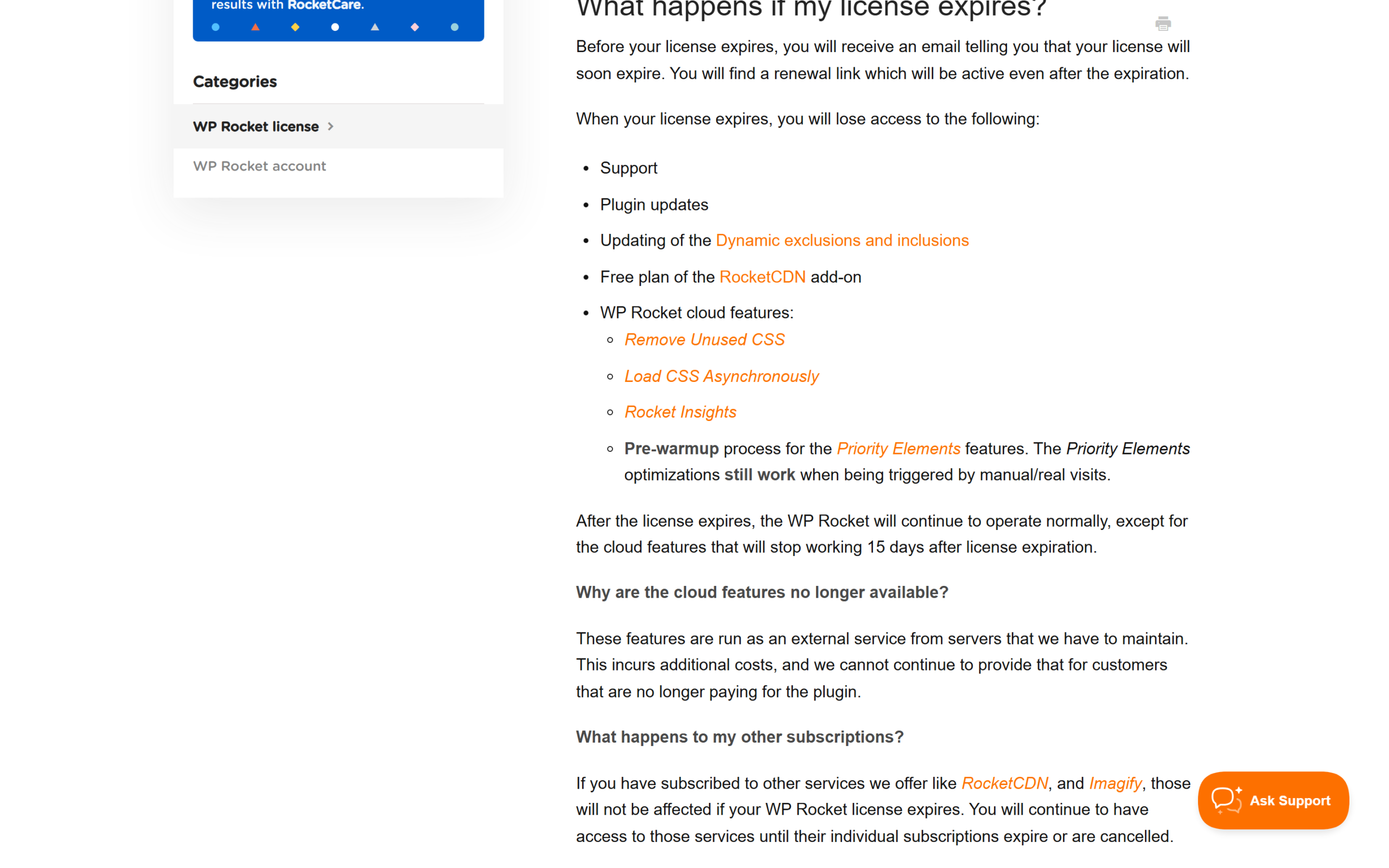
WP Rocket’s documentation on expired licences lists what you lose: support, plugin updates, updates to its dynamic exclusions and inclusions, the free RocketCDN plan, and its cloud features, which are Remove Unused CSS, Load CSS Asynchronously, Rocket Insights and the pre-warmup process for Priority Elements. It then says the plugin continues to operate normally, except for those cloud features, which stop 15 days after expiry. Page caching, preloading, minification, JavaScript delay, lazy loading and database cleanup keep running. The site is slower than with an active licence, but it is still cached.
FlyingPress after expiry
FlyingPress’s licence renewal article is blunt: an active licence is required for FlyingPress to function fully, and most optimizations rely on cloud processing and will not work if your licence expires or the renewal fails. The same article says renewal is automatic, that you get a reminder email 30 days before the renewal date, that failed payments are retried, and that manual or early renewals are not supported.
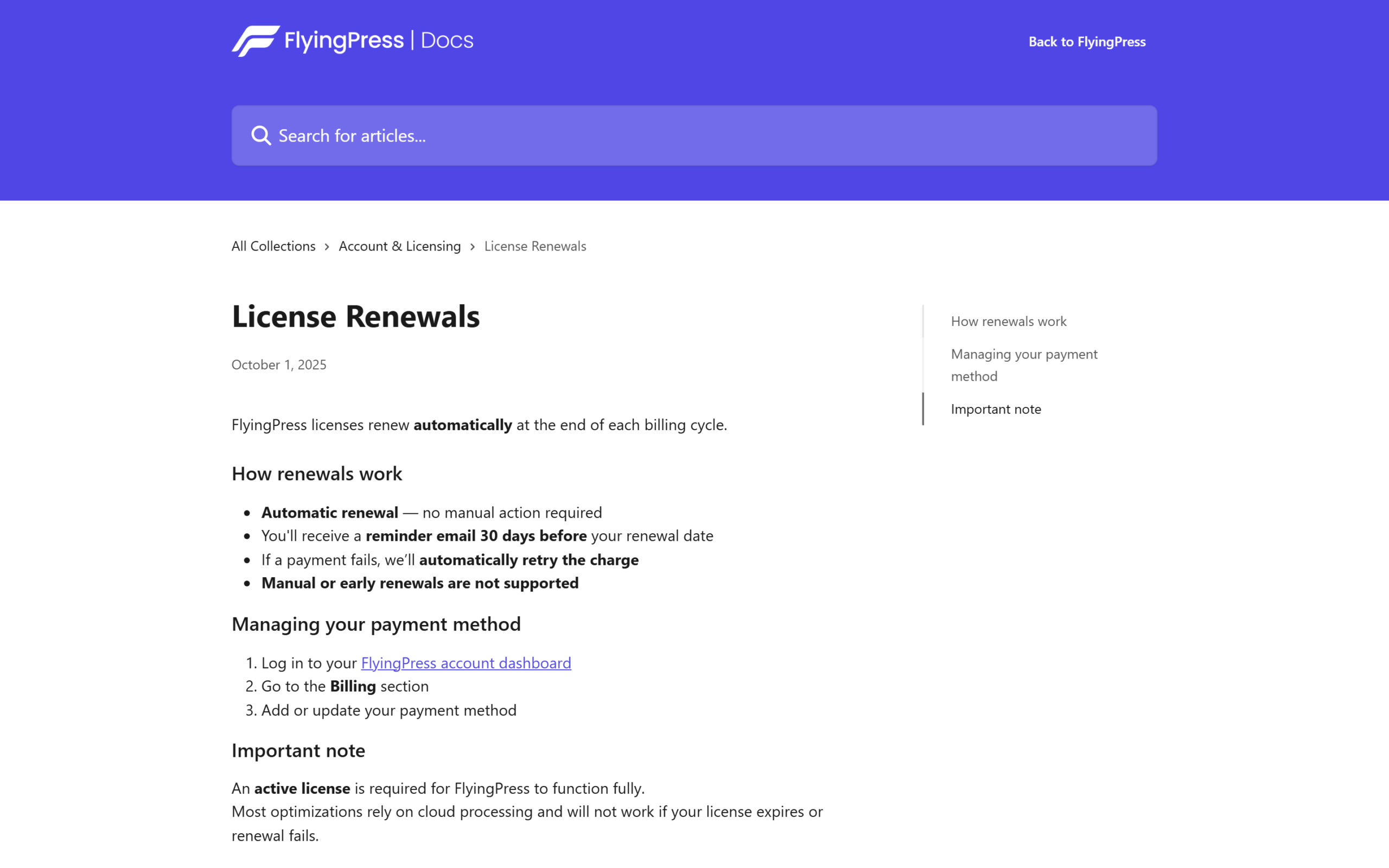
In practice, this makes FlyingPress a subscription you keep rather than software you buy. That is fine for a business site whose owner pays the bill every year. It is a real risk for an agency that installs a licence on a client site and later loses the client, or for a site whose card expires unnoticed. With WP Rocket, the worst case after a lapse is a site without unused CSS removal; with FlyingPress, the docs warn that most of the optimization layer goes.
What this means for agencies
If you resell speed optimization as part of a care plan, either licence works as long as you own it and the client pays you. If you hand sites over and walk away, WP Rocket degrades more gracefully. Write down whose card each licence sits on before you choose.
Which is cheaper at 1, 3, 25 and 50 sites?
WP Rocket is cheaper on its sticker price for one and three sites, FlyingPress is cheaper from four sites up to 25, and the two are close at 50, before you count the extras each one needs. WP Rocket’s storefront quoted us euros and notes that taxes may apply by country; FlyingPress quotes US dollars. Neither page shows a first-year discount, so these are also the renewal prices.
| Sites | FlyingPress licence | WP Rocket licence | Note |
|---|---|---|---|
| 1 | Starter, $59/yr | Single, €49.95/yr | WP Rocket lower on sticker price |
| 2 to 3 | Pro, $109/yr ($36.33 per site at 3) | Plus, €99.95/yr | Close |
| 4 to 25 | Business, $229/yr ($9.16 per site at 25) | Multi, €249.95/yr | WP Rocket’s next step after 3 sites is the 50-site licence |
| 26 to 50 | Unlimited, $279/yr | Multi, €249.95/yr | Close; FlyingPress has no ceiling |
| Over 50 | Unlimited, $279/yr | Multi stops at 50; custom licence offered above 500 sites | FlyingPress |
The gap between Pro and Business is where FlyingPress pulls ahead: a freelancer with five sites pays $229 for up to 25, where WP Rocket’s Plus stops at three and the next step is the 50-site Multi licence. For a single site, the licences are within a few currency units of each other, and the decision comes down to the extras below. If you manage a handful of client sites and want the per-site cost to keep falling, compare the FlyingPress Business and Unlimited licences against the number of sites you expect next year, not this year.
FlyingPress also counts staging and development sites free, and its multisite documentation says one licence key covers every sub-site in a WordPress multisite network.
What does each licence include, and what costs extra?
FlyingPress puts more inside the licence; WP Rocket sells related products from the same company alongside it. To compare like with like, add the extras you would actually use.
Images
FlyingPress includes image optimization in every licence: its features page lists compression to AVIF, WebP or the original format, lossy or lossless. WP Rocket’s features page says it can create a separate cache file to serve WebP images if your site has them, but compression and conversion come from Imagify, a sister product. Imagify’s pricing page lists a free Starter plan at 20 MB a month, roughly 200 images, Growth at $4.99 a month billed yearly for 500 MB, and Infinite at $9.99 a month billed yearly for unlimited images. A site that adds more than a couple of hundred images a month needs a paid Imagify plan next to WP Rocket, or another image plugin.
Object caching
FlyingPress added Redis object caching in version 5.6.0 on June 24, 2026, followed by four fix releases through July. It needs a Redis server from your host. WP Rocket’s features page does not list object caching; most WP Rocket users get it from their host or a separate Redis plugin.
Monitoring
Both now include a way to watch results. WP Rocket’s Rocket Insights tracks key pages, shows what to improve and lets you re-test from the dashboard. FlyingPress records TTFB, LCP, INP and CLS from real visitors and, since 5.5.0, filters them by country and page. Real-user data is what Google ranks on; synthetic tests are what you use to debug. Each plugin leans toward one of those.
CDN
RocketCDN is free with a WP Rocket licence for three key pages, and $8.99 a month per domain for the whole site with unlimited bandwidth, according to its pricing page; it has no free trial and refunds within 24 hours. FlyingCDN is $10 per domain per month including 100 GB, then $5 per additional 100 GB, and is built on Cloudflare Enterprise with full-page edge caching and WebP conversion. Our FlyingCDN review covers what that add-on does at real traffic levels.
| Need | FlyingPress | WP Rocket |
|---|---|---|
| Image compression and WebP or AVIF | Included | Imagify: free to 20 MB/month, then $4.99 or $9.99 a month billed yearly |
| Full-site CDN | FlyingCDN, $10 per domain per month, 100 GB included | RocketCDN, $8.99 a month per domain, unlimited bandwidth |
| HTML at Cloudflare’s edge | Included, any Cloudflare plan | Cloudflare APO, $5/mo on the free plan, included on Cloudflare Pro and above |
| Redis object caching | Included (needs Redis on the server) | Host or separate plugin |
| Varnish and Sucuri integration | Varnish documented | Varnish, Cloudflare and Sucuri add-ons |
Which one works better with Cloudflare?
FlyingPress, for anyone on Cloudflare’s free plan who wants whole pages served from the edge. Cloudflare caches static files by default, not HTML. Its own product for caching WordPress pages at the edge is APO, which Cloudflare’s plans page lists at $5 a month on the free plan and included with Pro, Business and Enterprise.
FlyingPress’s Cloudflare full page caching guide says the integration caches full HTML pages at Cloudflare’s edge on any Cloudflare plan, including free, and keeps the two in step: pages excluded in FlyingPress are excluded at Cloudflare, ignored query strings and bypass cookies carry over, and purging in FlyingPress purges Cloudflare. Its guide tells you to switch APO off before enabling it, and notes that logged-in users always bypass the edge cache. If you already pay for APO, FlyingPress also integrates with it and purges its cache when content changes, through the official Cloudflare plugin.
WP Rocket’s Cloudflare documentation describes its add-on as a convenience rather than a requirement: it configures some Cloudflare settings and clears Cloudflare’s cache, and it only accepts the Global API key, not scoped API tokens. For HTML at the edge, WP Rocket documents compatibility with Cloudflare APO, with cache clearing synchronized when the official Cloudflare plugin is active and authenticated. In other words, on Cloudflare’s free plan WP Rocket users who want edge-cached pages pay Cloudflare $5 a month for APO; FlyingPress users get it in the licence.
How do the trials, refunds and renewals differ?
Both trials work the same way now; the refunds after a charge do not. WP Rocket’s pricing FAQ says you start a 14-day trial, get a reminder before it ends, and are charged automatically if you do not cancel. FlyingPress’s pricing page says the same: full access for 14 days, no charge until the trial ends.
The difference is what happens after money moves. WP Rocket’s billing documentation says it will gladly refund any purchase if the request comes within 14 days, and its pricing page offers a full refund if you are not satisfied with the results. FlyingPress’s trial and refund policy treats the trial as the refund: if you were charged because you forgot to cancel, you get 100% back within 24 hours of the charge, a refund minus a 20% processing fee between 24 hours and seven days, and nothing after seven days. That applies to renewals too, since FlyingPress charges on the renewal date.
Both renew automatically. WP Rocket emails 15 days before expiry with the amount it will charge and lets you cancel the subscription from the Billing page of your account. FlyingPress emails 30 days before renewal and you cancel from Account, Plans, Cancel plan. Put both dates in a calendar: a FlyingPress renewal you meant to cancel costs at least 20% of the licence a day after the charge.
How do you switch from WP Rocket to FlyingPress safely?
There is no settings importer between the two, so a switch is a short, careful rebuild. FlyingPress’s compatibility guidance is clear that it should be the only page caching and optimization plugin on the site.
- Copy the site to staging. FlyingPress does not count staging sites against the licence, so start the trial there with the real theme and plugins.
- Write down your WP Rocket exclusions. Note every URL, cookie, script and CSS exclusion you added over the years, especially for the cart, checkout, membership pages and any chat or consent script.
- Deactivate and delete WP Rocket, then clear its cache. If you used APO with WP Rocket, decide now whether to keep APO or switch to FlyingPress’s own Cloudflare integration; its guide says to disable APO before turning that on.
- Install FlyingPress and enable features one tab at a time. Turn on caching first, then CSS, then JavaScript delay, then images, testing menus, forms and checkout after each.
- Re-add your exclusions. Use the list from step two and add each exclusion in the matching FlyingPress settings tab.
- Keep original images. If you convert to WebP or AVIF, keep originals until you have watched Search Console for a few weeks.
- Swap on the live site, then cancel WP Rocket’s auto-renewal. If the switch happens within 14 days of a WP Rocket renewal, its refund window still applies.
If you also use Imagify or RocketCDN, cancel them separately: WP Rocket’s documentation notes that cancelling the WP Rocket subscription does not cancel RocketCDN, whose payments continue until you stop them.
Which one fits your site?
One brochure site on Cloudflare’s free plan. FlyingPress. At $59 it includes the edge HTML caching that would cost $5 a month in APO next to WP Rocket, plus image compression. Keep the card current.
One blog that might be abandoned in a year. WP Rocket. If you stop paying, the site stays cached, and only the cloud features stop after 15 days.
A freelancer with eight client sites. FlyingPress Business at $229 covers up to 25 sites; WP Rocket’s next step after three sites is Multi at €249.95. Put the licence on your own account, not the client’s.
A WooCommerce store on a managed host with server caching. Check what your host already does before buying either. Many managed hosts run their own page cache and object cache, and our ChemiCloud hosting review shows what one host includes. Ask the host which caching plugin it recommends or blocks, and test cart and checkout exclusions on staging with whichever plugin you choose.
A publisher with a global audience and heavy images. FlyingPress with FlyingCDN, or WP Rocket with RocketCDN and Imagify. The FlyingPress route bundles image conversion into the CDN and licence; the WP Rocket route spreads it over three subscriptions from the same company. Compare monthly bandwidth before choosing, since FlyingCDN charges per 100 GB and RocketCDN advertises unlimited bandwidth.
Where does each one fall short?
FlyingPress
Its biggest weakness is dependency on an active licence: most optimizations stop if it lapses. The refund after a charge is tight, at 24 hours for a full refund. It is a smaller vendor with a short settings page, which suits most users and frustrates those who want a switch for every exclusion.
- Pros: image optimization, Cloudflare edge caching on the free plan and Redis object caching included; real-user Core Web Vitals; cheaper from four sites up; unlimited sites at $279; staging sites free.
- Cons: most optimizations stop without an active licence; refund minus 20% after 24 hours and none after 7 days; no free version; smaller vendor.
WP Rocket
WP Rocket sells around its core: images through Imagify, a full-site CDN through RocketCDN, and HTML edge caching through Cloudflare APO, each a separate bill. Its Cloudflare add-on accepts only the Global API key. Licences jump from three sites to 50, which is poor value for a freelancer with five.
- Pros: keeps caching after a licence lapses; 14-day refund on any purchase including renewals; long track record and broad compatibility; Rocket Insights included; Varnish, Cloudflare and Sucuri add-ons.
- Cons: image optimization and full CDN cost extra; HTML edge caching needs APO on Cloudflare’s free plan; no tier between 3 and 50 sites; no free version.
Common buying mistakes
Comparing licence prices without adding Imagify, RocketCDN or APO to the WP Rocket side. Installing FlyingPress on a client’s site on your own card and forgetting it. Running two optimization plugins at once. Enabling JavaScript delay and image conversion on the live site on day one. And forgetting that cancelling WP Rocket does not cancel RocketCDN.
Part of our guide to the WordPress speed stack, which shows how hosting, page caching and a CDN fit together.
Frequently asked questions
Is FlyingPress better than WP Rocket?
For most active sites, it gives more per licence: image optimization, Cloudflare edge caching on the free plan and Redis object caching are included, and it is cheaper from four sites up. WP Rocket is better if you want the plugin to keep caching after a licence lapses, or a 14-day refund on any purchase. The core caching and optimization features are comparable.
Does FlyingPress work without an active licence?
Not fully. FlyingPress’s licence renewal documentation says an active licence is required for it to function fully and that most optimizations rely on cloud processing and will not work if the licence expires or the renewal fails. WP Rocket, by contrast, keeps operating after expiry, with only its cloud features stopping after 15 days.
Is WP Rocket cheaper than FlyingPress?
For one or three sites, WP Rocket’s sticker price is slightly lower: €49.95 and €99.95 against $59 and $109. From four to 25 sites, FlyingPress Business at $229 is the cheaper licence, because WP Rocket jumps from three sites to 50 at €249.95. Add Imagify or APO to WP Rocket and the single-site gap disappears for many sites.
Do both have a free trial?
Yes. Both offer a 14-day free trial that charges automatically if you do not cancel. WP Rocket refunds any purchase requested within 14 days. FlyingPress refunds 100% within 24 hours of a charge, minus 20% up to seven days, and nothing after that.
Can I use FlyingPress and WP Rocket together?
No. FlyingPress recommends being the only page caching and optimization plugin on a site, and it automatically disables conflicting features in several other optimization plugins. Two plugins minifying, delaying or lazy loading the same files can break layouts and increase server load. Remove one before activating the other.
Which one is better with Cloudflare?
FlyingPress, on Cloudflare’s free plan. Its integration caches full HTML pages at the edge on any Cloudflare plan and keeps exclusions and purges in sync. WP Rocket supports edge HTML caching through Cloudflare APO, which costs $5 a month on Cloudflare’s free plan and is included on Pro and above.
Does WP Rocket optimize images?
WP Rocket lazy loads images and can serve existing WebP files, but compression and conversion come from Imagify, a separate product with a free 20 MB monthly allowance and paid plans from $4.99 a month billed yearly. FlyingPress includes compression to WebP, AVIF or the original format in its licence.
FlyingPress vs WP Rocket: which should you choose?
Choose FlyingPress if you will keep the licence active and want the most included in it: image compression, edge HTML caching on Cloudflare’s free plan, Redis object caching and real-user vitals, with licences that get cheaper per site from four sites up. That covers most site owners and freelancers who treat performance as an ongoing service, which is why FlyingPress wins this FlyingPress vs WP Rocket comparison for active sites. Pair it with FlyingCDN only if your audience is spread across continents.
Choose WP Rocket if you want software that keeps caching when nobody renews it, a 14-day refund on every purchase, or a single site where the euro price and an existing Imagify or APO setup already fit. Do not choose FlyingPress for a client site you will hand over and forget. If FlyingPress fits, try FlyingPress free for 14 days on a staging copy and add your WP Rocket exclusions before you switch the live site.
8.3 Score
Pros
- Image compression to WebP or AVIF is included; WP Rocket needs a separate Imagify plan beyond 20 MB a month.
- Caches full HTML pages at Cloudflare's edge on the free plan, where WP Rocket relies on APO at $5 a month.
- Business at $229 covers 25 sites; WP Rocket jumps from 3 sites to a 50-site licence.
- Redis object caching and real-user Core Web Vitals tracking are part of every licence.
Cons
- Most optimizations stop if the licence lapses; WP Rocket keeps caching after expiry.
- After a charge, a full refund only within 24 hours and nothing after 7 days; WP Rocket refunds within 14 days.
- Slightly dearer than WP Rocket for one or three sites on sticker price.
- A smaller vendor with fewer exposed settings for edge cases.
Final Verdict
FlyingPress is the better buy for sites that will keep an active licence: image compression, Cloudflare edge caching on the free plan, Redis object caching and real-user vitals come in one licence that gets cheaper per site from four sites up. WP Rocket wins on what happens when you stop paying, since it keeps caching after expiry, and on refunds, with 14 days on any purchase, so it suits sites that may be handed over or left alone.