



Short answer: This FlyingHost review finds a new, genuinely different managed WordPress host: every site gets its own container with dedicated CPU cores, RAM, PHP workers, database and Redis, and FlyingPress, a Cloudflare Enterprise CDN and Patchstack are included in the price, from $19 a month per site (Lite) or $29 for the Core plan most sites will want.
- Pick FlyingHost if you run a WooCommerce store, a membership or course site, or any WordPress site where logged in and checkout pages are slow, and you want published, reserved resources instead of a vague visits allowance.
- Use the 14-day trial properly, because once a paid subscription starts, payments and renewals are generally non-refundable.
- Skip FlyingHost if you want to host many small sites on one cheap plan, need email hosting from your web host, or want a long track record and a written uptime guarantee before you move a business site.
Lite $19/mo per site ($190/yr), Core $29/mo ($290/yr), Growth $49/mo ($490/yr), Pro $99/mo ($990/yr), Scale $199/mo ($1,990/yr). Yearly billing gives 2 months free; the price is the same at renewal. Every site includes 100 GB of CDN bandwidth, then $5 per 100 GB. Free plan: no, 14-day free trial and free managed migration. Prices in USD from flyinghost.com, checked November 4, 2026.
Table of contents
What is FlyingHost, and how does it relate to FlyingPress?
FlyingHost is a managed WordPress hosting service sold by FlyingWeb LLC, the Delaware company that also makes the FlyingPress speed plugin. The homepage calls it hosting “from the team behind FlyingPress”, and both sites carry the same FlyingWeb LLC copyright, so the people behind a well known caching plugin have built the server underneath it.
The idea is easy to state. Most hosts sell a plan covering several sites, metered by visits or storage, while the CPU and memory behind it stay vague. FlyingHost sells one plan per site, runs each site in its own isolated container, and tells you what that container gets: dedicated CPU cores with 5 GHz+ boost speeds, fixed RAM, a fixed number of PHP workers, and its own MariaDB and Redis memory. Its documentation argues that storage is a poor measure of workload, because a small WooCommerce shop can need far more CPU and database capacity than a much larger static site.
Where FlyingPress and FlyingCDN fit
If you have read our FlyingPress review, you know the plugin normally costs $59 a year for one site, and it is the caching, CSS, JavaScript and image layer of a fast WordPress site. On FlyingHost it is included in every plan at no extra cost and can be switched on from the dashboard. FlyingPress’s own pricing page now points hosting buyers the same way, with a “Managed hosting. FlyingPress included.” banner and the line that no separate FlyingPress subscription is needed.
The CDN works the same way. Our FlyingCDN review covers the company’s Cloudflare Enterprise CDN add-on, which costs $10 per domain per month including 100 GB, with extra bandwidth at $5 per 100 GB. FlyingHost includes Cloudflare Enterprise as the CDN and security layer of every site with exactly the same allowance: 100 GB a month, then $5 per 100 GB. FlyingHost’s own company description on Trustpilot names FlyingCDN powered by Cloudflare Enterprise as part of the package. In other words, a FlyingHost site gets the two products we have already reviewed separately, wired together and managed for you.
For this FlyingHost review we read the homepage, all six documentation articles, the terms, the refund policy and the privacy policy on November 4, 2026, and compared them with the pricing pages of Kinsta, Rocket.net, SiteGround and ChemiCloud on the same day. We have not run our own speed tests, so where performance comes up, it is the vendor’s description of its hardware, labelled as such.
What does FlyingHost cost on each plan?
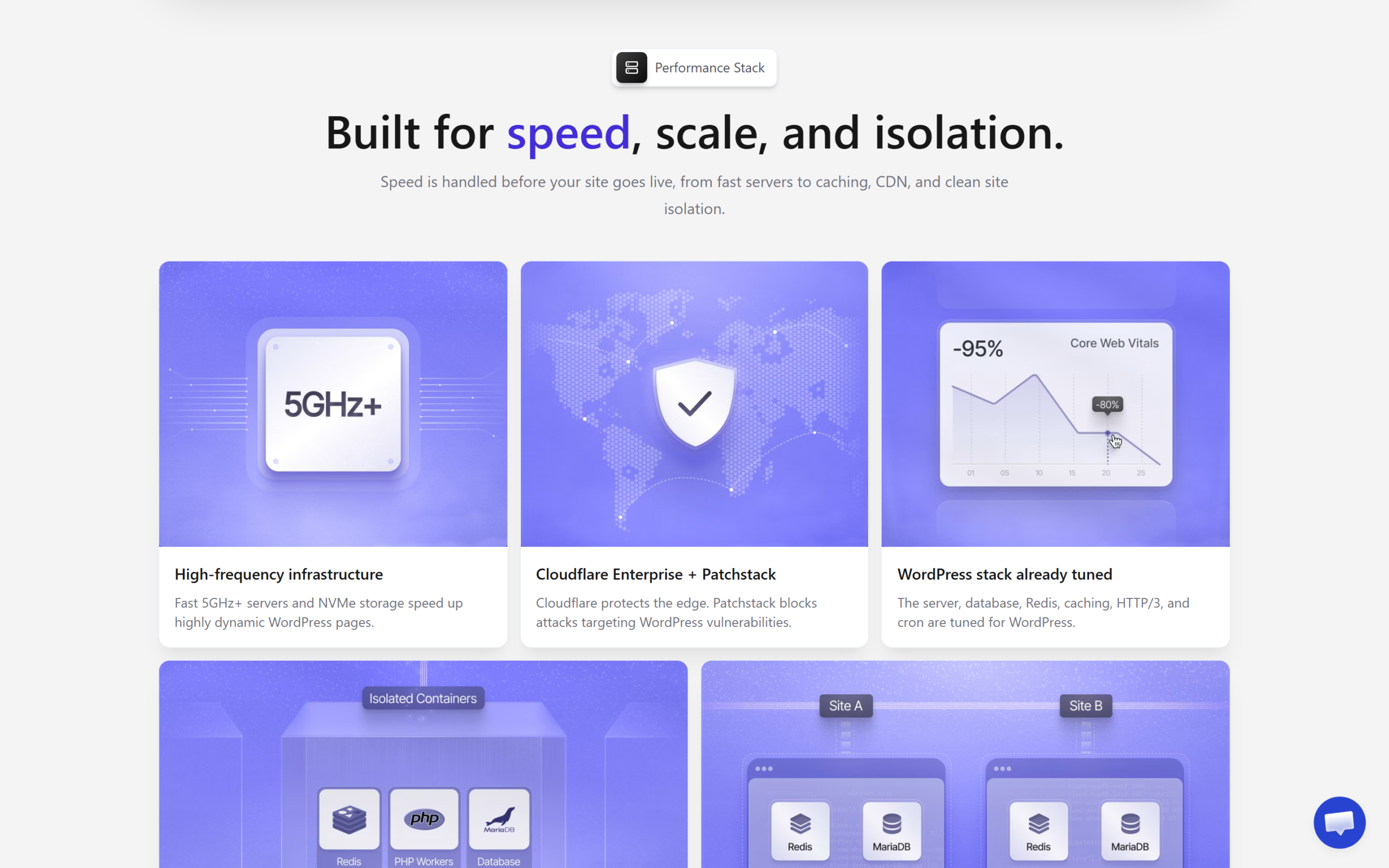
FlyingHost has five plans, all priced per site, all with the same features. The only things that change between them are the resources reserved for that site. Billing is monthly by default; paying yearly means you pay for 10 months and get 2 months free, and the resource limits are the same on both cycles. There is no separate introductory price on the pricing page, so the number you sign up at is also the number that renews.
| Resource per site | Lite | Core | Growth | Pro | Scale |
|---|---|---|---|---|---|
| Monthly price | $19 | $29 | $49 | $99 | $199 |
| Yearly price | $190 | $290 | $490 | $990 | $1,990 |
| Saved by paying yearly | $38 | $58 | $98 | $198 | $398 |
| Dedicated CPU cores | 1 | 2 | 4 | 8 | 12 |
| RAM | 2 GB | 4 GB | 6 GB | 12 GB | 20 GB |
| NVMe storage | 5 GB | 10 GB | 30 GB | 75 GB | 150 GB |
| PHP workers | 4 | 8 | 18 | 24 | 36 |
| MariaDB buffer pool | 256 MiB | 512 MiB | 1 GB | 2 GB | 4 GB |
| Redis memory | 64 MiB | 128 MiB | 256 MiB | 512 MiB | 1 GB |
| CDN bandwidth | 100 GB a month on every plan, then $5 per 100 GB | ||||
| Included on every plan | FlyingPress, Cloudflare Enterprise, Patchstack, staging, 14 days of backups, free managed migration | ||||
The full table, including OPcache memory, is in FlyingHost’s plans and resource limits documentation, which matches the pricing section of the homepage line for line.
Which plan does a normal site need?
FlyingHost’s own advice is that Core is powerful enough for most WordPress sites, and two dedicated cores, 4 GB of RAM and eight PHP workers is a generous allocation for one business site. Lite suits a small, mostly cached site, though 5 GB of storage fills quickly. Growth is where a store or course platform with many logged in users starts to make sense.
The way to decide is the PHP worker count. A worker handles one dynamic request until it finishes: an uncached page, a wp-admin screen, a cart or checkout, a REST or AJAX call, a cron job. Pages served from Cloudflare or the page cache normally do not use one. More workers let more requests run at once, but the documentation adds that they “do not make one slow request faster”. Cockpit’s Resources screen shows peak worker use and capacity limit events, so you can upgrade on evidence.
What a site costs in practice
For one site, FlyingHost is priced in the middle of the managed WordPress market: Core at $290 a year is less than the $350 a year Kinsta asks for its single site plan, and it already includes a FlyingPress licence and a Cloudflare Enterprise CDN. Bought separately from the same company, those two would cost $59 a year for FlyingPress plus $120 a year for FlyingCDN on one domain, $179 in total, before you pay for any hosting at all. If you were going to buy both anyway, FlyingHost’s per site plans are the cheaper way to get them, with the server thrown in.
For many sites, the sums flip: ten Core sites cost $290 a month, and FlyingHost’s own documentation says a multi site plan may suit many low traffic sites better.
What is in the FlyingHost performance stack?
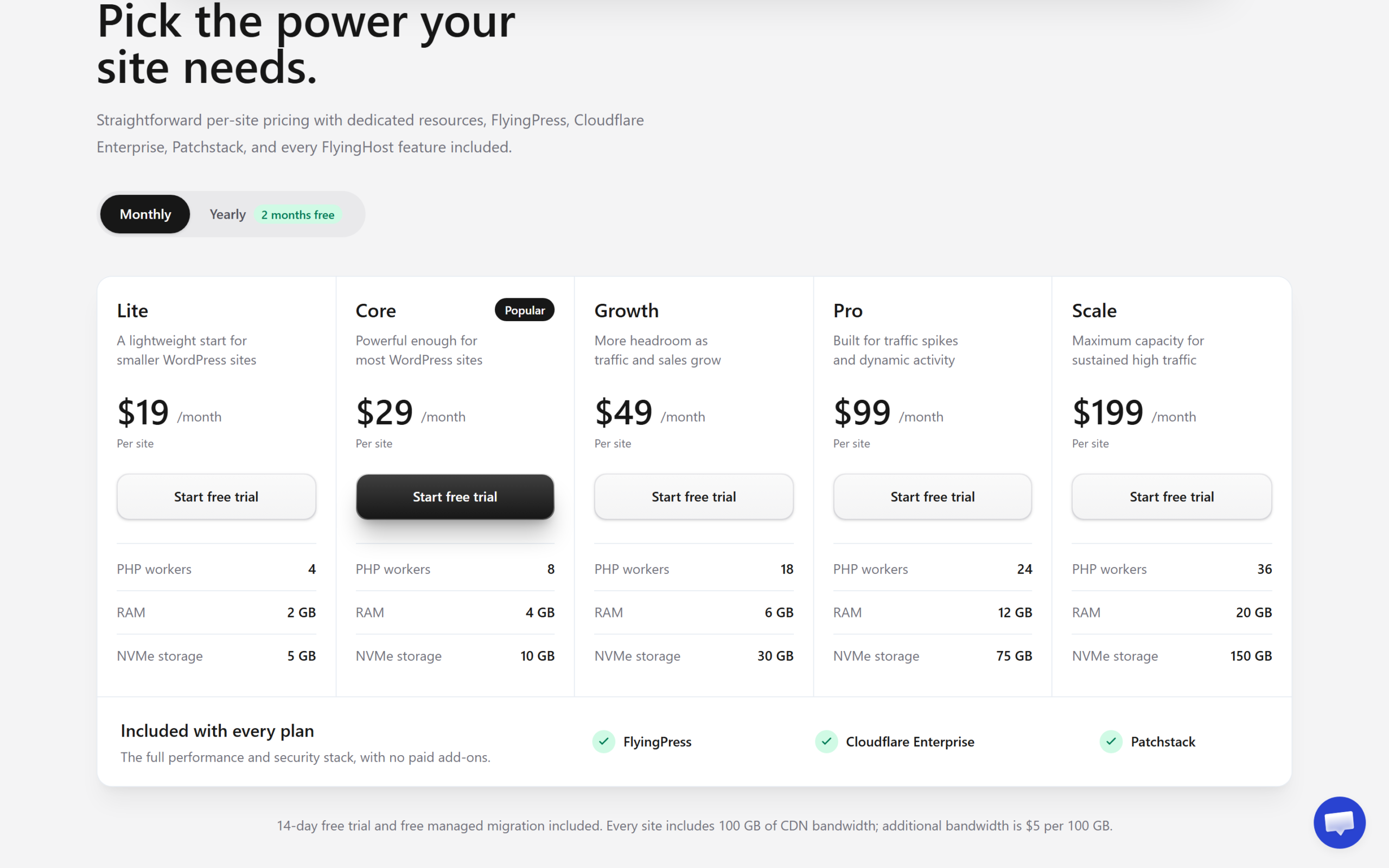
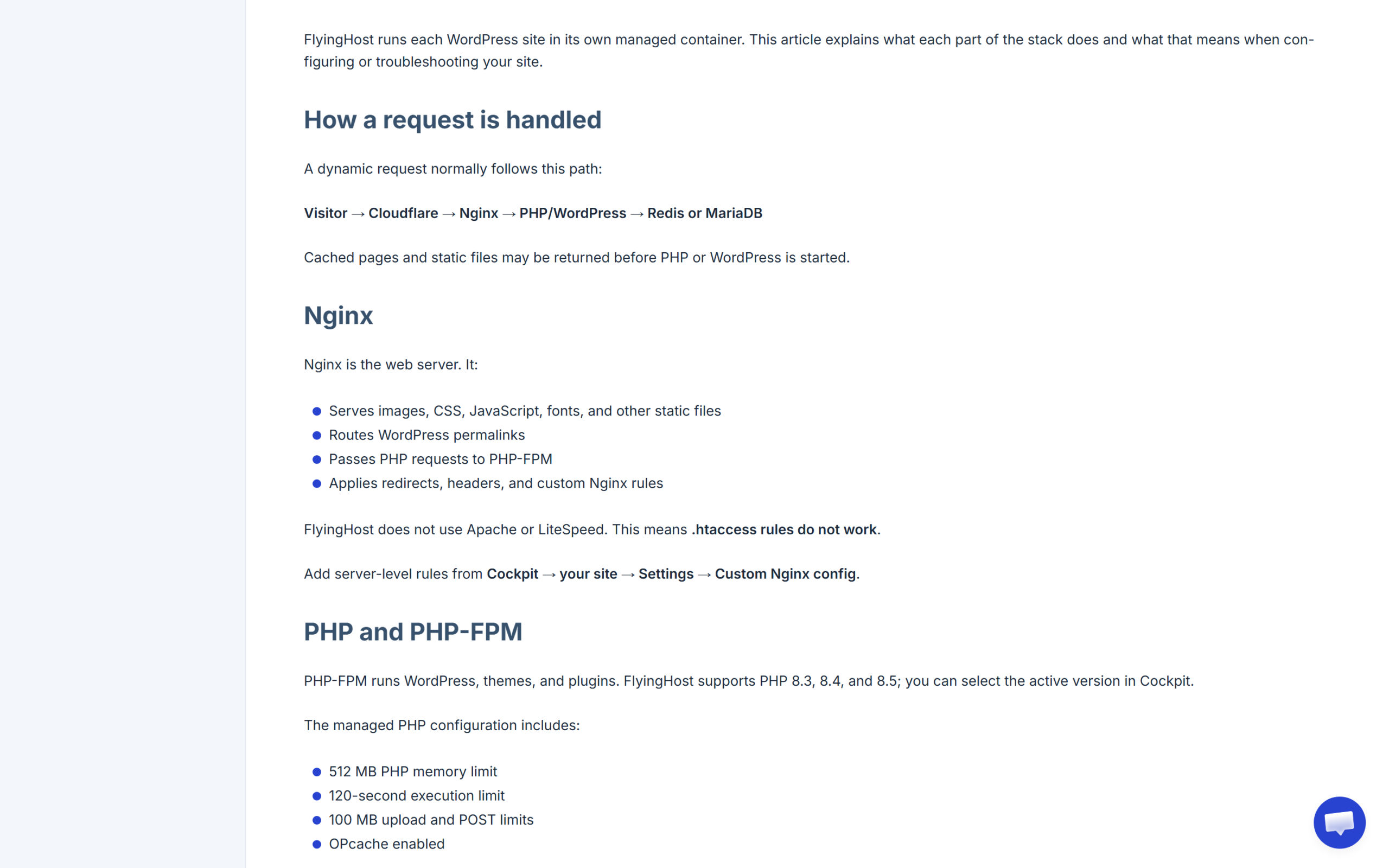
FlyingHost describes its stack as tuned for WordPress before your site goes live, and its documentation is unusually specific about what that means. A dynamic request follows the path Cloudflare, then Nginx, then PHP and WordPress, then Redis or MariaDB; cached pages and static files can be answered before PHP starts.
- Hardware: high frequency servers with 5 GHz+ boost speeds and NVMe storage, according to the homepage, with CPU cores reserved exclusively for each site.
- Web server: Nginx, not Apache or LiteSpeed, so .htaccess rules do not work. Custom rules go into a Cockpit screen that tests the syntax and restores the previous configuration if the reload fails.
- PHP: PHP 8.3, 8.4 and 8.5 are supported and selectable in Cockpit, with a 512 MB memory limit, a 120 second execution limit, 100 MB upload and POST limits, and OPcache enabled.
- Database: MariaDB 11.8, reached locally inside the site’s container and not exposed publicly.
- Object cache: a dedicated Redis instance per site, with the memory listed in the plan table.
- Cron: a managed system cron replaces WordPress’s traffic triggered cron and calls wp-cron.php every five minutes, with a random delay of up to 239 seconds to spread load and a 120 second timeout per run.
- Edge and security: Cloudflare Enterprise in front of every site, and Patchstack for WordPress specific vulnerability protection, including virtual patches for vulnerable plugins, themes and WordPress core. HTTP/3 is part of the tuned stack.
Two points matter if you are moving from another host. First, rules written for Apache or LiteSpeed have to be rewritten for Nginx; the documentation includes examples for redirects, security headers and bot blocking, and passes Cloudflare’s bot score and country headers through. If your site depends on LiteSpeed Cache, as many sites on ChemiCloud and other LiteSpeed hosts do, you would switch to the included FlyingPress. Second, FlyingHost manages the operating system: root access is restricted, and you ask support for system packages or database server changes.
Data centres today are in the USA, Germany, India, Singapore and Australia, with more regions planned. The Cloudflare edge serves cached pages close to visitors, but there is no South American, African or UK location yet.
What can you do in Cockpit, and how does it work for agencies?
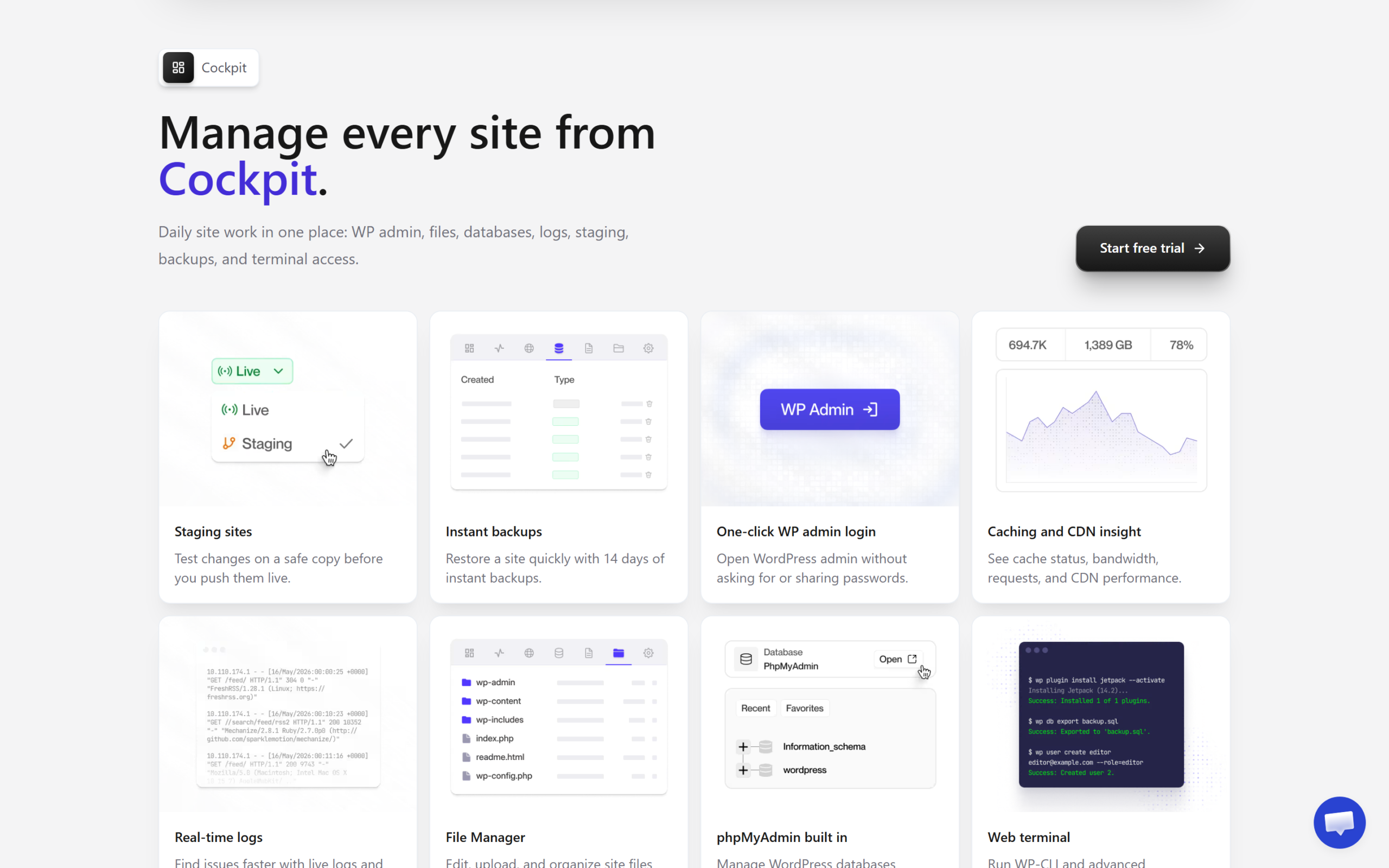
Cockpit is FlyingHost’s own dashboard, and it is where daily site work happens. The homepage lists what is in it:
- Staging sites to test changes on a copy before pushing them live.
- Instant backups with 14 days of backups you can restore from.
- One click WP admin login, so you never need to ask for or share a WordPress password.
- Caching and CDN insight: cache status, bandwidth, requests and CDN performance.
- Real time logs and monitoring in one place.
- File Manager, phpMyAdmin and a web terminal for WP-CLI, with SFTP access to the document root as well.
- Resources, the screen that shows peak PHP workers, capacity limit events, CPU and memory use for a chosen time range.
Nothing on that list is unique; Kinsta, Rocket.net and ChemiCloud all offer staging, backups and logs. What stands out is how directly Cockpit ties into the per site resource model: when a checkout is slow, you can check whether the site ran out of workers at that moment instead of waiting on a ticket.
One caution on backups: the terms of service call them a convenience and say you remain responsible for your own copies of important data. Fourteen days of restore points is not an archive, so keep an off platform copy.
Agency and team features
FlyingHost has a section aimed at agencies managing client sites at scale, and it is built around organisations rather than individual sites. You add sites to an organisation and invite people once instead of per site, give teammates and clients a role across every site in that organisation, and switch between personal, company and client accounts without logging out. That covers the access problem every agency has. What the pages do not mention is a white label dashboard, an agency discount, reseller billing or bulk plugin updates, so an agency comparing FlyingHost with Kinsta’s or Rocket.net’s agency plans is comparing better per site resources against a thinner set of business tools, at a per site price.
How does FlyingHost compare with Kinsta, Rocket.net, SiteGround and ChemiCloud?
The fair comparison is single site managed WordPress plans, since that is what FlyingHost sells. The table uses each host’s own pricing page on November 4, 2026; SiteGround is shared hosting with WordPress tools rather than container hosting, and is included because it is the host many buyers start from.
| Host and plan | Price | Sites | Storage | Bandwidth | PHP workers | Money back or trial |
|---|---|---|---|---|---|---|
| FlyingHost Core | $29/mo, or $290/yr | 1 | 10 GB NVMe | 100 GB CDN, then $5 per 100 GB | 8, on 2 dedicated cores | 14-day free trial, then no refunds |
| FlyingHost Lite | $19/mo, or $190/yr | 1 | 5 GB NVMe | 100 GB CDN | 4, on 1 dedicated core | 14-day free trial, then no refunds |
| Kinsta Single 20GB | $30/mo, or $350/yr; first month $0 | 1 | 10 GB | 20 GB server, 125 GB CDN | not listed on the plan card | first month free |
| Rocket.net Starter | $30/mo; $1 first month | 1 | 10 GB | 50 GB | listed as unlimited | 30-day money back |
| ChemiCloud Managed WordPress MWH 1 | $25/mo; $1 first month | 1 | 20 GB NVMe | 100 GB CDN, 250,000 visits | listed as unlimited | 45-day money back |
| SiteGround StartUp | $1.99/mo for the first 12 months prepaid, renews at $17.99/mo | 1 | 10 GB | unlimited traffic | not listed | not checked for this article |
Kinsta
Kinsta’s single site plan costs $1 a month more than FlyingHost Core, or $60 a year more on yearly billing, with the same 10 GB of storage, 14 days of backups, unlimited free migrations, 24/7 human support in eight languages and a free first month. The gap is in the extras: Kinsta lists Redis caching as an add-on at $100 per site per month, while every FlyingHost plan includes its own Redis. For a store or membership site that leans on object caching, that is FlyingHost’s biggest advantage. Kinsta’s are maturity, support coverage and tools such as automatic updates with visual regression testing.
Rocket.net
Rocket.net is the closest match in philosophy: Cloudflare Enterprise, free migrations, and no price rises at renewal. Starter is $30 a month with a $1 first month, 30 days of backup retention, a 99.99% uptime guarantee and a 30-day money back guarantee. Its plans also cover more sites as you go up: Business includes 10 installs for $100 a month, while ten FlyingHost Core sites cost $290. For one heavy site FlyingHost publishes more about what you get; for a portfolio, Rocket.net is far cheaper.
ChemiCloud and SiteGround
ChemiCloud’s MWH 1 plan is $25 a month with twice FlyingHost Core’s storage, Redis, LiteSpeed Enterprise, a 99.99% uptime guarantee and a 45-day money back guarantee, and it was offering 6 months free on select annual plans for Black Friday when we checked. SiteGround’s StartUp plan is $1.99 a month for the first 12 months prepaid and renews at $17.99, with email included. Both are cheaper for a brochure site or a blog. SiteGround is shared hosting rather than an isolated container, though, and neither publishes dedicated cores or a worker count. For a store whose checkout slows at peak times, that is FlyingHost’s ground.
What you can verify, and what you cannot
You can verify the allocation before paying: cores, RAM, workers, database buffer and Redis memory are written down per plan, and an unlimited worker count says little about what the hardware behind it can run at once. You cannot verify speed from the outside. The homepage testimonials praise backend and checkout speed, but the vendor chose them, and we have no independent benchmark. The trial with free migration is how you measure it on your own site.
How do the free trial, refunds and migration work?
Every new FlyingHost account includes a 14-day free trial, and the plan you select only starts billing when the trial ends, unless you cancel first. The refund policy adds that a valid payment method may be required to start the trial and that the subscription converts to a paid plan automatically. Put a reminder in your calendar for day 12.
After that, the policy is strict. Because there is a free trial, all payments are generally non-refundable once a paid subscription begins, and subscription renewals are non-refundable too. Refunds may be issued at FlyingHost’s discretion for duplicate charges, billing errors, unauthorised payments or where the law requires it. Compare that with Rocket.net’s 30 days and ChemiCloud’s 45 days, and the trial becomes the only real test drive. That is one more reason to pay monthly for the first month or two before choosing a yearly plan, even though yearly saves $58 on Core.
Migration is free and managed: FlyingHost moves the site and tests it fully before DNS is updated. Because the server runs Nginx, ask the team to convert any .htaccess redirects during the move. You can cancel at any time from your account dashboard; cancelling stops future renewals but does not refund a period already paid. You can upgrade a plan as a site grows; the pages we read do not say whether you can move down a plan later, so ask support before you size up.
Where does FlyingHost fall short?
The weak points in this FlyingHost review are mostly about age and scope, not about the technology.
- It is new. The refund policy and privacy policy were last updated in May 2026 and the Trustpilot profile was claimed in August 2026. Its Trustpilot profile had only 7 ratings when we checked, all five stars, with a 4.2 TrustScore and a note that the company has not invited customers recently. That is too small a sample to judge reliability.
- No uptime guarantee. The terms of service say FlyingHost aims to provide reliable service but does not guarantee uninterrupted availability. Rocket.net and ChemiCloud both advertise 99.99%.
- Per site pricing gets expensive for portfolios. Every site is its own plan. FlyingHost says so itself and points low traffic, many site buyers elsewhere.
- No email hosting. Nothing on the site mentions mailboxes, so plan for a separate email provider.
- No refunds after the trial, including renewals, which is stricter than most rivals in this table.
- A small help centre. The documentation had six articles when we checked. They are good, specific articles, but there is no long knowledge base to search yet. Support is by chat and email, and the pages we read state no support hours.
- No Apache or LiteSpeed, and only five server regions.
Who should use FlyingHost, and who should not?
Judged on the documents alone, this FlyingHost review points to one kind of buyer: a WordPress site that does real dynamic work. Four situations show where it fits.
A WooCommerce store whose checkout slows down at busy times
Cart, checkout and account pages cannot be page cached, so they use PHP workers and database time. Start on Core, watch the Resources screen during a sale, and move to Growth if capacity limit events line up with slow checkouts after you have cleaned up slow plugins.
A course, membership or community site
Logged in users bypass most page caching, which is why these sites feel slow on shared hosting. Reserved cores, a dedicated database buffer and Redis per site are the resources that matter here.
A FlyingPress user who wants the whole stack managed
If you already pay for FlyingPress and FlyingCDN, FlyingHost folds both into the hosting bill and puts plugin and server under one support team.
An agency with a few demanding client sites
Organisations and roles cover team access, and each client sits on the plan its traffic needs. An agency with fifty small brochure sites should keep those on cheaper bundle hosting and move only the busy ones.
Who should not
Skip FlyingHost if you want email with your hosting, a long public track record before moving a business critical site, a written uptime guarantee, a refund window after you have paid, or the lowest possible price for a simple site. A blog that serves almost everything from cache will not use most of what a dedicated container offers.
FlyingHost review: pros and cons
Pros
- Each site gets its own container with dedicated CPU cores, RAM, PHP workers, MariaDB and Redis, all published per plan.
- FlyingPress, a Cloudflare Enterprise CDN with 100 GB a month, and Patchstack are included on every plan with no paid add-ons.
- Simple pricing: one price per plan, no introductory rate, and 2 months free on yearly billing.
- Cockpit combines staging, 14 days of backups, logs, a web terminal and a Resources screen that shows worker use.
- 14-day free trial and free managed migration.
Cons
- A new host with a very small public review record.
- No uptime guarantee in the terms of service.
- Payments and renewals are generally non-refundable once the trial ends.
- Per site pricing is expensive for a portfolio of small sites.
- No email hosting, no Apache or LiteSpeed, and only five server regions.
Part of our guide to the WordPress speed stack, which shows how hosting, page caching and a CDN fit together.
Frequently asked questions
Is FlyingPress included with FlyingHost?
Yes. Every FlyingHost plan includes FlyingPress at no extra cost, and you activate it from Cockpit. Bought on its own, a single site FlyingPress licence is $59 a year. Cloudflare Enterprise is included as the CDN and security layer, with 100 GB of monthly CDN bandwidth per site, which matches what FlyingCDN charges $10 a month per domain for.
Does FlyingHost have a free trial?
Yes, every new account gets a 14-day free trial. Your selected plan only starts billing when the trial ends, unless you cancel before then. The refund policy says a valid payment method may be required to start it, and that the trial converts to a paid plan automatically.
Can I get a refund from FlyingHost?
Generally not. Once a paid subscription begins, payments are generally non-refundable, and renewals are non-refundable. FlyingHost may refund at its discretion for duplicate charges, billing errors, unauthorised payments or where the law requires it. Use the 14-day trial to make the decision.
Where are FlyingHost’s servers?
FlyingHost offers server locations in the USA, Germany, India, Singapore and Australia, and says more regions are planned. Cloudflare Enterprise sits in front of every site, so cached pages and static files are served from the edge close to the visitor.
Does FlyingHost support WooCommerce?
Yes. FlyingHost says it is optimised for WooCommerce with dedicated resources, Redis and fast database performance. Cart, checkout and account pages use PHP workers because they cannot be page cached, so pick the plan by worker count: 8 on Core, 18 on Growth, 24 on Pro and 36 on Scale.
Does FlyingHost include email?
Nothing on FlyingHost’s site or in its documentation mentions email hosting or mailboxes, so plan on a separate email provider for addresses on your domain, and send WordPress’s own mail through a transactional email service.
Is FlyingHost worth it?
FlyingHost is worth it for one site that does a lot of uncached work: a store, a course platform, a membership site, or any WordPress site where the admin and checkout drag. For that site, published dedicated resources, a database and Redis of its own, and FlyingPress plus a Cloudflare Enterprise CDN in the price are a strong package at $29 a month on Core, and better value than buying the plugin, the CDN and a comparable managed plan separately.
It is not worth it yet for a portfolio of small sites, for anyone who needs email or a written uptime guarantee, or for a buyer who wants a refund window. It is also new, a fair reason to move one site first.
The bottom line of this FlyingHost review: the most transparent resource model we have seen in managed WordPress hosting, built by people who clearly know where WordPress gets slow, with the caveats any young host carries. Let the free migration move one demanding site, watch its Resources screen through the trial, and if it holds up, move your busiest site to FlyingHost before the trial clock runs out.
7.8 Score
Pros
- Dedicated CPU cores, RAM, PHP workers, MariaDB and Redis per site, all published per plan.
- FlyingPress, a Cloudflare Enterprise CDN and Patchstack included with no paid add-ons.
- One price per plan with no introductory rate, and 2 months free on yearly billing.
- Cockpit shows peak PHP worker use, so you upgrade on evidence.
Cons
- A new host with a very small public review record and no uptime guarantee.
- Payments and renewals are generally non-refundable once the 14-day trial ends.
- Per site pricing gets expensive for a portfolio of small sites.
- No email hosting, no LiteSpeed or .htaccess support, five server regions.
Final Verdict
FlyingHost gives each WordPress site its own container with published, dedicated resources, and includes FlyingPress, a Cloudflare Enterprise CDN and Patchstack in a simple per site price from $19 a month. For one store, course or membership site with heavy uncached traffic, Core at $29 is a strong package. It is new, has no uptime guarantee and refunds nothing after the trial, so use the 14-day trial and free migration to prove it on your own site first.