



Short answer: In the Fluent Forms vs WPForms decision, Fluent Forms gives you more for less on almost every site, because its free version stores entries, runs conditional logic and takes Stripe payments at a 1.9% plugin fee where WPForms Lite charges 3%, and its single Pro tier at $79 a year includes every feature that WPForms spreads across four tiers up to $599.
- Pick Fluent Forms if you take payments, need conditional logic or file uploads, or run more than one site, and you want one price that covers every feature.
- Pick WPForms if you want the largest template gallery (2,100+), a builder your clients can use without training, or an Elite-only connector such as Salesforce on WPForms’ terms.
- Skip WPForms Lite if you need a record of submissions on your own site: it sends entries by email only and keeps no database copy without a paid licence.
Fluent Forms Pro: $79/yr for 1 site, $159 for 5, $299 unlimited; first year $63.20 with the automatic 20% coupon, then $79 per year until cancelled. WPForms: Basic $49.50, Plus $99.50, Pro $199.50, Elite $299.50 for the first year, renewing at full price ($99, $199, $399, $599). Free plan: yes on both. Prices checked October 11, 2026.
Table of contents
How do the two form builders compare at a glance?
Fluent Forms is the cheaper and more generous plugin; WPForms is the bigger and more polished one. That is the whole Fluent Forms vs WPForms argument in one line, and the rest of this article is about where each half of that sentence costs or saves you money. Our Fluent Forms review already covers the plugin on its own, its field list, its speed claim and its support record. This piece is narrower: it puts the two free versions side by side, does the payment fee arithmetic, maps the WPForms tier ladder against the single Fluent Forms licence, and walks through what a switch from one to the other actually involves.
The scale is lopsided. WPForms lists 5+ million active installations on WordPress.org with a 4.8 star average from roughly 14,400 ratings. Fluent Forms lists 700,000+ installations, also at 4.8 stars, from roughly 800 ratings. Both shipped updates in the last few weeks: WPForms Lite 2.0.2.2 and Fluent Forms 6.2.15, released on September 30, 2026. Every price and limit below comes from the two vendors’ own pricing pages, feature tables, documentation and WordPress.org listings, read on October 11, 2026; the multi-year totals are our arithmetic from those figures.
| Fluent Forms | WPForms | |
|---|---|---|
| Active installations (WordPress.org) | 700,000+ | 5+ million |
| Free version stores entries on your site | Yes, with CSV, Excel, ODS and JSON export | No, email only; optional cloud backup kept for 1 year |
| Conditional logic in the free version | Yes | No |
| Stripe in the free version | Yes, 1.9% plugin fee plus Stripe’s charges | Yes, 3% plugin fee plus Stripe’s charges |
| Cheapest paid licence | $79/yr, 1 site, every feature ($63.20 first year) | Basic $49.50 first year, renews at $99, 1 site |
| Cheapest licence with no payment fee | Pro, $79/yr, 1 site | Pro, $199.50 first year, renews at $399, 5 sites |
| Unlimited sites | $299/yr, or $899 lifetime list | Elite, $299.50 first year, renews at $599 |
| Templates | Pre-built templates, including free ones | 2,100+ on paid plans; basic templates on Lite |
| Refund window | 14 days | 14 days |
| Best for | Payment forms, multi-site owners, anyone who wants every feature at one price | Beginners and client sites that value the template gallery and polish |
Which free version is actually usable for a business?
Fluent Forms’ free version is a working form system; WPForms Lite is a contact form with a sales funnel attached. That is not a criticism of WPForms’ business model, which is open about it, but it changes what “free” means in each case.
Where your submissions go
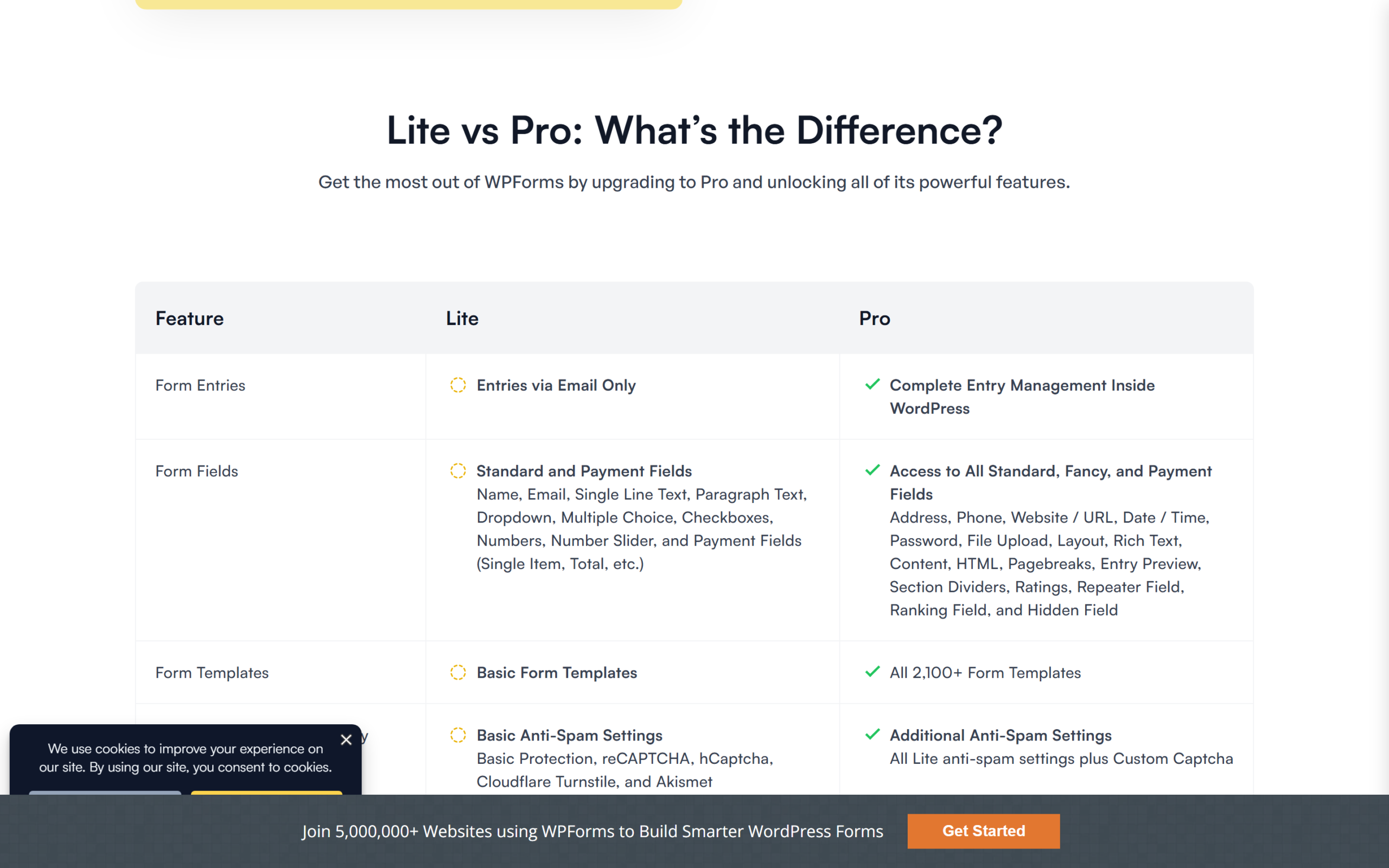
The single biggest difference is entries. WPForms’ own Lite versus Pro table lists form entries on Lite as “Entries via Email Only”, and its Lite Connect guide states that WPForms does not store entries without a paid licence. Lite Connect is the workaround: an opt-in switch that backs submissions up to WPForms’ servers, encrypted, so they can be restored into your dashboard if you later buy a licence. The same guide sets two limits worth knowing before you rely on it: it only captures entries submitted after you switch it on, and backed up entries expire after one year. If an email notification is lost to a spam filter on Lite and you never enabled the backup, that submission is gone.
Fluent Forms Free keeps every entry in your WordPress database, with filters, a form finder and export to CSV, Excel, ODS or JSON, according to its WordPress.org listing. For a small business that treats form submissions as leads, this alone settles the free tier comparison.
Logic, fields and templates
WPForms lists smart conditional logic as “Not Available” on Lite, and its free field set is the basics: name, email, single line and paragraph text, dropdown, multiple choice, checkboxes, numbers, a number slider and payment fields. Address, phone, date, file upload, page breaks, ratings and the repeater are paid. Lite gets basic templates; the 2,100+ template gallery is a paid feature. For marketing, Lite connects to Constant Contact only.
Fluent Forms Free includes conditional logic, conversational forms, an AI form builder, a multi-column layout, more than 25 ready fields including address, date and time, mask input, hidden fields and a GDPR checkbox, plus spam protection through reCAPTCHA, hCaptcha and Turnstile. Its free integrations are Mailchimp, Slack and the vendor’s own products, such as FluentCRM. The fields it holds back for Pro are the ones that matter most to many contact forms: file and image upload and the phone field.
| Free version | Fluent Forms Free | WPForms Lite |
|---|---|---|
| Entries saved in WordPress | Yes, with export | No, email only (Lite Connect cloud backup, 1 year) |
| Conditional logic | Yes | Not available |
| Conversational forms | Yes, standard layout | No |
| AI form builder | Yes | Yes |
| Address and date fields | Yes | Paid |
| Phone field | Pro (mask input works as a stand in) | Paid |
| File upload | Pro | Paid |
| Stripe payments | Yes, 1.9% plugin fee | Yes, 3% plugin fee, no conditional logic on payment forms |
| Email marketing connection | Mailchimp, plus vendor’s own CRM | Constant Contact only |
| Migration from other plugins | WPForms, Contact Form 7, Gravity Forms, Ninja Forms, Caldera | Not listed for Lite |
The fair summary: if all you need is a plain contact form whose submissions arrive by email, WPForms Lite does that well and is famously easy to set up. The moment you need logic, a record of submissions or a payment, Fluent Forms Free does more at the same price of nothing.
What do payment forms cost you in fees on each plugin?
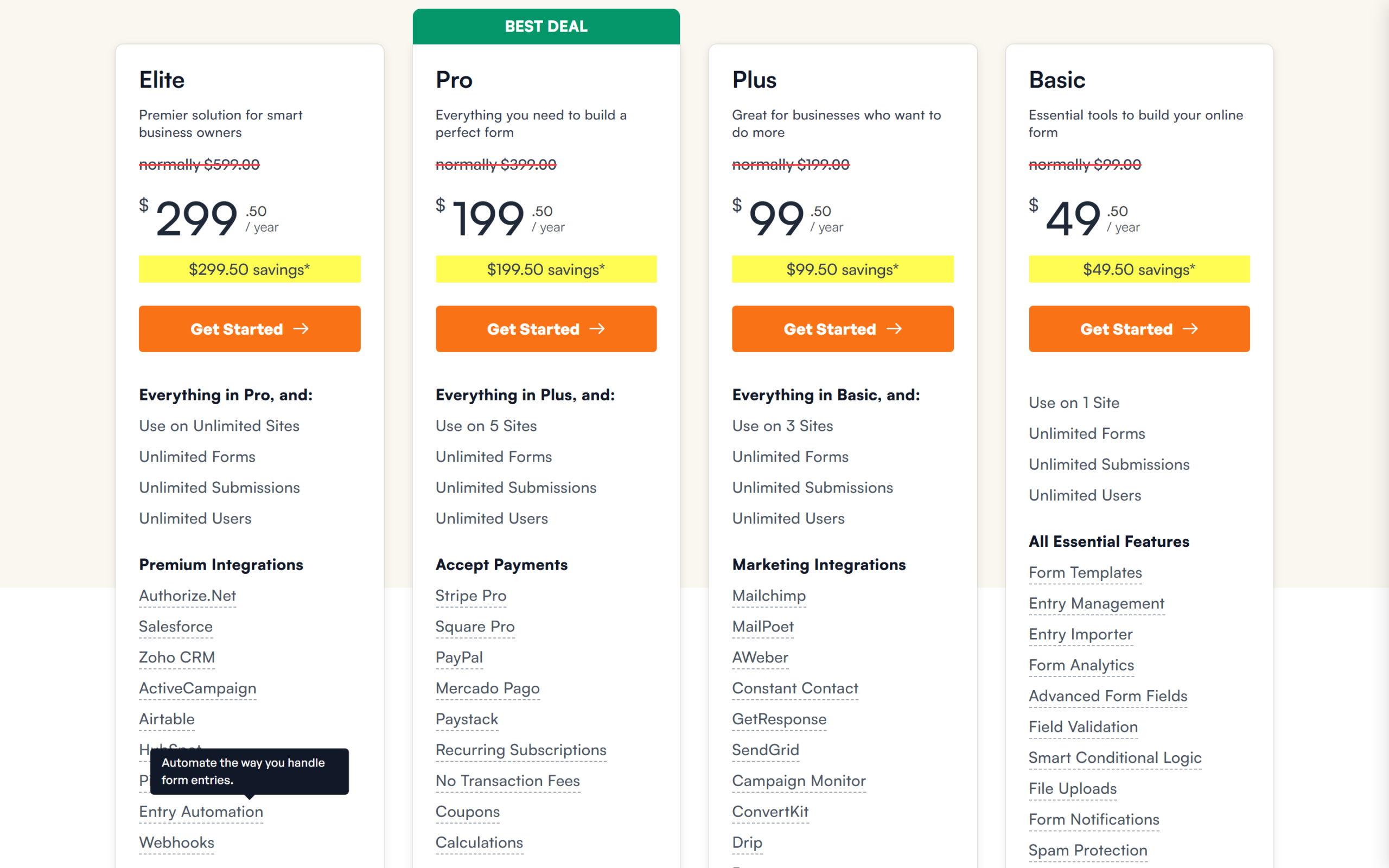
Both free versions take Stripe payments, and both add their own percentage on top of Stripe’s processing charge, which is the part most buyers never notice until they read a statement. Fluent Forms’ WordPress.org listing says free payment forms carry a 1.9% transaction fee and that Pro removes it, leaving only Stripe’s charges. WPForms’ guide to using Stripe with WPForms Lite says there is a 3% fee on every transaction along with Stripe’s charges, and that removing it takes a Pro licence or higher. The same guide notes that Lite does not support conditional logic on Stripe payment forms.
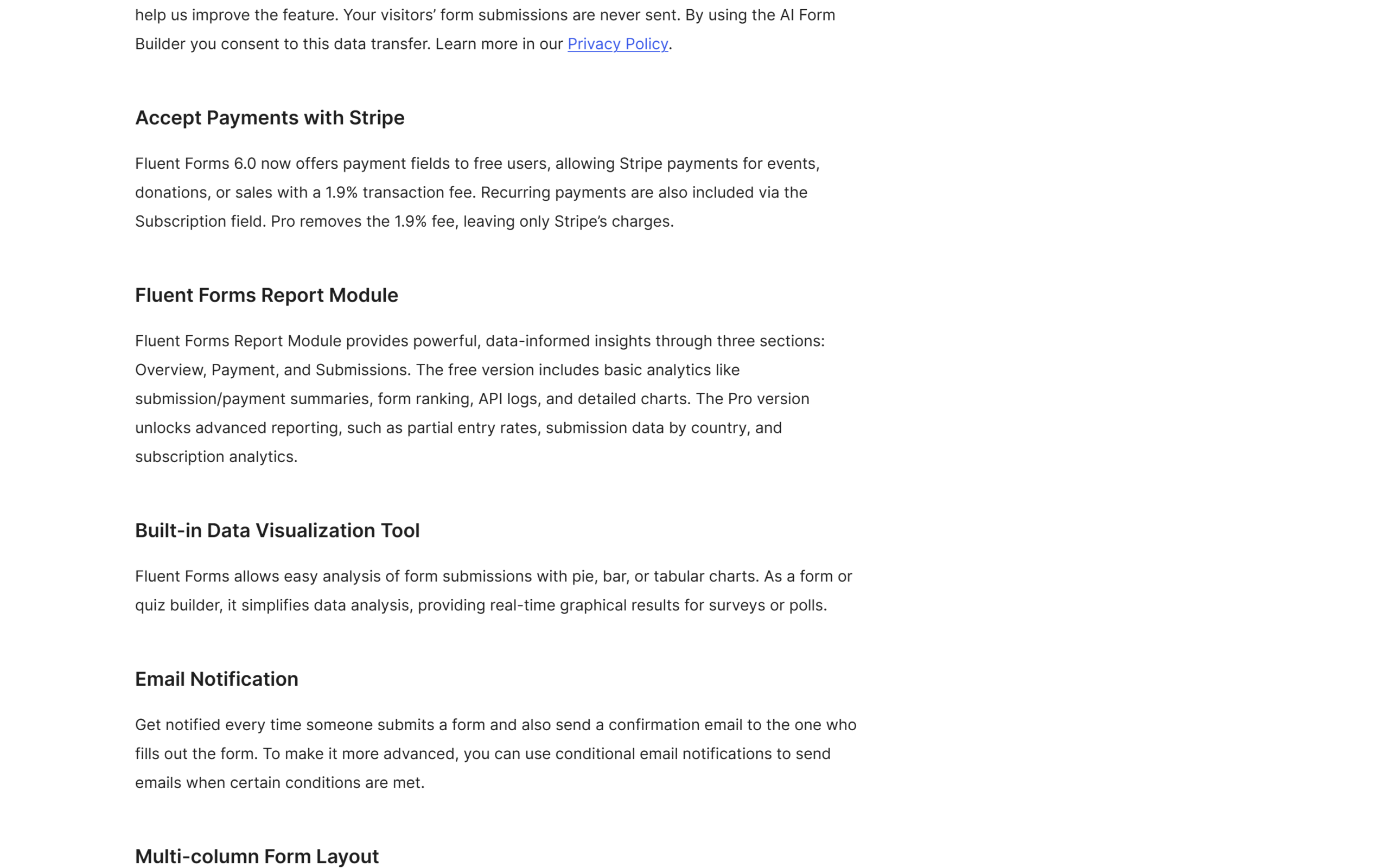
That last detail matters for the tier choice. WPForms’ pricing page lists “No Transaction Fees” under Pro, and its Stripe guide names Pro as the minimum, so a site on Basic or Plus that takes payments still pays the 3% on top of Stripe. On Fluent Forms, every paid licence is Pro, so any licence removes the fee.
When paying for a licence is cheaper than the fee
The arithmetic is simple, and it is where the two plugins separate most sharply. On $10,000 of payments a year, Fluent Forms Free costs $190 in plugin fees and WPForms Lite costs $300. On $50,000, it is $950 against $1,500.
| Payments through the form per year | Fluent Forms Free fee (1.9%) | WPForms Lite fee (3%) | Fluent Forms Pro, 1 site | WPForms Pro, 5 sites |
|---|---|---|---|---|
| $2,000 | $38 | $60 | $63.20 first year, then $79 | $199.50 first year, then $399 |
| $10,000 | $190 | $300 | $63.20 first year, then $79 | $199.50 first year, then $399 |
| $50,000 | $950 | $1,500 | $63.20 first year, then $79 | $199.50 first year, then $399 |
Fluent Forms Pro pays for itself once your form takes more than about $4,160 a year at the renewal price ($79 divided by 1.9%), or about $3,330 in the first year at $63.20. WPForms Pro pays for itself against the Lite fee at about $13,300 a year at its $399 renewal price, or about $6,650 in the first year at $199.50. Below those lines, staying on the free version and paying the percentage is the cheaper option on either plugin; above them, the licence is cheaper than the fee. For a deposit form, a workshop booking page or a small donation form, the break-even on Fluent Forms arrives three times sooner. If you are collecting donations specifically, our Paymattic review covers the same vendor’s dedicated payment plugin.
Gateways beyond Stripe
Fluent Forms Pro lists PayPal, Stripe, Square, Mollie, Paddle, Paystack, RazorPay and Authorize.net. The 6.2.15 release on September 30, 2026 added a Stripe Payment Element option with Apple Pay and Google Pay to the inline Stripe field. WPForms Pro covers Stripe Pro, Square Pro, PayPal, Mercado Pago and Paystack, with recurring subscriptions, coupons and calculations; Authorize.Net is an Elite-only gateway. If your payment provider is Mollie, Paddle or RazorPay, Fluent Forms is the one of the two that lists it.
Which WPForms tier do you need, and what is the Fluent Forms equivalent?
WPForms sells four tiers that add features as well as sites; Fluent Forms sells one feature set at three site counts. So the useful question is not “which is cheaper” in the abstract, but “which WPForms tier would my site need, and what does Fluent Forms charge for the same work”.
| WPForms tier | First year | Renews at | Sites | What it adds | Fluent Forms equivalent |
|---|---|---|---|---|---|
| Basic | $49.50 | $99 | 1 | Entry management, conditional logic, file uploads, multi-page forms, all field types | Pro single site, $63.20 then $79 |
| Plus | $99.50 | $199 | 3 | Email marketing integrations (Mailchimp, MailerLite, Brevo, Kit and others), Slack, Twilio, Notion | Pro 5 sites, $127.20 then $159 |
| Pro | $199.50 | $399 | 5 | Payments with no plugin fee, PayPal, Square, coupons, calculations, surveys, quizzes, conversational forms, Zapier, Google Sheets, user registration, 2,100+ templates | Pro 5 sites, $127.20 then $159 |
| Elite | $299.50 | $599 | Unlimited | Salesforce, HubSpot, ActiveCampaign, Zoho CRM, Pipedrive, Airtable, Authorize.Net, webhooks, multisite | Pro unlimited, $239.20 then $299 |
The renewal column is the one to read. WPForms’ pricing page says plainly that the shown prices are special introductory pricing and that all renewals are at full price, so every WPForms tier doubles in year two. Fluent Forms’ first-year coupon is smaller, 20%, and its checkout states the single site licence as $79.00 per year until cancelled, so the jump at renewal is $15.80.
Three-year cost on each side
Spread over three years, the gap widens. A single site that needs conditional logic and file uploads costs $247.50 on WPForms Basic ($49.50 plus two renewals at $99) and $221.20 on Fluent Forms Pro ($63.20 plus two at $79). That is the closest the two get. A single site that takes payments without a plugin fee needs WPForms Pro, $997.50 over three years, against the same $221.20 on Fluent Forms. An agency on unlimited sites pays $1,497.50 for WPForms Elite over three years and $837.20 for Fluent Forms Unlimited; Fluent Forms also sells that licence for life at $899 list, which the pricing page showed at $719 with the coupon on October 11, 2026.
The fair caveat is that Fluent Forms’ $79 tier does not get you everything WPForms Elite has. Both list Salesforce, HubSpot, Pipedrive, Zoho CRM, ActiveCampaign and Airtable among their integrations, but WPForms’ 2,100+ templates, its client management tools and its polish are things you pay for knowingly. If those are not on your list, the Fluent Forms Pro licence covers the same jobs as WPForms Pro for less than WPForms charges for Basic at renewal plus a payment fee.
Which builder is easier to work in day to day?
WPForms is the easier builder for a first-time user; Fluent Forms is the faster one for someone who builds forms often. Both are drag and drop, both have AI builders, and both embed through a block or shortcode, so the differences are in the details of daily use.
WPForms: guided and template-first
WPForms was built by the team behind WPBeginner, and its WordPress.org page makes beginner friendliness its main claim. On a paid plan, the 2,100+ templates mean you rarely start from a blank form: a request for quote, a volunteer sign-up or a patient intake form exists already. Its recent releases show the same priority on guidance: a dashboard home screen that totals forms, entries, payments, views and spam, added on September 17, 2026, and a built-in QR code generator for every form, added on August 27, 2026, both on every plan including Lite. For a client who will edit their own forms after handover, that hand-holding is real value.
Fluent Forms: denser, with more in the free box
Fluent Forms puts more controls on one screen, which suits builders who already know what they want. Conditional logic, conversational layouts, multi-column containers and undo and redo with version history are all available without a licence. It loads its styles and scripts only on pages that contain a form, and the vendor states the combined CSS and JavaScript for a standard form is under 30 KB. Its basic templates are functional rather than styled, which our review flagged, so expect a few minutes in the form styler to match a theme.
Entries and reporting
On paid plans both plugins handle entries properly: filters, exports, partial entries and analytics on both sides. Fluent Forms offers some of this free, including entry export and a visual report; WPForms offers it only on a licence, with Lite users relying on email. If you hand forms to an office manager who needs to search last month’s enquiries, that workflow exists on Fluent Forms Free and on WPForms Basic or higher.
How hard is it to move from WPForms to Fluent Forms?
Moving forms from WPForms to Fluent Forms is a built-in, two-button job; moving the surrounding workflow is the real work. Fluent Forms’ WordPress.org FAQ describes the route: go to Fluent Forms, Tools, Migrator, find the WPForms section, click Import Form to bring the forms across, then Import Entries for the stored submissions. The migrator is in the free version and also covers Contact Form 7, Gravity Forms, Ninja Forms and Caldera Forms.
What to check after the import
- Entries only exist if WPForms stored them. A Lite site has no entries in its database to import. If Lite Connect was on, the backups restore only into a paid WPForms licence, so a Lite user moving to Fluent Forms starts with a clean entry history.
- Conditional rules and notifications. Rebuild or test every rule, every notification recipient and every confirmation message on a staging copy before switching the live form.
- Payment forms. Reconnect Stripe in Fluent Forms and run a live test with a small amount. Subscriptions created in WPForms stay in your Stripe account; plan how existing subscribers will be handled before you remove the old form.
- Integrations. Every connection to an email tool or CRM has to be set up again on the Fluent Forms side, and on Fluent Forms Free only Mailchimp, Slack and the vendor’s own products connect.
- Shortcodes and blocks. Pages embed forms by a plugin-specific shortcode or block, so each page needs the new embed.
A sensible order is to keep WPForms active while you work: import the forms, rebuild the integrations, test on staging, then swap the embeds page by page and deactivate WPForms only when the last live form has been replaced. Set a reminder for the WPForms renewal date, because the switch is cheapest if it is finished before a full-price renewal falls due.
Which one fits your site?
Six common situations, with the pick for each and the reasoning in money where it applies.
A plumber or salon with one contact form. Either free version works, and WPForms Lite is slightly quicker to set up. But Lite sends entries by email only, so if a lost lead would hurt, Fluent Forms Free keeps a copy in your dashboard for nothing.
A quote request form with photo uploads. File upload is paid on both. WPForms Basic is $49.50 for the first year, then $99; Fluent Forms Pro is $63.20, then $79. Over three years Fluent Forms is cheaper by $26.30 and includes everything else, such as calculations and quizzes, in case the form grows.
A coach taking deposits for a programme. Fluent Forms. On free versions, the plugin fee is 1.9% against 3%. With a licence, Fluent Forms removes the fee for $79 a year, while WPForms needs Pro at $399 at renewal to do the same. Pair it with FluentCRM and a deposit can tag the contact and start an onboarding email sequence without a connector. If the same coach runs a member area, our FluentCommunity vs BuddyBoss comparison covers that side of the stack.
A freelancer handing sites over to non-technical clients. WPForms is a defensible choice here. Its templates and guided screens mean fewer support calls after handover, and the client recognises the name. Budget for the renewal at full price, and put payment forms on Pro or above.
An agency with 30 client sites. Fluent Forms Unlimited at $299 a year, or the lifetime licence, against WPForms Elite at $599 at renewal. The saving across three years is $660.30, and the lifetime option removes the renewal entirely for sites you expect to keep.
A sales team that lives in Salesforce or HubSpot. Both plugins list both CRMs. On WPForms, these are Elite connectors, so the minimum is $599 a year at renewal; on Fluent Forms they are part of the Pro integration list from $79. Test the field mapping you need on each before buying, because CRM integrations differ more in depth than in name.
Whichever scenario fits, compare renewal prices rather than first-year prices, because the WPForms introductory discount makes the first year look much closer than the years after it.
Where does each one fall short?
Fluent Forms
The phone field and file upload are Pro, and they are the two fields people most often expect in a free contact form. Its free templates are plain. Support is shared with the vendor’s other products, which our review noted shows up in some low ratings. Its free integrations lean toward its own products. And its community is a fraction of WPForms’: roughly 800 WordPress.org ratings against roughly 14,400, which means fewer tutorials and third-party answers when you search for a fix.
- Pros: entries, conditional logic and conversational forms free; a lower 1.9% fee on free payments; one licence with every feature from $79 a year; a free migrator from WPForms and others; a lifetime option.
- Cons: file upload and phone field paid; plain templates; smaller ecosystem and community; support shared across a product family.
WPForms
The free version is deliberately limited: no stored entries, no conditional logic and a 3% payment fee. The paid tiers double at renewal, which WPForms states on its pricing page but which many buyers only notice when the second invoice arrives. Payments without a plugin fee start at Pro, five sites and $399 at renewal, even if you have one site. Premium CRM connectors and webhooks are Elite only.
- Pros: 2,100+ templates on paid plans; the easiest builder for beginners and clients; 5+ million installations and a large body of tutorials; a broad paid add-on catalogue; frequent feature releases.
- Cons: Lite stores no entries and has no conditional logic; 3% fee on free payments; renewals at full price, double the first year; fee-free payments only from Pro.
Common buying mistakes
Comparing a WPForms introductory price with a Fluent Forms renewal price, or the reverse. Buying WPForms Basic or Plus for a payment form and still paying the 3% fee. Running WPForms Lite for months on the assumption that entries are saved somewhere. Choosing Fluent Forms Free for a contact form that needs attachments, then discovering upload is Pro. And buying any lifetime licence for a site you are not sure will exist in four years.
Frequently asked questions
Is Fluent Forms better than WPForms?
For value, yes. Fluent Forms’ free version stores entries, includes conditional logic and charges a lower 1.9% fee on Stripe payments, and its $79 Pro licence includes every feature. WPForms is better for beginners and client handover, thanks to its 2,100+ templates and guided builder, and has a far larger user base. Which is better depends on whether price or polish decides it for you.
Does WPForms Lite save form entries?
No. WPForms’ own feature table lists Lite entries as email only, and its documentation says entries are not stored without a paid licence. You can switch on Lite Connect, which backs entries up to WPForms’ servers for up to one year and restores them if you upgrade, but it only captures submissions after you turn it on.
Does Fluent Forms charge a fee on payments?
On the free version, yes: its WordPress.org listing states a 1.9% transaction fee on Stripe payments, on top of Stripe’s own charges. Any Fluent Forms Pro licence removes it, leaving only Stripe’s fees. WPForms Lite charges 3%, and WPForms removes its fee only from the Pro tier upward.
How much does WPForms cost after the first year?
WPForms states that its shown prices are introductory and that renewals are at full price. On October 11, 2026, that meant Basic $49.50 renewing at $99, Plus $99.50 at $199, Pro $199.50 at $399 and Elite $299.50 at $599 a year. Fluent Forms’ single site licence was $63.20 in the first year and $79 a year after that.
Can I import my WPForms forms into Fluent Forms?
Yes. The free Fluent Forms plugin has a migrator under Tools that imports WPForms forms with one button and stored entries with another. A WPForms Lite site has no stored entries to bring over. Test conditional rules, notifications and payment settings on a staging copy before replacing live forms.
Which has more templates?
WPForms, by a wide margin: it advertises 2,100+ form templates, available in full on paid plans, with basic templates on Lite. Fluent Forms ships a library of pre-built templates, many free, covering contact, registration, quote, feedback and application forms, but they are plainer and need styling to match a theme.
Do both have a refund policy?
Yes, both offer 14 days. WPForms describes a 14-day money-back guarantee with no questions asked on its pricing page, and Fluent Forms’ pricing FAQ says you can ask for a refund within 14 days of purchase. Neither period is long, so test the free versions first and buy when you know which features you need.
Fluent Forms vs WPForms: which should you choose?
Choose Fluent Forms if price, payments or the free tier matter to you. Its free version stores entries, runs conditional logic and takes Stripe payments at a lower plugin fee, and its single Pro licence gives one site every feature for $79 a year, where WPForms needs its $399 Pro tier just to drop the payment fee. For multi-site owners and agencies, the gap only grows. That is why Fluent Forms wins this Fluent Forms vs WPForms comparison for most sites.
Choose WPForms if you build forms for clients who need a guided, template-led builder, or if the 2,100+ template gallery and the larger community are worth paying full price for every year. Do not choose WPForms Lite for anything where losing a submission matters, and do not choose Fluent Forms Free for a form that needs an upload. If Fluent Forms fits, start with the free Fluent Forms plugin and upgrade when a form needs Pro, and use the built-in migrator to bring your WPForms forms across.
8.5 Score
Pros
- The free version stores entries and includes conditional logic, which WPForms Lite does not.
- Free Stripe payments carry a 1.9% plugin fee against 3% on WPForms Lite.
- One Pro licence with every feature from $79 a year removes the fee; WPForms needs Pro at $399 renewal.
- A free one-click migrator imports WPForms forms and stored entries.
Cons
- File upload and the phone field are Pro only.
- Templates are plainer and far fewer than WPForms' 2,100+.
- About 800 WordPress.org ratings against roughly 14,400 for WPForms, so a smaller community.
- Support is shared across the vendor's product family.
Final Verdict
Fluent Forms beats WPForms on value for most sites: its free version keeps entries, runs conditional logic and charges a lower fee on Stripe payments, and one $79 Pro licence includes every feature WPForms spreads across four tiers that double at renewal. WPForms remains the friendlier builder for beginners and client handover, with a far larger template gallery and community, but you pay full price for that every year after the first.