



Short answer: In the MRPeasy vs Katana choice, MRPeasy is the better fit for a small manufacturer whose hard problem is the shop floor, because it schedules every operation against the real capacity of each workstation and publishes a price you can work out to the dollar; Katana is the better fit for an online brand that makes simple products, wants unlimited users and is happy to sign a custom annual contract after a scoping call.
- Pick MRPeasy if orders queue for the same machines, you need routings, a Gantt chart and realistic finish dates, and you want to start self-serve from $49 per user a month.
- Pick Katana if your catalogue is small enough for its free plan, or if Shopify sales drive production and you would rather pay one quoted price for a setup built and maintained by Katana’s own team.
- Skip both if you need full accounting, payroll and multi-entity consolidation in the same system; both expect you to keep QuickBooks Online or Xero.
MRPeasy: Starter $49, Professional $69, Enterprise $99, Unlimited $149 per user per month, users 11 and up in bundles of 10 for $79 a month, annual billing one month free. Katana: Free up to 30 SKUs; Advantage by custom annual quote, no price published. Free plan: Katana yes (30 SKUs); MRPeasy no, a 15 plus 15 day trial. Prices checked October 11, 2026.
Table of contents
How do MRPeasy and Katana compare at a glance?
MRPeasy and Katana are both cloud manufacturing systems for small companies that have outgrown spreadsheets, and both cover the same core loop: bills of materials, manufacturing orders, stock, purchasing and sales orders, with live material availability and product costing. They come from different directions. MRPeasy is a classic MRP and MRP II system scaled down for manufacturers of up to 200 employees, built around production planning. Katana, made by the Estonian company Katana Technologies, grew up next to ecommerce platforms such as Shopify and positions itself as inventory software for modern commerce, with manufacturing as an add-on to an inventory core.
Our MRPeasy review covered MRPeasy’s plans feature by feature. This MRPeasy vs Katana comparison asks the narrower questions a small manufacturer has when these two are the last names on the list: which one plans production the way your workshop actually runs, what each costs at your headcount, and what changed on Katana’s pricing page this year. Everything below comes from the two vendors’ pricing pages, help centres and user manuals, read on October 11, 2026. We describe features from that documentation rather than from a long production test of our own.
| MRPeasy | Katana | |
|---|---|---|
| Pricing model | Per user, four published tiers | Free plan, then one custom annual contract |
| Entry price | $49 per user a month (Starter) | $0 up to 30 SKUs; Advantage not published |
| Users | Paid per seat; seats 11 and up in bundles of 10 for $79 | Unlimited on both plans |
| Production scheduling | Finite capacity per workstation, calendar and Gantt | Priority queue; deadlines from one weekly throughput figure |
| Setup | Self-serve, with optional paid training and support | Free is self-serve; Advantage is built by Katana’s team |
| Trial | 15 plus 15 days, no card | Free plan, no card; unlimited SKUs for the first 15 days |
| Accounting | Built-in standard accounting, plus QuickBooks Online and Xero | QuickBooks Online and Xero integrations |
| Best for | Job shops and batch makers where machine time is the constraint | Ecommerce brands with simple production and many users |
Which one tells you when an order will really be finished?
MRPeasy does, because it books each operation onto a specific workstation and refuses to double-book it; Katana estimates finish dates from a single weekly hours figure for the whole workshop. This is the one capability where the two systems genuinely differ, and for many manufacturers it decides the purchase on its own.
How MRPeasy schedules
MRPeasy’s user manual describes a workstation as the place where one operation is done, a machine, a bench or an assembly table, and states that your workstations define your production capacity: one operation can run at one time in one workstation. Workstations sit in groups, a product’s routing names the group for each operation, and the scheduler picks a specific workstation when the order is planned. The MRPeasy manual on workstations also explains how to model a department with many tools as one group whose number of workstations equals the operations that can run at once, usually the average number of workers present.
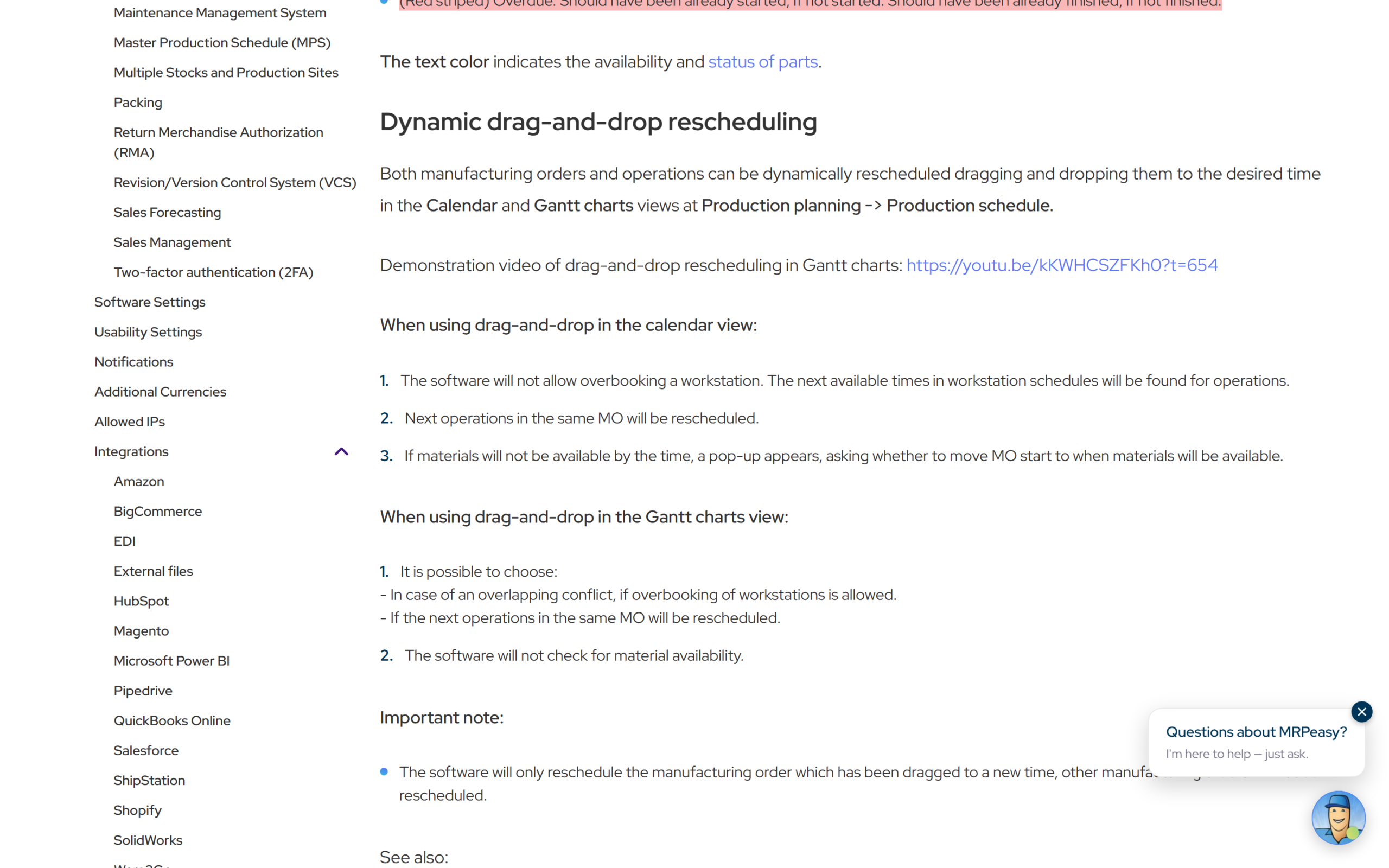
The production schedule then shows every planned manufacturing order on a calendar and on Gantt charts by order or by workstation. When you drag an order to a new time in the calendar view, the manual says the software will not allow overbooking a workstation, finds the next free times for each operation, reschedules the following operations of the same order, and warns you if materials will not have arrived by the new start. The pricing page lists finite capacity operations scheduling, Gantt charts and drag-and-drop rescheduling on every plan, with backward scheduling for just-in-time delivery, a master production schedule and rough cut capacity planning on Enterprise.
How Katana schedules
Katana manages production on its Make screen, which its help centre describes as a central production queue: manufacturing orders are executed from top to bottom by priority, and you change priority by dragging an order up or down. Make-to-order jobs inherit their priority from the linked sales order. To estimate when production will finish, Katana asks for one number, your weekly throughput, defined in its help article on weekly throughput as the total productive hours your workshop can use in a typical week. Katana’s own example is three full-time workers productive for about 33 hours each, so a throughput of 99 hours. It then combines the planned production time on each product with that figure to set production deadlines, and shows a “last 7 days actual” figure so you can recalibrate.
That model is simple and honest for a workshop where everyone can do every job and orders flow through in sequence. It breaks down where a laser cutter, a paint booth or a CNC machine is the bottleneck, because one weekly total cannot see that three orders all need the same machine on Tuesday. Katana’s Advanced Manufacturing features add routings, operation types (process, setup, per unit and fixed cost), resources and operators, plus insights on resource utilisation, which improves costing and tracking, but the help centre still describes execution as a priority queue rather than a capacity-checked calendar.
What that means in practice
If your customers ask “when will it ship?” and the honest answer depends on which machine is free, MRPeasy gives you a date the schedule can actually hit. If your bottleneck is materials and order volume rather than machine time, Katana’s queue is easier to run and easier for a new planner to understand, and the throughput figure gives a reasonable deadline without modelling every workstation.
What does each one cost, and can you even see the price?
MRPeasy publishes every price; Katana now publishes only its free plan. That is the biggest change in this comparison this year, and it matters for a small manufacturer trying to budget.
| Plan | Price | Users | What it adds |
|---|---|---|---|
| MRPeasy Starter | $49 per user a month | From 1 | Production planning, BOMs, finite scheduling, lot traceability, kiosk reporting, inventory, purchasing, CRM, standard accounting, integrations |
| MRPeasy Professional | $69 per user a month | From 1 | Serial numbers, quality control, subcontracting, product configurator, B2B portal, custom fields |
| MRPeasy Enterprise | $99 per user a month | From 1 | Barcodes, multiple stocks and sites, MPS, backward scheduling, maintenance, RMA, approvals, forecasting, 2FA |
| MRPeasy Unlimited | $149 per user a month | Minimum 2 | API and webhooks, no limits |
| Katana Free | $0 | Unlimited | All features, up to 30 SKUs, unlimited integrations and locations, API access |
| Katana Advantage | Custom annual contract, not published | Unlimited | Unlimited SKUs, setup and integrations built by Katana, dedicated Solutions Engineer and Customer Success Manager, 24/7 live support |
MRPeasy: a price you can calculate
MRPeasy charges per user per month, and from the eleventh user adds seats in bundles of ten at a flat $79 a month on every plan. Annual billing gives one month free. Its FAQ says the subscription includes all functionality of the chosen plan, updates, support tickets and learning resources, and that you are not required to buy implementation or training to get started. Optional extras are priced on the page: training at $150 an hour, and Advanced Support from $199 a month billed quarterly for one online hour a month, up to $499 a month for four hours. You can add or remove users and change plan at any time inside the software.
Katana: free, or a quote
Katana’s pricing page now offers two plans. Free costs nothing, needs no card, includes all Katana features, unlimited users, integrations and locations and API access, and is capped at 30 SKUs; for the first 15 days you can work with unlimited SKUs, and for ecommerce only Shopify integrates with Free. Everything beyond that is Advantage, which Katana describes in its FAQ as a custom annual contract: a Solutions Engineer maps your tech stack and workflows, and you get one price for the agreed scope. Katana says that price covers unlimited users, inventory, manufacturing, purchasing, traceability, warehouse management, the shop floor app, integrations, implementation, a dedicated Solutions Engineer and a Customer Success Manager, and that most teams are running in under six weeks. It does not publish a figure, so we cannot give you one. Customers on Katana’s older fixed tiers, which the FAQ names as Standard, Professional, Professional Plus and Core, are told Katana will contact them about changes.
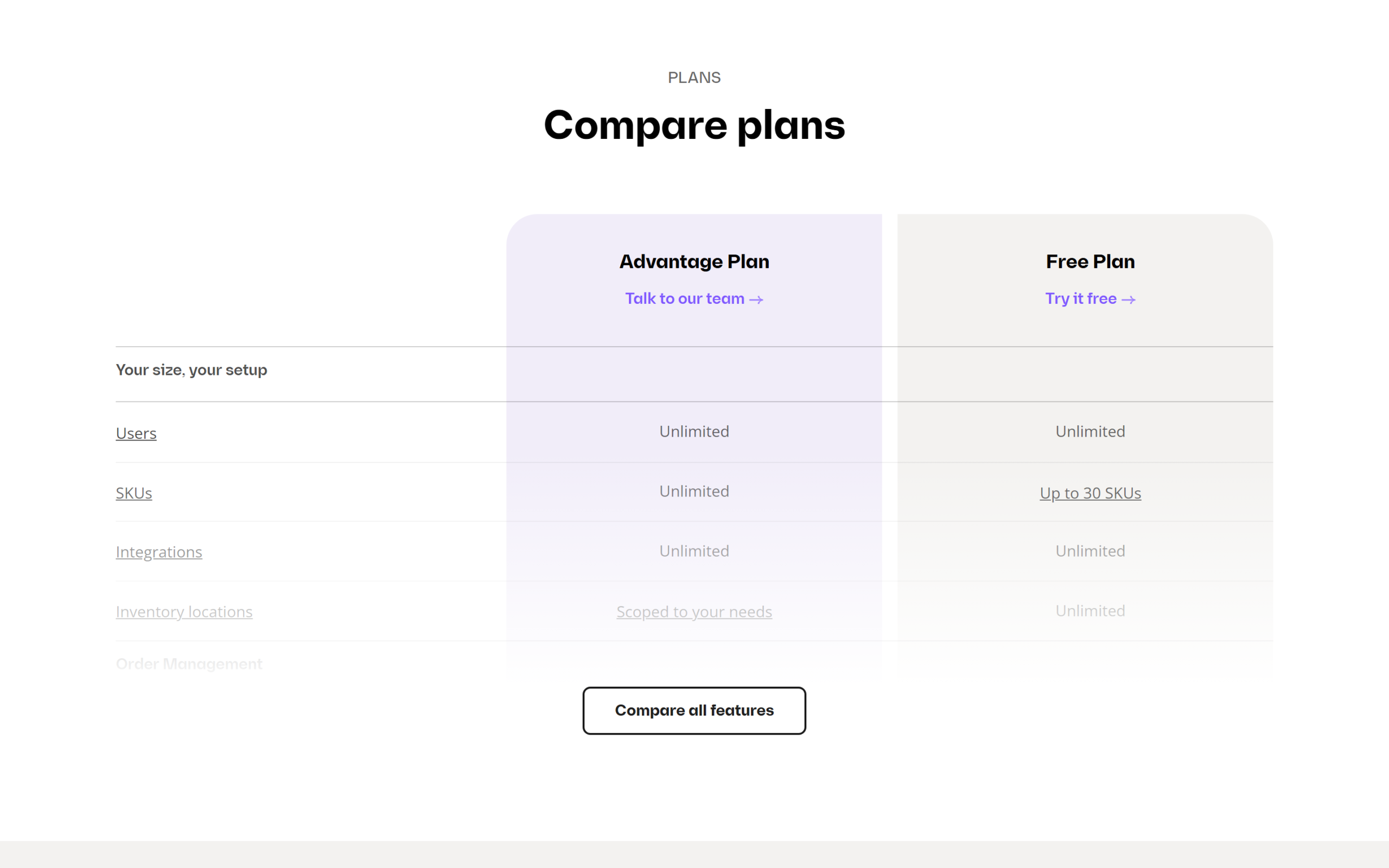
The practical consequence is that a small manufacturer can price MRPeasy on a napkin before talking to anyone, while Katana beyond 30 SKUs needs a sales conversation and an annual commitment. That is not necessarily worse: an all-in quote that includes integrations built and maintained by the vendor can be good value for a business that would otherwise pay a consultant. But you cannot compare it until you have the quote in writing, and you should ask for the price, the term, the renewal terms and the exact scope on one page.
How does the bill change as your team grows?
MRPeasy gets cheaper per person as you grow past ten users, while Katana’s price does not depend on users at all. The table shows MRPeasy’s monthly list price at five team sizes, from the published rates.
| Users | Starter | Professional | Enterprise | Enterprise per user |
|---|---|---|---|---|
| 3 | $147 | $207 | $297 | $99 |
| 8 | $392 | $552 | $792 | $99 |
| 10 | $490 | $690 | $990 | $99 |
| 15 | $569 | $769 | $1,069 | about $71 |
| 30 | $648 | $848 | $1,148 | about $38 |
MRPeasy’s own example matches the method: ten Enterprise users cost $990, adding two more adds one $79 bundle for $1,069, and that bundle covers you up to twenty users. With annual billing and one month free, ten Enterprise users cost $10,890 a year instead of $11,880. The tier you pick matters most for the first ten seats, because after that every plan adds people at the same $79 per ten.
Katana’s unlimited users matter most where many people need to touch the system lightly: packers, warehouse staff, salespeople checking stock. On MRPeasy you license only active users, and the vendor recommends starting with planners and managers and adding seats as needed. For a three-person workshop on MRPeasy Starter, the full year is $1,617 on annual billing, a figure you can set against Katana’s free plan if your catalogue fits in 30 SKUs, or against an Advantage quote if it does not. If the published number is what you need to get a purchase approved, check MRPeasy’s per-user plans and run the trial on your real bills of materials before you talk to either sales team.
How do operators report work on the shop floor?
Both systems let operators report progress from the floor, and both track time and materials against orders, but they organise it differently. MRPeasy’s Starter plan includes reporting through its Internet-kiosk, where workers start and finish operations, and MRPeasy lists iOS and Android apps among its platform features. Because operations are booked to workstations, a finished operation frees that workstation in the schedule, and the next order can move up. Piece payment to workers is a Professional function, and barcode scanning sits on Enterprise.
Katana’s Shop Floor app lets you assign tasks to your team and track materials and time, according to its production management page. Its help centre describes two levels of tracking: a simple one where you just update the status of each manufacturing order, from not started to work in progress to done, and an advanced one where production is split into operations and tasks assigned to resources and operators. Katana’s Advantage FAQ includes the shop floor app in the quoted price, and its free plan includes all features within the 30 SKU limit. Ingredient picking, where someone pulls the materials for an order before work starts, is part of the manufacturing features described in the same help article.
Costing follows the same split
MRPeasy calculates product cost from materials, overhead and labour, with actual or FIFO inventory costing and work in process, and its workstations carry an hourly rate, so labour cost follows from the operation times booked. Katana automates manufacturing cost from the bill of materials and production operations, and its operation types (process, setup, per unit and fixed cost) let you match how each step is charged. Both will give you a cost per unit you can trust if you enter honest operation times; MRPeasy ties it to specific workstations, Katana to operation types.
Which fits your sales channels and accounting software?
Katana is the more natural fit if Shopify is where your orders start; MRPeasy has the longer list of named integrations and its own basic accounting. Both connect to QuickBooks Online and Xero, so neither forces you to change bookkeeping.
MRPeasy’s pricing page lists integrations with QuickBooks Online, Xero, Shopify, Magento, WooCommerce, BigCommerce, Amazon, Pipedrive, HubSpot, Salesforce, ShipStation, Ware2Go, Zapier, Microsoft Power BI, Google Drive, OneDrive, Dropbox, CSV import and export, an API on paid accounts and EDI through partners. It also has a standard accounting module with a general ledger, balance sheet, profit and loss and cash flow forecast, which a very small company can use before it needs a separate accounting package. MRPeasy’s FAQ says most customers moving from another system import the bulk of their data within a few days from CSV templates.
Katana names Shopify, BigCommerce, WooCommerce, QuickBooks Online and Xero as its headline integrations, and its integrations page adds partner and community apps, an open API and a Katana MCP server that lets AI assistants such as Claude or ChatGPT read and update Katana data. On Advantage, its engineers build and maintain custom integrations, such as EDI, a CRM or a 3PL, as part of the contract. On Free, only Shopify connects among the ecommerce platforms. If you also run a separate warehouse system or sell wholesale through several channels, our Unleashed Software review covers an inventory-first option priced for that kind of business.
Which one fits your workshop?
The right choice depends on where your bottleneck is, how many people need access, and whether you want to set the system up yourself. Five common cases:
A machine shop with eight staff and four machines that every job queues for. MRPeasy. Finite capacity scheduling per workstation is exactly what this shop needs, and eight Enterprise users with barcodes cost $792 a month on list prices, or Professional at $552 if you can live without scanning. Katana’s single weekly throughput figure cannot see that two jobs need the same machine.
A Shopify candle brand making 25 scented products in batches. Katana Free. With fewer than 30 SKUs, unlimited users and a Shopify connection on the free plan, it costs nothing until the catalogue grows. Count SKUs carefully, though: raw materials and components are items too, so check how many your catalogue really needs before relying on the cap.
A furniture maker with 15 people and custom orders. Usually MRPeasy Professional, at $769 a month for 15 users: the product configurator handles options, subcontracting covers outsourced finishing, and the schedule gives real lead times for quotes. Katana Advantage is the alternative if you would rather pay for a done-for-you setup and need many staff to access the system, but get the quote before you decide.
A food business that needs lot traceability for recalls. Both can do it. MRPeasy includes lot traceability on Starter and expiry dates on Professional; Katana lists traceability in its plans and features recall-ready lot tracking in its own case studies. Choose on scheduling and price, not on traceability.
A growing brand with 30 warehouse, production and sales users who touch the system occasionally. Get a Katana Advantage quote and compare it with MRPeasy at $648 to $1,148 a month for 30 users. Unlimited users and a vendor-built integration layer can win here, especially when the bottleneck is order flow rather than machine time.
Where does each one fall short?
MRPeasy
MRPeasy’s per-seat model still bites at the small end: a workshop where ten people need logins pays for ten seats before the $79 bundles start. Barcodes, multiple warehouses, the master production schedule and two-factor authentication all sit on Enterprise at $99 a user. There is no free plan, only a 30-day trial. The accounting module is basic by design, and setting up workstations and routings properly takes thought, which is where the paid training and Advanced Support come in.
- Pros: finite capacity scheduling per workstation with Gantt charts, every price published, seats beyond ten at $79 per ten, built-in standard accounting, a long list of named integrations, and self-serve setup with no compulsory implementation fee.
- Cons: paid per user for the first ten seats, barcodes and 2FA only on Enterprise, no free plan, and a steeper modelling job up front to describe workstations and routings.
Katana
Katana’s weaknesses are price visibility and scheduling depth. Past 30 SKUs there is no published price, only a custom annual contract after a scoping process, which makes budgeting and side-by-side comparison harder for a small company. Its production planning is a priority queue with deadlines estimated from one weekly throughput figure, which suits simple flows and struggles with machine bottlenecks. The free plan is generous but capped at 30 SKUs and connects only Shopify among ecommerce platforms.
- Pros: a genuinely free plan with all features and unlimited users, unlimited users on the paid plan too, a strong Shopify-first workflow, an all-in Advantage quote that includes implementation and vendor-built integrations, 24/7 live support on Advantage, and an MCP server for AI assistants.
- Cons: no published price beyond Free, an annual contract on Advantage, no capacity-checked scheduling per machine, and a 30 SKU cap that a manufacturer with components can hit quickly.
Common buying mistakes
The first mistake is choosing on the price line before checking how each one schedules: a cheaper system that cannot see your bottleneck machine costs more in late orders. The second is counting only finished products against Katana’s 30 SKU limit when raw materials and subassemblies are SKUs too. The third is licensing every MRPeasy user from day one; the vendor itself recommends starting with the planners and adding seats as people actually use it.
Frequently asked questions
Is MRPeasy or Katana cheaper?
For a small catalogue, Katana’s free plan costs nothing up to 30 SKUs. Beyond that, MRPeasy is the only one with a published price: $49 to $149 per user a month, with users beyond ten added at $79 per bundle of ten. Katana’s paid plan, Advantage, is a custom annual quote, so you need that quote before you can compare.
Does Katana still have Standard and Professional plans?
Not on its pricing page. As of October 11, 2026, Katana sells a Free plan and Advantage, a custom annual contract. Its FAQ says existing customers on Standard, Professional, Professional Plus or Core will be contacted directly about any changes, and can talk to their Customer Success Manager about moving to Advantage.
Which has better production scheduling?
MRPeasy. It schedules each operation onto a specific workstation with finite capacity, shows calendar and Gantt views, and will not overbook a workstation when you drag an order. Katana runs a priority queue and estimates production deadlines from one weekly throughput figure for the whole workshop, which is simpler but cannot see a single bottleneck machine.
Can I try MRPeasy and Katana for free?
Yes. MRPeasy offers a 15 plus 15 day trial with no credit card and no obligation. Katana has a permanent Free plan with no card, all features and unlimited users, capped at 30 SKUs, and lets you work with unlimited SKUs for the first 15 days. Katana also offers a live demo with a product specialist.
Do MRPeasy and Katana work with QuickBooks and Xero?
Both integrate with QuickBooks Online and Xero. MRPeasy also has its own standard accounting module with a general ledger, balance sheet, profit and loss and cash flow forecast, which a very small company can use on its own. Katana relies on the accounting integration for the books.
Which is better for a Shopify store that makes its own products?
Katana is the more natural fit when Shopify drives production, and Shopify is the only ecommerce platform that connects to its free plan. MRPeasy also integrates with Shopify, WooCommerce, BigCommerce, Magento and Amazon, so pick MRPeasy if your production scheduling is harder than your order flow.
Does MRPeasy charge for every user?
For the first ten users, yes, at the plan’s per-user rate. From the eleventh user, MRPeasy adds seats in bundles of ten at a flat $79 a month on every plan, so 30 Enterprise users cost $1,148 a month. Katana includes unlimited users on both of its plans.
MRPeasy vs Katana: which should you choose?
For most small manufacturers, MRPeasy wins the MRPeasy vs Katana decision. It plans production the way a workshop with real machines runs, books each operation against workstation capacity, gives finish dates you can promise, and prices every plan in public so you can budget before you speak to anyone. Its weak points are paying per seat for the first ten users and keeping barcodes and 2FA on the Enterprise tier.
Choose Katana if you sell through Shopify, make relatively simple products, and either fit in 30 SKUs or want a vendor-built setup with unlimited users under one annual quote. Do not choose Katana if a bottleneck machine decides your lead times, and do not choose MRPeasy if you need dozens of occasional users and no production scheduling. If MRPeasy’s way of planning fits your floor, try MRPeasy with your own BOMs and routings and see whether the schedule matches what your team already knows about the week.
8.4 Score
Pros
- Finite capacity scheduling books each operation to a workstation and will not overbook it.
- Every plan is priced in public, from $49 per user a month, with seats beyond ten at $79 per ten.
- Built-in standard accounting plus QuickBooks Online, Xero, Shopify and a long integration list.
- Self-serve start with a 15 plus 15 day trial and no compulsory implementation fee.
Cons
- The first ten users are paid per seat, where Katana includes unlimited users.
- Barcodes, multiple warehouses and 2FA are on Enterprise at $99 a user.
- No free plan; Katana is free up to 30 SKUs.
- Modelling workstations and routings takes more setup than Katana's priority queue.
Final Verdict
MRPeasy wins for small manufacturers whose lead times depend on machine and bench capacity: it schedules every operation against real workstations, shows Gantt charts and publishes every price, so you can budget before a sales call. Katana suits Shopify-led brands with simple production, offering a free plan up to 30 SKUs and unlimited users, but beyond that it is a custom annual quote and its scheduling is a priority queue.