


Short answer: This WebCatalog review covers an app that turns any website into a dedicated desktop window, with its own icon, notifications and dock slot, plus multiple signed-in accounts per app and unlimited spaces to separate work from personal use. The free Basic plan caps you at 2 desktop apps and 1 space; Pro removes every limit at $6 a month billed monthly or $5 a month billed annually, and Business adds team management and single sign-on at $10 or $8 a month. It is a genuinely useful fix for tab overload across Gmail, Slack, WhatsApp and similar web apps, on Windows, macOS and Linux, and its main rival, Coherence, only runs on a Mac and charges once instead of monthly.
- Pick the free Basic plan if you only need 2 apps and want to try the multiple-account and spaces model before paying anything.
- Pick Pro at $5 to $6 a month if you juggle more than 2 web apps or multiple accounts on the same service, like separate work and personal WhatsApp or Slack.
- Pick Business at $8 to $10 a month per user only if you need shared spaces, team billing or SSO across a company.
- Skip it if you are on a Mac only and want to own the app outright rather than pay monthly; Coherence’s one-time price may suit you better.
Basic: free. Pro: $5/mo annual, $6/mo monthly. Business: $8/mo annual, $10/mo monthly. WebCatalog.io, checked September 13, 2026.
Table of contents
What is WebCatalog and who is it for?
WebCatalog is a desktop app for Windows, macOS and Linux, plus a browser extension, that turns any website into what feels like a standalone native app: its own window, its own icon in the dock or taskbar, native notifications and badges, instead of one more tab lost in a browser window. The pitch on its own homepage is direct: “Your apps and accounts, all in one place,” built around three ideas that this WebCatalog review tests one at a time, dedicated apps, multiple accounts per app, and spaces to separate contexts.
The buyer this suits is someone who runs several web-based tools all day, Gmail, Slack, Google Calendar, ChatGPT, and wants each one to behave like its own application rather than a tab, with its own place to alt-tab or cmd-tab to. It also suits anyone juggling more than one account on the same service, a work and a personal WhatsApp, or two client Slack workspaces, since WebCatalog’s stated design keeps each account’s session separate by default rather than forcing a logout and login cycle. This review reads WebCatalog’s own homepage, its full pricing and feature comparison table, its FAQ, and its documentation on data handling, all on September 13, 2026, and compares it against Coherence, the closest named rival for turning a website into a desktop app.
WebCatalog pricing: Basic, Pro and Business
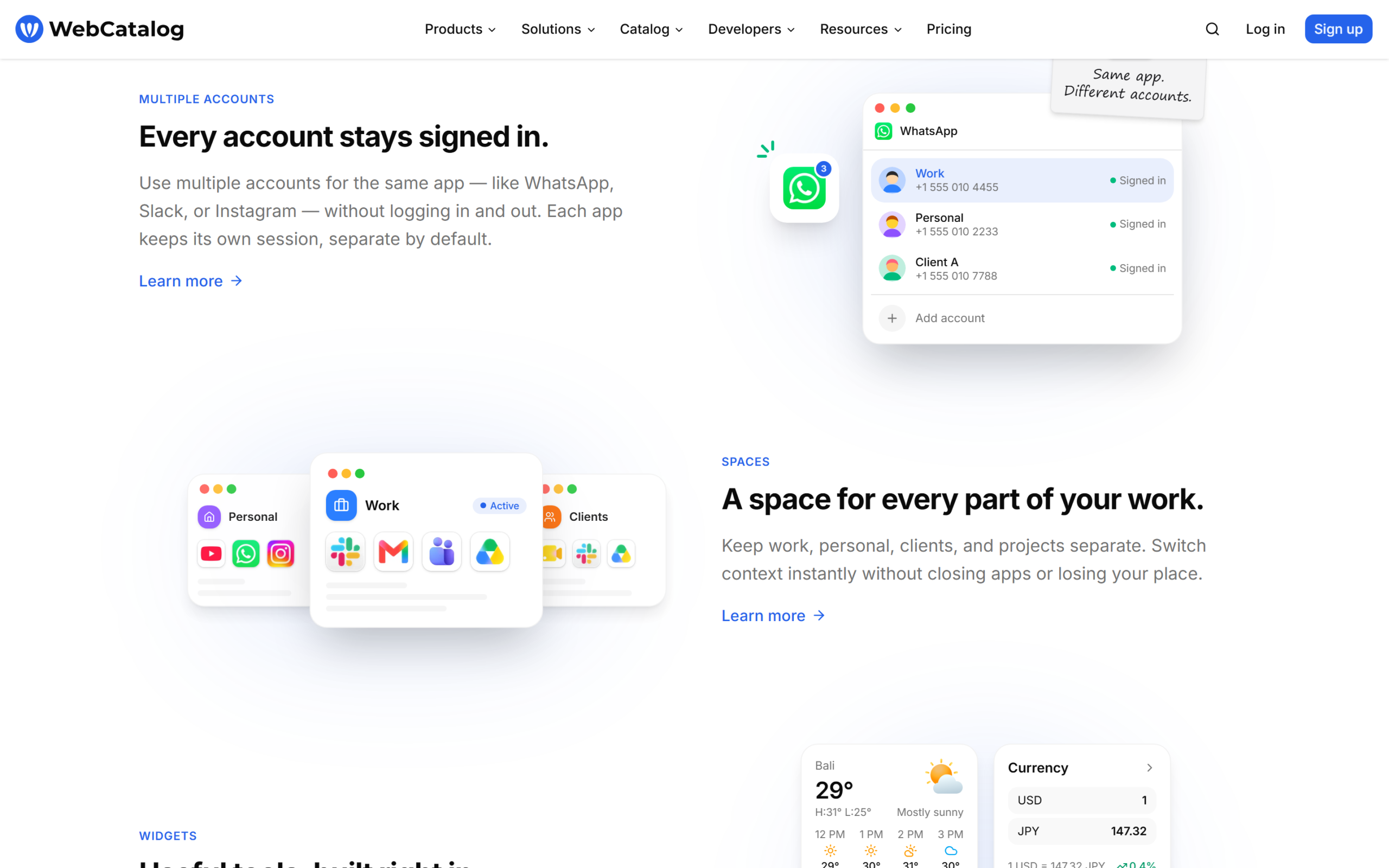
WebCatalog has three tiers. Basic is free and needs no credit card: 2 desktop apps, 2 profiles, 1 space, cloud sync, curated wallpapers, to-dos, live weather and focus mode. Pro removes the app, profile and space limits entirely and adds an ad-free experience, theme colors, an ad and tracker blocker, app lock, custom wallpapers, hourly and daily weather forecasts, a world clock, a currency converter, a calculator, a Pomodoro timer and priority support. Business adds shared spaces, shared pages, team management, centralized billing, an activity log and single sign-on (SAML SSO) on top of everything in Pro.
| Plan | Monthly billing | Annual billing | Apps / spaces |
|---|---|---|---|
| Basic | Free | Free | 2 apps, 1 space |
| Pro | $6/mo per user | $5/mo per user | Unlimited |
| Business | $10/mo per user | $8/mo per user | Unlimited, shared |
From WebCatalog’s pricing page, USD prices, checked September 13, 2026.
| Feature | Basic | Pro | Business |
|---|---|---|---|
| Desktop apps | 2 | Unlimited | Unlimited |
| Profiles | 2 | Unlimited | Unlimited |
| Spaces | 1 | Unlimited | Unlimited, shared |
| Ads and tracker blocker | No | Yes | Yes |
| Team management, SSO | No | No | Yes |
| Priority support | No | Yes | Yes |
Annual billing saves 20 percent over monthly on both paid plans, a straightforward discount rather than a hidden tier: Pro drops from $6 to $5 a month, Business from $10 to $8, both a flat fifth off, not a teaser rate that jumps back up after an introductory period. The free Basic plan is a real starting point, not a crippled trial, since it needs no credit card and does not expire; the 2-app cap is the only thing that pushes most users toward Pro, and it happens quickly if you want Gmail, Slack and a third tool as dedicated apps.
Per-seat pricing is worth flagging for a small team: Business at $8 a month billed annually is $96 a year per person, and a five-person team pays $480 a year for shared spaces, team management and SSO. That is a fair price against a dedicated app-management tool aimed at teams, but it is a real jump from Pro’s $60 a year per person, and a team evaluating WebCatalog should confirm which specific Business features it actually needs (shared spaces and billing, or SSO specifically) before assuming the whole tier is necessary. Compare the current WebCatalog plans directly, since a promotional rate can change the annual math.
Dedicated apps, multiple accounts and spaces
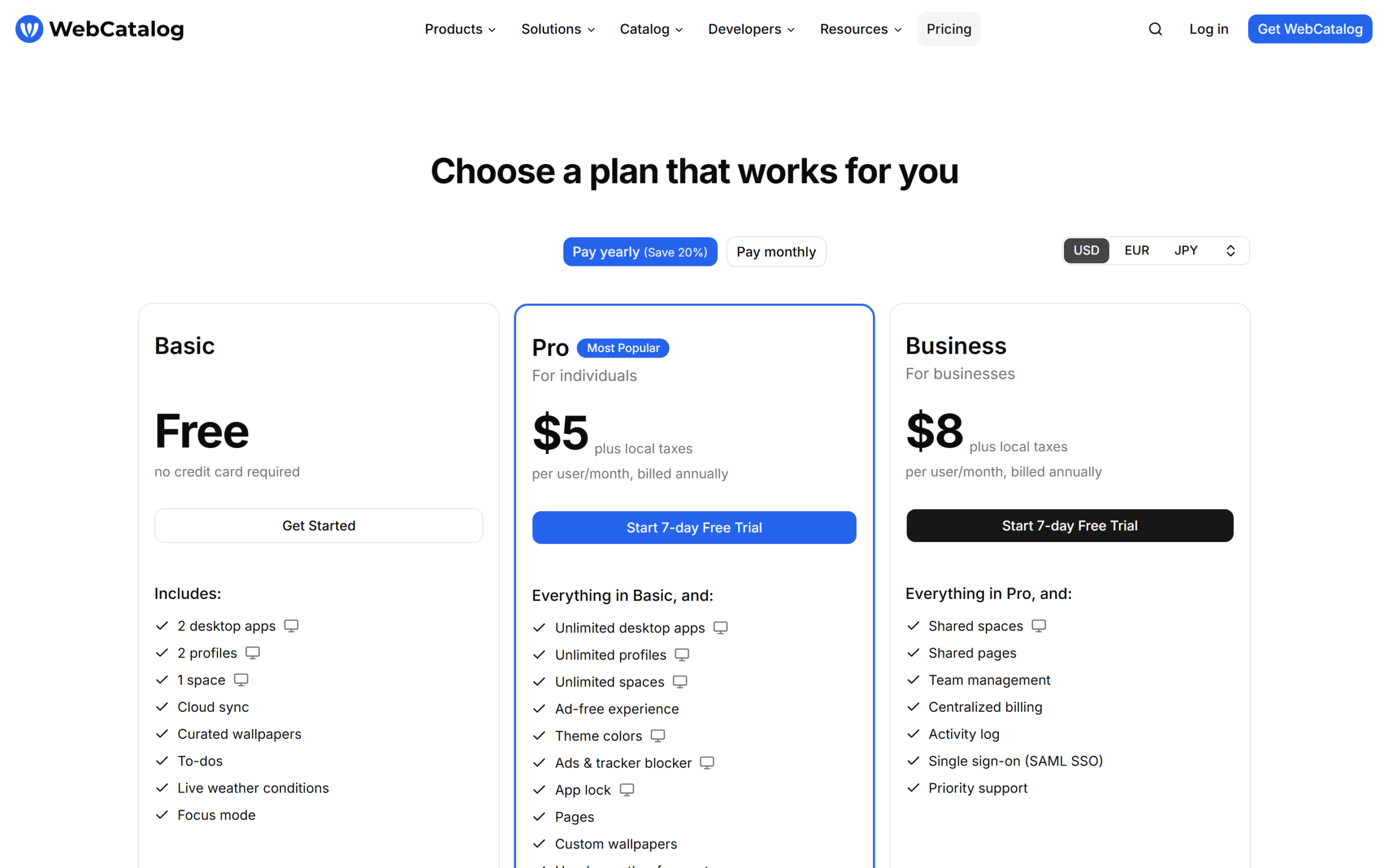
The core feature is turning a URL into an app: WebCatalog’s own catalog lists over 50,000 apps ready to install, or you can add any website manually, and each one opens in its own window with native notifications and a badge count rather than living as a tab. WebCatalog frames this plainly as staying “out of the tab pile.”
The second feature is multiple accounts on the same app kept separately signed in at once, the example given on the homepage is WhatsApp, Slack or Instagram with a work and a personal account both logged in simultaneously, each with its own session, separate by default. This is the feature that most directly replaces a common workaround: opening a second account in an incognito window, or logging out and back in every time you switch context. WebCatalog’s version keeps both sessions live at once, so switching accounts is a click between two already-open windows rather than a re-authentication.
The third is spaces, letting you group apps into contexts, personal, work, active projects or clients, and switch between them without closing anything or losing your place. On the free Basic plan this is capped at 1 space, which in practice means Basic users get the multiple-apps and multiple-accounts benefits without the organizational layer on top; spaces only become useful once Pro’s unlimited tier removes that cap. A widgets panel rounds it out: focus mode, a to-do list, live weather, a currency converter, a calculator and a Pomodoro timer sit on a home screen inside the app, all listed as Pro-tier or higher on the feature comparison table above, so the free plan is genuinely about the core app-switching behavior, not a taste of every feature with a few removed.
Widgets and the browser extension
Beyond the desktop app, WebCatalog also ships a browser extension, described as a way to use the same account-and-space model directly inside your existing browser rather than a separate app. The homepage frames the desktop app and the extension as two ways into the same idea, and the product page lists two other, more specialized apps under the same company, Switchbar and Singlebox, both documented separately in WebCatalog’s help center rather than covered in this review.
Privacy and how WebCatalog handles your data
WebCatalog’s own security and privacy documentation addresses the question directly for a tool that necessarily sits between you and every website you load in it. Its help article on the subject states plainly: “WebCatalog does not sell your personal data,” and that “WebCatalog may collect limited account, product usage, and diagnostic information to operate the service, improve the product, and provide support,” while browsing history, website sessions, cookies and login credentials are “not sold or used for advertising.” For a tool that holds multiple logged-in accounts across many services at once, that is the specific claim worth reading in full before trusting it with a work email account, not just taking the marketing copy’s word for it.
WebCatalog vs Coherence and the rest of the category
Coherence, sold by BZG Apps, is the closest named rival: a macOS-only app that turns a website into a native Mac app powered by a Chromium browser of your choice (Chrome, Brave, Edge, Vivaldi or others), with standard, tabbed and incognito app modes, link routing rules, and profile and extension import from your existing browser.
| WebCatalog | Coherence X6 | |
|---|---|---|
| Platforms | Windows, macOS, Linux | macOS only |
| Pricing model | Subscription, $5 to $10/mo | One-time, starting at $39.99 |
| App catalog | 50,000+ curated apps | Manual URL entry per app |
| Multiple accounts per app | Yes, built in | Via separate app instances |
| Browser engine | Built in (Electron-based) | Your choice of Chromium browser |
From WebCatalog’s pricing page and Coherence’s own product and pricing pages, checked September 13, 2026.
The platform split is the decisive difference for most buyers: Coherence simply is not an option on Windows or Linux, and WebCatalog is not a one-time purchase. A Mac-only user who wants to pay once and never think about a subscription again has a real reason to choose Coherence’s $39.99 starting price over WebCatalog’s ongoing $5 to $10 a month; over three years, WebCatalog’s Pro plan at $5 a month annually comes to $180, well past Coherence’s one-time $39.99, though WebCatalog includes cross-platform sync and a curated app catalog that Coherence’s model does not attempt to match. A Windows or Linux user, or anyone who wants a pre-built catalog of 50,000 apps rather than building each one from a URL, has no Coherence option at all and WebCatalog wins by default.
Coherence’s own website separately compares itself against WebCatalog, ToDesktop and Nativefier on a feature grid, listing native macOS behaviors, tabbed apps, incognito apps and multiple browser engine choices as points in its own favor; treat any vendor’s self-published comparison table, including this kind of grid on either company’s own site, as a starting point to verify rather than a neutral source, since neither company is a disinterested party in how it draws its own comparison. What is independently checkable is the platform support and the pricing model, and those two facts alone answer the WebCatalog vs Coherence question for most buyers before any feature grid does.
Where WebCatalog falls short
The free plan’s 2-app cap is generous enough to try the product honestly, but tight enough that most people who like it will hit the paywall within their first week of real use, once a third genuinely useful web app shows up. The subscription model itself is a real cost difference against Coherence’s one-time price for the Mac-only audience that has the choice between them, and it compounds every year rather than being paid once and forgotten.
WebCatalog’s refund window is a comparatively short 14 days from the FAQ, and is explicitly “not guaranteed” even inside that window in cases of “repeated or abusive requests,” which is looser language than a flat, unconditional refund policy; a buyer relying on a refund as a safety net should treat 14 days as a hard deadline, not a suggestion. Finally, this review did not find WebCatalog listed on G2 at the time of writing, so third-party review volume to weigh against the vendor’s own claims is thin; the FAQ and pricing page, not an independent review aggregator, are the main sources behind this WebCatalog review, which is exactly why every price and feature claim here links back to WebCatalog’s own pages rather than a summarized third-party score.
Who should buy it, and who should not?
Scenario one: someone drowning in browser tabs across Gmail, Slack and a handful of other tools
The free Basic plan covers 2 of those as real apps immediately; Pro at $5 to $6 a month removes the cap entirely once you need a third.
Scenario two: someone running separate work and personal accounts on the same service
The built-in multiple-account model is the specific feature to test, keeping WhatsApp, Slack or similar signed into two identities without a logout cycle.
Scenario three: a small team that wants shared app configurations
Business at $8 to $10 a month per user adds shared spaces, shared pages and centralized billing, the tier built for that case.
Who should not buy
A Mac-only user who wants to pay once and own the tool outright, rather than an ongoing subscription, is better served by Coherence’s one-time pricing starting at $39.99, accepting the trade-off of losing WebCatalog’s larger pre-built app catalog and cross-platform support.
Common buying mistakes
Signing up for Pro before testing whether the free Basic plan’s 2-app limit is actually a problem for your workflow. Assuming multiple accounts work the same in every app; WebCatalog’s own marketing names WhatsApp, Slack and Instagram specifically, not a blanket guarantee for every website. Expecting a Coherence-style one-time price; WebCatalog is subscription only. Buying Business for the whole team when only one or two people actually need SSO or shared billing, when Pro at a third of the per-seat price covers everyone else’s actual daily use.
This WebCatalog review found no scenario where the free Basic plan is a worse choice than paying immediately; the only real question most readers face is how quickly the 2-app cap becomes a genuine limitation, not whether to try WebCatalog at all.
WebCatalog pros and cons
WebCatalog
- Free Basic plan needs no credit card and covers 2 real desktop apps indefinitely.
- Runs on Windows, macOS and Linux, unlike its closest named rival.
- Built-in multiple accounts per app, confirmed for WhatsApp, Slack and Instagram.
- 50,000+ app catalog plus the option to add any website manually.
- Clear, published stance against selling personal data in its own documentation.
- Subscription only, no one-time purchase option like Coherence’s.
- Free plan caps out at 2 apps and 1 space.
- Refund window is 14 days and explicitly not guaranteed.
- Not listed on G2 at the time of this review, limiting independent review volume.
Frequently asked questions
How much does WebCatalog cost?
Basic is free. Pro is $6 a month billed monthly or $5 a month billed annually. Business is $10 a month billed monthly or $8 a month billed annually, both per user.
Does WebCatalog work on Windows?
Yes. WebCatalog’s desktop app is available for Windows, macOS and Linux, unlike Coherence, which is macOS only.
Can I use multiple accounts in the same app?
Yes. WebCatalog’s own homepage names WhatsApp, Slack and Instagram as examples of apps that can stay signed into more than one account at once, each kept separate by default.
Can I switch or cancel my plan anytime?
Yes, per WebCatalog’s FAQ: you can upgrade, downgrade or cancel at any time, changes take effect immediately, and you are only charged for the current billing period, with access continuing until the end of the cycle if you cancel.
Does WebCatalog offer refunds?
If you subscribed by mistake, WebCatalog’s FAQ states you can request a refund within 14 days of purchase, though refunds are described as not guaranteed and may be declined for repeated or abusive requests.
Does WebCatalog sell my data?
No, according to WebCatalog’s own documentation on the question: it states personal data, browsing history, sessions, cookies and login credentials are not sold or used for advertising.
Is WebCatalog better than Coherence?
It depends on your platform and how you want to pay. WebCatalog wins on Windows or Linux, where Coherence is not an option at all, and on its larger pre-built app catalog. Coherence wins for a Mac-only user who wants to pay once instead of monthly.
Is WebCatalog worth it?
This WebCatalog review concludes that the free Basic plan is worth installing for anyone tired of losing Gmail, Slack or ChatGPT in a pile of browser tabs, since it needs no credit card and genuinely works as described for 2 apps. Pro is worth $5 to $6 a month the moment you need a third dedicated app or want to run a second account on WhatsApp or Slack without a logout cycle, and Business earns its higher price only once a team actually needs shared spaces or SSO.
Skip it only if you are committed to macOS alone and would rather own a tool outright than pay monthly, in which case Coherence’s one-time price is the more direct fit. For everyone else running more than one web app all day across more than one platform, WebCatalog’s free plan is a real, no-risk place to start.
8.1 Score
Pros
- Free Basic plan needs no credit card and covers 2 real desktop apps indefinitely.
- Runs on Windows, macOS and Linux, unlike its closest named rival, Coherence.
- Built-in multiple accounts per app, confirmed for WhatsApp, Slack and Instagram.
- 50,000+ app catalog plus the option to add any website manually.
Cons
- Subscription only, with no one-time purchase option like Coherence's.
- Free plan caps out at 2 apps and 1 space.
- Refund window is 14 days and explicitly not guaranteed.
- Not listed on G2 at the time of this review, limiting independent review volume.
Final Verdict
WebCatalog's free Basic plan is a genuine, no-credit-card way to try turning browser tabs into real desktop apps, and Pro at $5 to $6 a month is worth it the moment a third app or a second account on the same service is needed. Its main limits are the subscription model itself against Coherence's one-time price, and a thin independent review record outside the vendor's own site. For anyone on Windows or Linux, or who wants a large pre-built app catalog, WebCatalog is the more practical pick regardless of price.