



Short answer: In the fluentcrm vs mailerlite decision, FluentCRM is the better buy for a business that already runs on WordPress and has more than a few thousand contacts, because its licence is priced by site rather than by list size and the sending itself costs cents per thousand emails through a service such as Amazon SES. MailerLite is the better choice when you do not want to run any email infrastructure yourself, when your site is not WordPress, or when your list is still small enough for its free or entry plan.
- Pick FluentCRM if your shop, courses or membership already live in WordPress and you are comfortable setting up an SMTP plugin, a sending service and a real cron job.
- Pick MailerLite if you want a hosted service that handles sending, bounces and IP reputation, works with any website and comes with landing pages and signup forms.
- Skip FluentCRM if nobody on your team will look after DNS records, sending limits and server cron; skip MailerLite if a list of tens of thousands would make its subscriber pricing the biggest line in your software budget.
FluentCRM Pro: $129/yr for 1 site, $249/yr for 5 sites, $499/yr for 50 sites (first year shown at $103, $199 and $399); sending is paid separately, Amazon SES Essentials lists $0.16 per 1,000 emails. Free plan: yes, the core FluentCRM plugin is free. MailerLite: Free up to 250 subscribers; Comfort from $12/mo or $129.60/yr; Power from $25/mo or $270/yr at 500 subscribers. Prices checked October 11, 2026.
MailerLite Black Friday: 26% off any annual plan, on any list size, with a code entered at checkout, from 17 November until 18 December 2026. The discount lasts 12 months from the date you pay; monthly plans are not included, but a monthly customer can switch to an annual plan during the sale and get it. See the MailerLite Black Friday deal
Table of contents
How do FluentCRM and MailerLite differ at a glance?
FluentCRM is a plugin that turns your WordPress site into the email marketing system, while MailerLite is a hosted service that you connect your website to. Everything else in this comparison follows from that one difference: who stores the contact list, who sends the mail, who pays for growth and who fixes things when a campaign stalls halfway through.
FluentCRM is made by WPManageNinja, the company behind Fluent Forms and FluentSMTP. Its WordPress.org listing shows more than 80,000 active installations and a rating of 4.8 out of 5. The core plugin is free; FluentCRM Pro adds email sequences, the visual email builder, advanced segmentation and most of the automation triggers, and is sold as a yearly licence per number of sites. MailerLite is a hosted email marketing platform with a free plan for up to 250 subscribers and two paid plans, Comfort and Power, whose price rises with the number of active subscribers. Our earlier FluentCRM review and MailerLite review cover each product on its own; this page is about the choice between the two models.
| FluentCRM | MailerLite | |
|---|---|---|
| What it is | Self-hosted WordPress plugin | Hosted (SaaS) email platform |
| Where contacts are stored | Your WordPress database | MailerLite’s servers, in the EU |
| Who sends the email | A service you connect, such as Amazon SES | MailerLite |
| Free option | Free core plugin, unlimited contacts | Free plan, 250 subscribers, 2,500 emails a month |
| Paid pricing basis | Number of sites: 1, 5 or 50 | Number of active subscribers |
| Entry paid price | $129/yr for 1 site (first year $103) | Comfort $129.60/yr at 500 subscribers |
| Sending cost | Paid to your provider, SES Essentials $0.16 per 1,000 | Included, up to 10 times your tier on Comfort, unlimited on Power |
| Works without WordPress | No | Yes |
| Refund or trial | 14-day money-back guarantee | 14-day premium trial, no card |
| Best for | WordPress stores, course sites and memberships with growing lists | Any website, owners who want no infrastructure to manage |
Where does your list live, and who actually sends the email?
With FluentCRM, your list lives in your own WordPress database and the mail leaves through whatever delivery service you plug in, so the sending reputation is yours to build and protect. With MailerLite, both the list and the sending sit with MailerLite, and its team polices the shared infrastructure that your campaigns travel on.
FluentCRM: your database, your sending service
FluentCRM builds each email inside WordPress and then hands it to WordPress’s mail function. The plugin’s own pricing FAQ puts it plainly: FluentCRM uses your WordPress email setup to send messages, and your connected delivery service may charge separately. Its documentation on email delivery strongly recommends a dedicated email service provider rather than your hosting account’s own mail, and points you to FluentSMTP, a free plugin from the same company. FluentSMTP connects natively to Amazon SES, Mailgun, SendGrid, Brevo, SparkPost, Postmark, Gmail and Google Workspace, Outlook and any other SMTP server, and it lets you set a fallback connection so mail still goes out if the first provider fails.
The practical consequence is control. You choose the provider, you can route marketing mail through one service and website notifications through another, and nobody outside your business holds your contact records. The flip side is responsibility: FluentCRM’s pricing FAQ says deliverability depends on your email service, which is a polite way of saying that if your domain lands in spam, there is no vendor support team whose job it is to fix it.
MailerLite: a managed service with house rules
MailerLite stores your data in a data centre in the European Union with ISO 27001 certification, according to its pricing FAQ, and sends every campaign through its own infrastructure. That convenience comes with oversight. The same FAQ says MailerLite reserves the right to monitor the lists, content and response data of all accounts, to protect the reputation of its shared IPs and their users. A dedicated IP only appears in the Enterprise tier, which is aimed at lists above 200,000 subscribers.
For most small businesses this is a good trade. Someone else watches bounce rates, complaint rates and blocklists, and a sudden problem with one sender does not become your problem to diagnose at midnight. What you give up is independence: your ability to send depends on staying within MailerLite’s rules, and your list sits in someone else’s system.
What does each cost at 1,000, 10,000 and 50,000 contacts?
On price, fluentcrm vs mailerlite comes down to list size. MailerLite is cheaper below roughly 500 subscribers, because its free plan costs nothing and its entry plan costs about the same as a single FluentCRM licence. Above that, FluentCRM wins by a widening margin, because its licence does not grow with your list and the sending cost per email is tiny.
The table uses MailerLite’s yearly prices read from its pricing calculator on October 11, 2026, and for FluentCRM the $129 single-site list price plus Amazon SES at the $0.16 per 1,000 emails that SES lists for its Essentials plan, the default for new SES accounts from July 21, 2026. To compare like with like we assume four emails per contact per month, which is a weekly newsletter. Your hosting is left out on both sides, since a WordPress site needs hosting either way, though a large FluentCRM list may push you to a stronger plan.
| Contacts | Emails a year (4 a month) | FluentCRM: licence + SES | MailerLite Comfort, yearly | MailerLite Power, yearly |
|---|---|---|---|---|
| 1,000 | 48,000 | $129 + $7.68 = $136.68 | $205.20 | $421.20 |
| 5,000 | 240,000 | $129 + $38.40 = $167.40 | $529.20 | $745.20 |
| 10,000 | 480,000 | $129 + $76.80 = $205.80 | $961.20 | $1,393.20 |
| 25,000 | 1,200,000 | $129 + $192 = $321 | $1,933.20 | $2,581.20 |
| 50,000 | 2,400,000 | $129 + $384 = $513 | $3,445.20 | $4,201.20 |
At 10,000 contacts the gap is $755.40 a year against MailerLite Comfort, and at 50,000 contacts it is $2,932.20. FluentCRM’s own pricing page runs a similar example, 10,000 contacts receiving 100,000 emails a month, and lands on $321 a year: the $129 plan plus $192 of sending, which matches the SES rate above. If you run several sites, the five-site licence at $249 a year covers all of them with no extra charge per list.
What the MailerLite price includes that FluentCRM’s does not
The MailerLite figure is not just a sending bill. Comfort includes 5,000 emails a month at the 500-subscriber tier and, as the FAQ explains, ten times the top of your subscriber tier at larger sizes, three user seats, 50 automations, ten landing pages and websites, ten signup forms and 24/7 email support. Power adds unlimited sending, unlimited seats, multiple automation triggers and 24/7 live chat. Annual billing saves 10% over monthly, and nonprofits can apply for 30% off. MailerLite counts only active subscribers, so unsubscribed and bounced addresses do not raise your bill, but it counts any address that was active at any point in the billing cycle, even if you delete it later. On a paid plan, outgrowing your tier upgrades you automatically to the next one.
What the FluentCRM price leaves to you
The FluentCRM figure assumes you already have WordPress hosting that can process campaigns, and it assumes your own time is free, which it is not. There are also optional costs at the sending end: SES charges $24.95 a month per standard dedicated IP if you outgrow shared sending, and $0.12 per gigabyte of attachments. The first-year licence prices on the FluentCRM page are discounted, and the FAQ says that offer applies to the first year only, so budget on the $129, $249 or $499 list price from year two. If the arithmetic favours you, compare the 1, 5 and 50 site FluentCRM plans and lean on the 14-day money-back guarantee while you test your sending setup. For more on MailerLite’s own tiers, our MailerLite pricing explainer goes plan by plan.
How much work does each take to set up and keep running?
MailerLite is ready the day you sign up, while FluentCRM needs a sending service, an SMTP plugin and a reliable cron job before the first campaign is safe to send. That setup is a one-time job for someone comfortable in WordPress, but it is real work, and it does not disappear after launch.
The FluentCRM setup list
- Install the plugins. FluentCRM, then FluentSMTP or another SMTP plugin. FluentCRM’s WordPress.org page lists WordPress 6.0 and PHP 7.4 or higher as requirements.
- Open a sending account. With Amazon SES, a new account starts in the sandbox, where Amazon’s documentation says you can only send to verified addresses, at most 200 messages in 24 hours and one message per second. You have to request production access before you can mail a real list.
- Authenticate your domain. Add the DNS records your provider asks for so that Gmail, Outlook and Yahoo can verify that mail really comes from you.
- Replace WordPress’s built-in cron. FluentCRM’s documentation says it relies on scheduled jobs that run every 60 seconds, 5 minutes and 60 minutes, and its docs include guides for setting up a real server cron on cPanel, a VPS, Cloudways, xCloud or an external cron service. Without that, campaigns on a quiet site can stall.
- Set up bounce handling. Connect your provider’s bounce notifications so that dead addresses are marked automatically; the docs have a dedicated bounce handling section.
Once this is done, day-to-day work looks much like any email tool: write, segment, send, read the report. FluentCRM shows live progress on its Email Processing screen and can spread a large send across a date and time window to avoid sudden spikes.
The MailerLite setup list
MailerLite’s setup is shorter: create the account, verify your sending domain, build a form and import your contacts. The 14-day premium trial needs no card. The work you do not do is the work above: there is no cron to configure, no sandbox to leave and no SMTP plugin to monitor. The trade-off is that MailerLite decides what is acceptable to send, and an account that breaks its rules can be paused. If your business cannot tolerate either a stalled cron or a paused account, the deciding question is which risk you are better placed to manage.
Which one automates better?
FluentCRM automates better inside WordPress, because it reacts directly to what happens in your plugins, while MailerLite automates better across a mixed stack that is not built on WordPress. Both have visual builders with delays, conditions and branching.
FluentCRM: triggers from the plugins you already run
FluentCRM’s free versus Pro comparison shows how much the Pro licence matters here. The free plugin has one built-in automation template, one CRM trigger, one WordPress trigger and five e-commerce triggers, and no email sequences. Pro raises that to ten templates, nine CRM triggers, two WordPress triggers and eight e-commerce triggers, and adds ten subscription triggers, thirteen LMS triggers for LearnDash, LifterLMS, LearnPress, Tutor LMS and Academy LMS, and eight membership triggers for MemberPress, WishList Member, Restrict Content Pro and Paid Memberships Pro. Its automation page describes the result: workflows that start from form submissions, purchases, bookings and course activity, and actions that update contacts, enrol students or assign tasks across other plugins.

For a WordPress business that is the decisive advantage. A student finishing a LearnDash lesson, a member whose subscription lapses or a buyer of a specific WooCommerce product can each start a different flow without any connector service in between. If you collect leads with Fluent Forms, the two plugins share data natively; our Fluent Forms review covers that plugin.
MailerLite: seven triggers that work with any site
MailerLite’s help article on automation triggers lists seven default triggers: joins a group, completes a form, clicks a link, updated field, joins a segment, event anniversary and exact date, plus e-commerce triggers. On the Power plan you can add up to three triggers to one workflow. The limits are set by plan: the free plan allows three active automations of up to five steps each, Comfort allows 50 automations and Power unlimited, both with up to 100 steps. To react to something that happens on your website, MailerLite needs a form, its own e-commerce integrations, its API or a connector such as Zapier or Make.
That is enough for welcome series, lead magnets, abandoned carts on supported stores and re-engagement flows, which is what most small businesses run. It is less suited to the membership and course logic that FluentCRM handles natively.
How well does each fit a WordPress site?
FluentCRM is part of WordPress itself, so it fits as closely as any tool can, while MailerLite connects through plugins and forms that work but sit one step removed.
FluentCRM sees WordPress users, WooCommerce orders and plugin events directly, and keeps a contact’s purchases, form submissions, support tickets and course progress on one profile when the matching Fluent plugins are installed, according to its free versus Pro table. Its WordPress.org listing shows the plugin tested up to WordPress 7.1.3 and updated within the last two weeks when we checked.
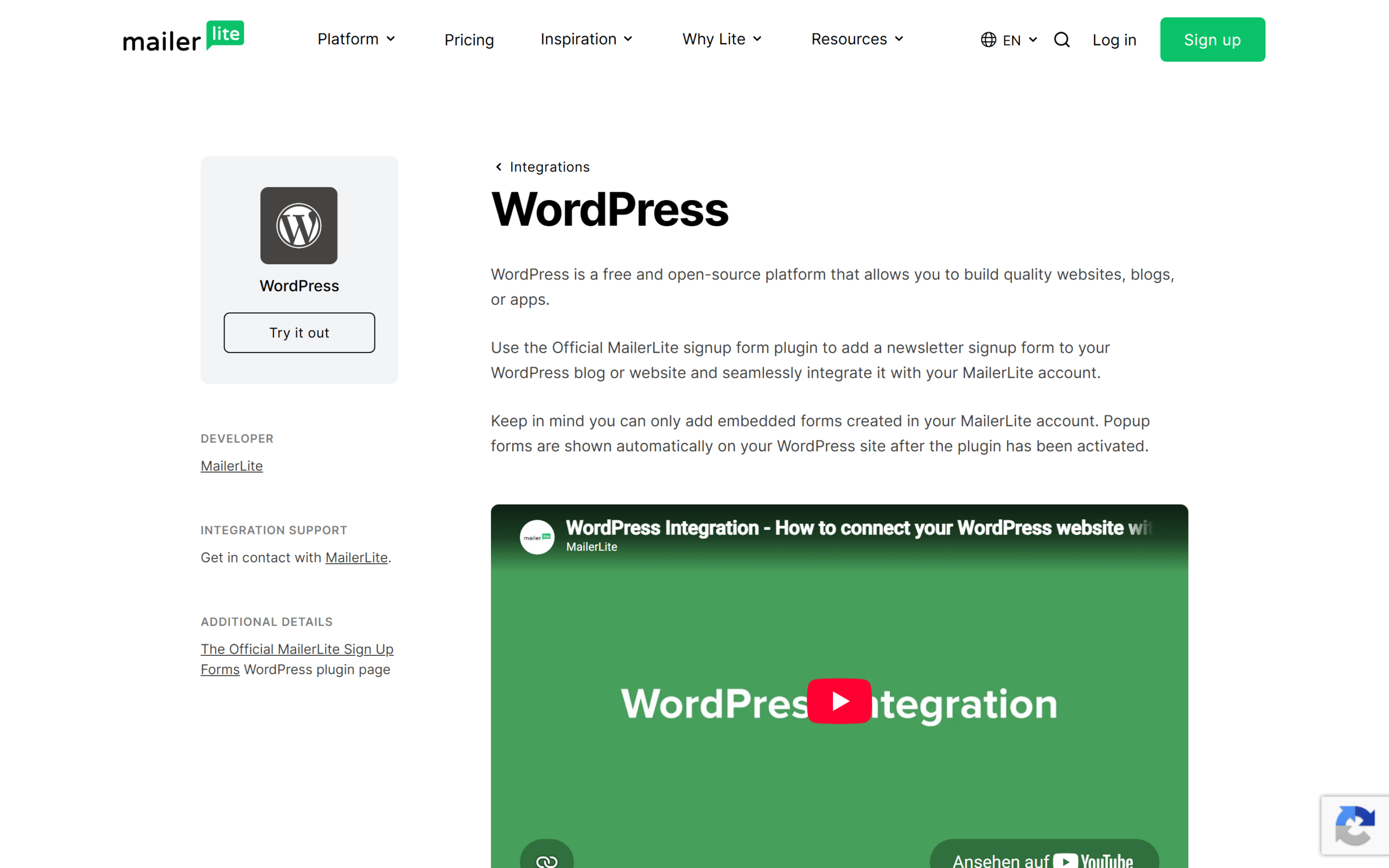
MailerLite’s hosted platform offers an official signup forms plugin for WordPress, which its integration page says lets you place embedded MailerLite forms with a shortcode, and shows popup forms automatically once activated. On October 11, 2026 that plugin’s WordPress.org page showed more than 100,000 active installations, but also a notice that it has not been tested with the latest three major releases of WordPress, with “tested up to” at 6.8.11. MailerLite’s separate WooCommerce plugin, with more than 30,000 installations and an update five days earlier, forwards orders, tracks sales and powers abandoned cart emails. MailerLite’s integration page also lists Zapier, Make, SyncSpider and WP Fusion as other ways to connect it to WordPress.
In practice, a blog that only needs a signup form will not notice much difference. A store, course platform or membership site that wants email to react to what customers do inside WordPress will.
Which one fits your situation?
The fluentcrm vs mailerlite answer changes with list size, platform and who looks after the technical side. Five common situations show where each lands.
A new blog with 200 subscribers. MailerLite Free. At 250 subscribers and 2,500 emails a month it costs nothing, and a weekly newsletter to 200 people uses 800 of those emails. Setting up SES and cron to save nothing would be wasted effort. Just note that if you pass 250 active subscribers on the free plan, MailerLite locks campaigns and automations until you upgrade or remove contacts.
A WooCommerce store with 8,000 customers. FluentCRM Pro with Amazon SES. MailerLite Comfort at the 10,000 tier costs $961.20 a year, against less than $206 for FluentCRM with weekly sending (our 10,000-contact figure above), and FluentCRM reads WooCommerce orders without a connector. The condition is that someone sets up SES, DNS authentication and a real cron.
A course creator on LearnDash or LifterLMS. FluentCRM Pro, mainly for the 13 LMS triggers. Course progress, completions and inactivity reminders can drive emails directly, which in MailerLite would require a connector or custom work.
A coach whose website runs on Squarespace or Shopify. MailerLite. FluentCRM is built only for WordPress, as its own FAQ says, so it is not an option without a WordPress site, and MailerLite also gives you landing pages and forms to work around the main site.
An agency running email for many WordPress client sites. FluentCRM’s 50-site licence at $499 a year, if the agency already manages hosting and DNS for those clients. Each client still needs a sending account and proper authentication, so price the setup time, not just the licence.
Common buying mistakes
The first mistake is comparing the FluentCRM licence with the MailerLite plan and forgetting the sending bill and the setup time. The second is the opposite: assuming that a hosted service is always the safe choice, then paying four figures a year for a list that a plugin could serve for a few hundred dollars. The third is running FluentCRM on WordPress’s default cron and cheap shared hosting, then blaming the plugin when a campaign stalls. The fourth is ignoring MailerLite’s cumulative counting: an address active at any point in the billing cycle still counts that month, even if you delete it.
Where does each one fall short?
FluentCRM
FluentCRM’s weaknesses are the cost of self-hosting. You are the deliverability team, the server administrator and the person who notices when cron stops. It only works on WordPress. The free plugin lacks email sequences and most triggers, so the useful version is the paid one. Very large lists put real load on a database that also serves your website, and FluentCRM itself says performance depends on proper hosting and sending configuration.
- Pros: licence priced by site, not list size; contacts stay in your own database; deep triggers for WooCommerce, LMS and membership plugins; free FluentSMTP with fallback routing; 4.8 rating on WordPress.org from more than 80,000 active installations.
- Cons: you manage sending, DNS, bounces and cron; WordPress only; sequences and most triggers need Pro; first-year discount does not apply to renewals.
MailerLite
MailerLite’s weaknesses show up as the list grows. The price climbs with every tier, the free plan stops at 250 subscribers and locks sending above that, and Comfort caps monthly emails at ten times your tier. Your ability to send depends on MailerLite’s account monitoring, a dedicated IP is an Enterprise feature, and the official WordPress forms plugin was not tested with the latest WordPress releases when we checked. Our MailerLite vs Mailchimp comparison shows how it fares against the other big hosted name.
- Pros: nothing to host or configure; works with any website; landing pages, websites, forms and digital products included; 14-day trial without a card; data stored in the EU with ISO 27001 certification.
- Cons: cost scales with subscribers; free plan limited to 250 subscribers and three automations; sending capped on Comfort; account subject to monitoring and review.
Can you move from one to the other later?
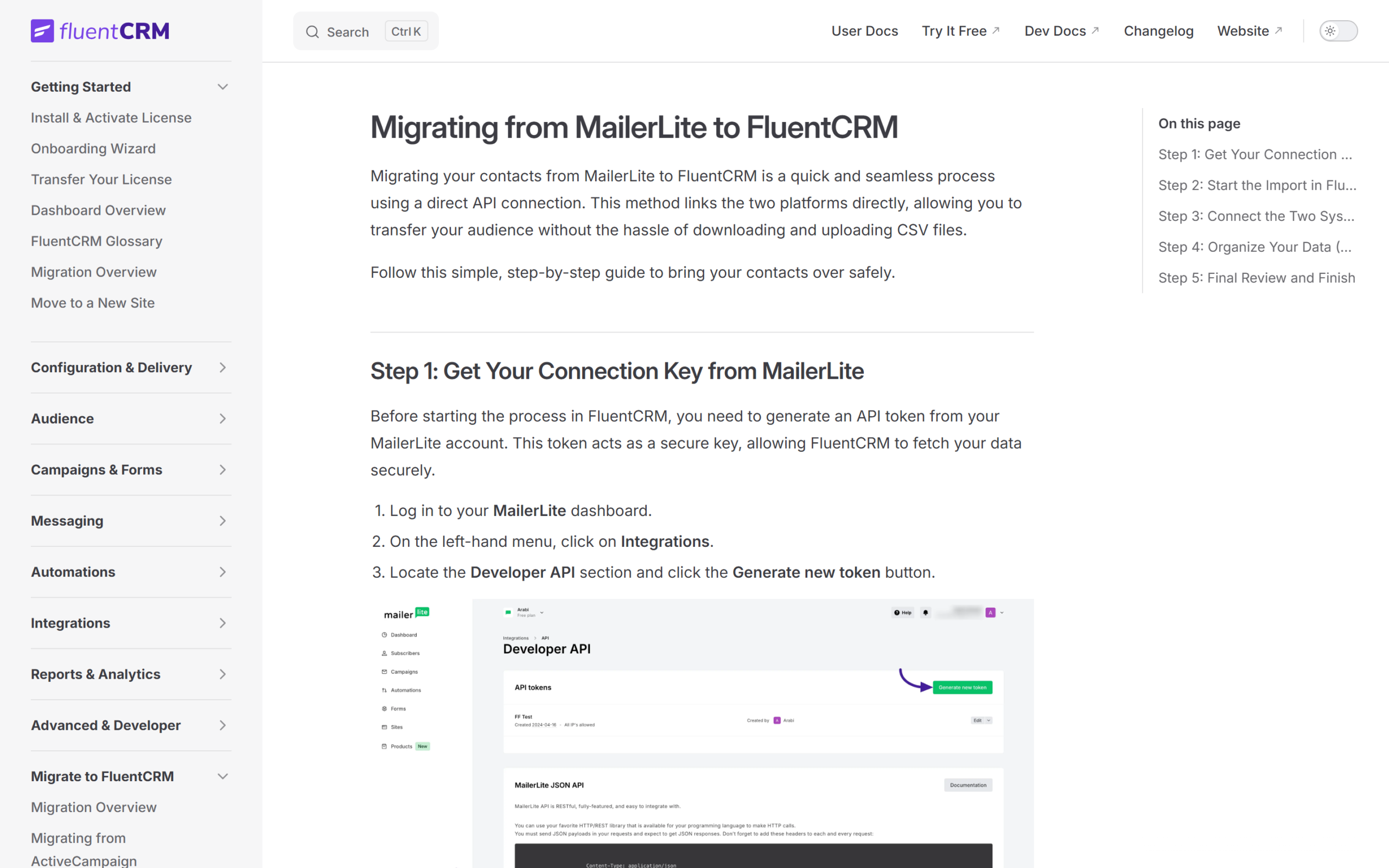
Yes. Many people researching fluentcrm vs mailerlite start on MailerLite and move later, and moving from MailerLite to FluentCRM is easier than the reverse, because FluentCRM has a built-in importer that connects to MailerLite directly. Its MailerLite migration guide, published in FluentCRM’s documentation, walks through it: generate an API token in MailerLite under Integrations and Developer API, open FluentCRM’s contact import, choose Import From Other Providers and MailerLite, paste the token, then map lists, tags and fields before confirming. MailerLite shows the token only once, so save it before closing the window.
What does not move automatically are your automations and email designs, which you rebuild in FluentCRM’s editor, and your sending reputation, which starts fresh on your own domain and provider. Plan a gradual ramp of volume on the new sending account rather than mailing the whole list on day one.
Moving the other way, from FluentCRM to MailerLite, is a contact export from FluentCRM and a CSV import into MailerLite. Contact export is included in the free FluentCRM plugin. MailerLite’s trigger guide notes that imported subscribers only start an automation if you tick the option to let them during the import, which is worth knowing before you import a list into a welcome flow by accident.
Frequently asked questions
Is FluentCRM cheaper than MailerLite?
Above a few hundred contacts, yes; in a fluentcrm vs mailerlite cost comparison the licence stays flat while subscriber pricing climbs. A single-site FluentCRM licence costs $129 a year at list price, and Amazon SES lists $0.16 per 1,000 emails on its Essentials plan. At 10,000 contacts and weekly sending that is about $206 a year, against $961.20 for MailerLite Comfort. Below 250 subscribers MailerLite’s free plan is cheaper.
Does FluentCRM send emails by itself?
No. FluentCRM prepares each email inside WordPress and hands it to WordPress’s mail function. FluentCRM recommends a dedicated email service such as Amazon SES, Mailgun or SendGrid, connected through its free FluentSMTP plugin. Your delivery service charges separately for sending, and deliverability depends on how that service and your domain are set up.
Can I use FluentCRM without WordPress?
No. FluentCRM’s own pricing FAQ says it is designed exclusively for WordPress. If your website runs on Shopify, Squarespace, Wix or another platform, MailerLite or another hosted service is the practical choice, because it connects through forms, integrations and an API rather than living inside your site.
Which has better deliverability, FluentCRM or MailerLite?
Neither wins by default. MailerLite manages shared sending infrastructure and monitors accounts to protect it. FluentCRM’s deliverability is whatever your provider and your domain setup deliver: Amazon SES, correct DNS authentication, bounce handling and a clean list can perform very well, but nobody fixes it for you if it goes wrong.
Does MailerLite charge for unsubscribed contacts?
No. MailerLite bills on active subscribers, and its pricing FAQ says unsubscribed and bounced addresses do not count. It does count every address that was active at any point during the billing cycle, even if you delete it before the cycle ends, and the count resets on your monthly billing date.
Is the free FluentCRM plugin enough?
For simple newsletters to a list, it can be. The free plugin includes unlimited contacts, campaigns, list and tag segmentation and basic automation. It lacks email sequences, the drag and drop visual builder, dynamic segments and most automation triggers, including all LMS and membership triggers, which are the main reasons WordPress businesses buy Pro.
Can I import my MailerLite list into FluentCRM?
Yes. FluentCRM has a direct MailerLite importer: create an API token in MailerLite, choose MailerLite in FluentCRM’s Import From Other Providers option, paste the token and map your lists, tags and fields. Automations and email designs do not transfer and have to be rebuilt.
Which should you choose?
Choose FluentCRM if your business already runs on WordPress, your list is past a few thousand contacts or growing quickly, and you have someone who will look after a sending service, DNS records and a real cron job. You get a licence that does not grow with your list, sending that costs cents per thousand emails, and automations that react directly to WooCommerce, course and membership plugins. That combination is why FluentCRM wins this fluentcrm vs mailerlite comparison for WordPress businesses with real lists.
Choose MailerLite if your site is not on WordPress, if your list is still small, or if nobody on the team wants to own email infrastructure. Its free plan and MailerLite’s 14-day premium trial are the easiest way to start, and it stays a sensible choice for as long as its subscriber price is smaller than the time you would spend running your own sending. Do not choose FluentCRM if you will never configure cron or SES, and do not stay on MailerLite at 25,000 contacts out of habit without running the numbers above. If FluentCRM fits, pick a FluentCRM Pro licence for your sites, set up SES in the sandbox first, and send to your full list only once authentication and cron are proven.
8.3 Score
Pros
- The licence is priced by number of sites, so a 50,000-contact list costs the same licence as a 500-contact list.
- Sending through Amazon SES Essentials is listed at $0.16 per 1,000 emails, far below per-subscriber pricing at scale.
- Pro adds 13 LMS, 8 membership and 10 subscription triggers that react directly to WordPress plugins.
- A built-in importer pulls lists, tags and fields straight from MailerLite with an API token.
Cons
- You run the sending service, DNS authentication, bounce handling and a real server cron yourself.
- It works only on WordPress, so non-WordPress sites need a hosted service such as MailerLite.
- Email sequences and most automation triggers are missing from the free plugin.
- The discounted first-year price does not apply to renewals.
Final Verdict
FluentCRM wins for WordPress businesses with growing lists: a site-based licence plus cents per thousand emails beats MailerLite's subscriber pricing by hundreds or thousands of dollars a year, and its triggers read WooCommerce, course and membership events directly. MailerLite remains the better choice for non-WordPress sites, small lists under a few hundred subscribers and owners who want no email infrastructure of their own to manage or monitor.