


Short answer: This Paymattic review lands in a clear place: it is the cheapest way to take one-off payments and donations on a WordPress site without a store or a platform fee, its free version already ships Stripe with Apple Pay and Google Pay, and Pro at $119 a year unlocks recurring billing, coupons, tax and fourteen regional gateways in one tier, with the trade-off that it is a small plugin from a large plugin company, at 3,000 active installs.
- Pick Paymattic Free if you need a Stripe payment or donation form with templates, a progress bar and PDF invoices, and nothing recurring.
- Pick Paymattic Pro if you need subscriptions or recurring donations, a donor leaderboard, coupons, tax, a currency switcher, or a gateway that is not Stripe, from $119 a year for one site or $349 for life.
- Skip it if you need a full store with a cart and shipping, peer-to-peer fundraising, or the ten-year track record and 100,000 installs of GiveWP.
From $119 per year for one site ($95 in the first year with the current 20% discount) · Free plan: yes, Stripe and offline payments · Prices checked October 12, 2026.
Table of contents
What is Paymattic and what does it replace?
Paymattic is a WordPress payment and donation form plugin from WPManageNinja, the company behind Fluent Forms, FluentCRM and FluentCommunity, that lets a site take one-off payments, subscriptions, one-time and recurring donations through a drag and drop form rather than a shop. It replaces three things small sites usually cobble together: a Stripe or PayPal button hard-coded into a page, a donation platform such as Donorbox that takes a percentage, and a lightweight store that was only ever installed to sell one thing. The plugin’s own framing is that it is a payment plugin and a donation plugin in one: choose payment fields and templates to sell, choose donation fields and templates to fundraise.
What a Paymattic review has to weigh is not the feature list, which is long, but the scale. The free plugin, listed on WordPress.org under the slug wp-payment-form since February 2019, has 3,000-plus active installations and a 4.8 rating from 44 reviews as of September 4, 2026. GiveWP, the incumbent in donations, has 100,000. That gap is the honest context for everything that follows: Paymattic is cheaper, ships every feature in one tier, and is maintained by a company with a track record, but it is a small product inside a large catalogue, and you should price that into the decision.
The numbers behind the plugin
Version 4.6.25 shipped on August 20, 2026, and the release before it, 4.6.23 on July 7, added Gift Aid declarations and a fee recovery field. May 2026 brought a one-click migration from GiveWP with a compatibility report and rollback. The August release is mostly hardening: Square webhook signature verification, PayPal IPN always verified, a FluentCommunity endpoint that had been reachable without authentication closed, and predefined donation amounts enforced server-side. A changelog that names its own security fixes is a better sign than one that does not.
What do you get free, and what is locked behind Pro?
The free version is a working payment form, not a demo. It includes Stripe for both payments and donations, with credit cards, Apple Pay and Google Pay through Stripe’s on-site checkout, plus offline payments by bank transfer or cheque, pre-built payment and donation templates, 22 form fields with multi-column layouts, a step form, a donation progress bar, PDF invoices, anonymous donations, three layers of spam protection (reCAPTCHA v2 and v3, honeypot and Cloudflare Turnstile), basic reporting, import and export of entries, custom CSS, and free integrations with FluentCRM, Fluent Support, Mailchimp, Slack, Zapier and FluentCommunity.
Pro adds the things that make it a business tool: recurring payments and recurring donations, the fourteen regional gateways beyond Stripe, coupons, tax calculation, a currency switcher, a customer and donor dashboard, a donor leaderboard, conditional logic, email and SMS notifications, form import and export, advanced templates and advanced reporting. The vendor’s comparison page lists 23 rows; nine are Pro only.
| Feature | Free | Pro |
|---|---|---|
| Stripe payments and donations, on-site checkout, Apple Pay and Google Pay | Yes | Yes |
| Offline payments (bank transfer, cheque) | Yes | Yes |
| Pre-built templates, multi-column fields, step form | Yes | Yes |
| Donation progress bar, anonymous donations, PDF invoice | Yes | Yes |
| Spam protection, basic reporting, entry import and export | Yes | Yes |
| Recurring payments and donations | No | Yes |
| Regional gateways (PayPal, Square, Mollie, Razorpay, Paystack and others) | No | Yes |
| Coupons, tax calculation, currency switcher | No | Yes |
| User dashboard, donor leaderboard | No | Yes |
| Conditional logic, email and SMS notifications, form import and export | No | Yes |
| Advanced templates and advanced reporting | No | Yes |
From the vendor’s Free vs Pro comparison page and the WordPress.org listing on September 4, 2026.
The practical reading: a church, club or freelancer that wants a Stripe form for fixed one-off amounts can stay free indefinitely. The moment you want monthly donors, a subscription product, PayPal, or a discount code, you are buying Pro.

How much does Paymattic Pro cost, and what does the lifetime deal change?
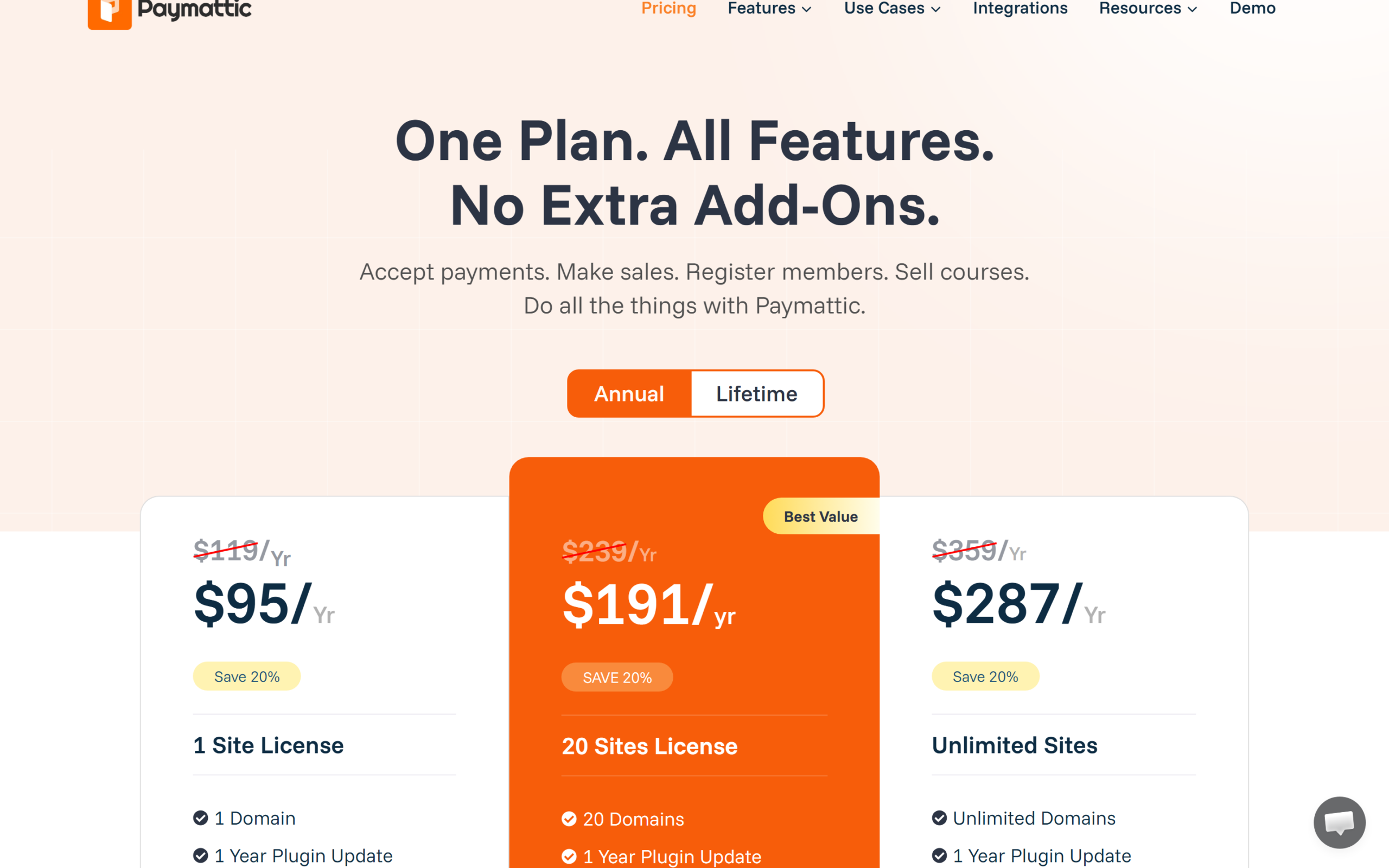
For this Paymattic review we priced every licence at checkout on September 4, 2026 and read the pricing page again on October 12, 2026. Paymattic Pro has one feature set and three licence sizes, billed annually: a single site at $119 a year, an Agency licence for 20 sites at $239, and unlimited sites at $359. The pricing page now shows a 20 percent first-year discount on every licence, which brings the single and Agency licences to $95 and $191 and the unlimited licence to $287, and the same 20 percent comes off the lifetime licences, to $279, $479 and $719. The pricing page says plainly that the discount is on your first year, so renewals are at list.
| Licence | Annual list | First year with discount | Lifetime list | Lifetime with discount | Sites |
|---|---|---|---|---|---|
| Single Site | $119 per year | $95 | $349 one time | $279 | 1 |
| Agency | $239 per year | $191 | $599 one time | $479 | 20 |
| Unlimited | $359 per year | $287 | $899 one time | $719 | Unlimited |
Prices in USD from the Paymattic pricing page on October 12, 2026, with the 20 percent first-year discount it shows on every licence. Every licence includes one year of updates and priority support on annual plans; all features are included in every tier, and the vendor charges no transaction fee of its own.
The lifetime maths
The single-site lifetime licence at $349 list is just under three years of the $119 annual price, and at the current $279 it is under two and a half. For a nonprofit that will run its donation form for years, lifetime is the obvious buy. The Agency lifetime at $599 covers 20 client sites for the price of two and a half years of the annual Agency licence. If you expect to be using the plugin in 2029, buy lifetime; if you are testing whether recurring donations work for your audience, take the $95 first year and decide at renewal. Either way, check the current Paymattic licence page, because the first-year discount changes.
Which payment gateways does Paymattic support, and what do they cost?
Paymattic’s gateway page lists fifteen ways to get paid: Stripe, PayPal, Authorize.net, Square, Paystack, Viva Wallet, Moneris, Payrexx, Billplz, SSLCommerz, Mollie, Xendit, Flutterwave, Razorpay and offline. Stripe and offline are free; the rest are Pro. Subscriptions are supported on Stripe, PayPal, Square and Moneris, per the WordPress.org description; the other gateways are one-time payments only, which matters if your recurring donors are in a country where Stripe does not operate. Paymattic itself charges no transaction fee, and the FAQ is explicit that each gateway’s own fees apply and differ.
Regional coverage is the reason to pay
The gateway list is unusual for a plugin this size. Razorpay covers India, Paystack and Flutterwave cover Nigeria and much of Africa, Xendit covers Indonesia and the Philippines, Billplz covers Malaysia, SSLCommerz covers Bangladesh, Payrexx and Viva Wallet cover Switzerland and Greece, Moneris covers Canada, and Mollie covers the Netherlands and Belgium. GiveWP reserves international gateways for its $399 Pro tier; Paymattic includes them in every Pro licence from $119. One user review on the vendor’s own site describes finding it as the only plugin that worked with Indonesian payment services. Currency support is quoted as 157-plus on the pricing page and 135-plus on WordPress.org, which reads as the listing lagging the site.
Stripe first
Stripe is the gateway to start with, on Free or Pro: on-site checkout, card, Apple Pay and Google Pay, subscriptions, and a documented setup path. The vendor’s Stripe configuration guide covers keys, test mode and webhooks; the August 2026 release fixed renewal webhooks against Stripe’s updated invoice schema, which is the kind of maintenance a payment plugin needs to keep doing.
How good is Paymattic as a donation plugin?
For a small nonprofit or a creator with supporters, Paymattic covers the donation checklist without the add-on pricing that defines the category. One-time donations with predefined amounts are free, while a field that lets donors type their own amount is Pro, and the August 2026 release enforces the predefined list server-side when custom input is off, which closes a common exploit. The donation progress bar, anonymous giving and PDF receipts are free. Pro adds recurring donations, the donor dashboard, the donor wall and leaderboard, Gift Aid declarations for UK charities, and a fee recovery field so donors can cover the gateway fee.
Moving from GiveWP
Since version 4.6.22 in May 2026 there is a GiveWP to Paymattic migration with pre-checks, a compatibility report, and a one-click rollback, and migrated donors are flagged with a badge in the customer list. July’s release improved it. That is aimed squarely at organisations paying GiveWP’s $399 Pro tier for recurring donations and fee recovery, both of which Paymattic includes at $119. Test it on staging: donor records migrate, but your GiveWP add-on configuration does not have a one-to-one equivalent, and peer-to-peer campaigns have no home in Paymattic at all.
What it does not do
No peer-to-peer fundraising, no crowdfunding pages with individual fundraisers, no tributes in memory of someone, no text-to-give. Charitable and GiveWP both sell those on their upper tiers. If your fundraising model is supporters raising money on your behalf, Paymattic is the wrong tool; if it is a donate button that needs to work in fifteen currencies with monthly giving, it is one of the cheapest right tools.

How good is Paymattic for selling and subscriptions?
As a payment plugin it sits between a payment button and a store. You can list single items, let a buyer choose one of several, or sell multiple items in a tabular layout with a summary that behaves like a mini cart, in three Pro templates. Subscriptions run through Stripe, PayPal, Square and Moneris with preferred billing intervals, coupons with expiry dates and minimum spends, tax by percentage, and a customer dashboard where subscribers can update the card on file, added in the August 2026 release. Advanced reporting in Pro shows revenue per period, payment methods, status, top customers and recent activity. Form scheduling and webhooks are Pro, and the August release scoped webhook and Zapier feed changes to the authorised form.
What it is not is WooCommerce. There is no cart across pages, no shipping, no inventory, no order statuses beyond payment status, and no marketplace of extensions. A consultant selling three packages, a course creator selling access, a club collecting membership fees, a school taking event payments: those fit. A shop with variable products and postage does not, and the vendor’s own FluentCart is the answer it would point you to. The management side is documented; the subscription management guide covers pausing, cancelling and refunding from the admin.
How does Paymattic compare with GiveWP, Charitable and WP Simple Pay?
The comparison depends on which half of the product you are buying, so the table splits the rivals by what they are for.
| Plugin | Focus | Free version | Entry paid plan | Recurring included from | Top tier | Notes |
|---|---|---|---|---|---|---|
| Paymattic | Payments and donations | Stripe, offline, templates, progress bar | $119 per year, 1 site ($95 first year) | $119 (every Pro tier) | $359 unlimited; lifetime $349 to $899 | All features in every tier; 3,000 installs |
| GiveWP | Donations | Yes, forms and Stripe, PayPal, Square | Essentials $199 per year | Pro $399 | Elite $599 (peer-to-peer, currency switcher) | 100,000 installs, 4.8 Trustpilot per vendor |
| Charitable | Donations | Yes | Basic $69 per year (list $149), 1 site | Plus $99 (list $199) | Pro $199 (list $399), peer-to-peer | 10,000-plus nonprofits per vendor |
| WP Simple Pay | Stripe payments | Yes, Stripe only | Professional $199.50 per year (list $399), 10 sites | Professional | Elite $299.50 (list $599), unlimited | Stripe only, deep Stripe methods (Klarna, Affirm, BECS) |
Prices from each vendor’s pricing page on September 4, 2026; “list” figures are the crossed-out regular prices shown against current promotions.
Against GiveWP, Paymattic wins on price at every tier and matches the recurring and fee recovery features at a fraction of the cost, and loses on scale, ecosystem and peer-to-peer. Against Charitable, the entry prices are close and Charitable’s Plus at $99 includes recurring, tributes and Gift Aid; Paymattic’s advantages are the payment side, the regional gateway list and the 20-site licence. Against WP Simple Pay, Paymattic is cheaper and covers donations and non-Stripe gateways, while WP Simple Pay goes deeper into Stripe’s own methods such as Klarna, Affirm and BECS, which Paymattic does not expose. The honest summary: Paymattic is the value buy for a site that needs both payments and donations, and the specialist plugins still win their specialities.
Where does Paymattic fall short?
The gaps this Paymattic review found are about scale and scope rather than bugs.
It is small
Three thousand active installs and 44 reviews after seven years on WordPress.org is a niche product, and the support forum shows it: recent threads ask about a Stripe key exposed on a site, which the vendor says it fixed in an update, about a payment success hook that only fires on manual status changes, and about a Bank Transfer option missing on hosted checkout. The two lowest reviews, from 2022, complain about updates breaking paid and free versions and about performance and code errors. None of that is unusual for a payment plugin; all of it means fewer people have walked the path before you.
Subscriptions on four gateways only
Recurring billing works on Stripe, PayPal, Square and Moneris. If your subscribers are in India or Nigeria, Razorpay, Paystack and Flutterwave are one-time only in Paymattic, so recurring donors there still need a card that Stripe will take.
No peer-to-peer, no store
Covered above, and worth repeating as a weakness because the marketing says “do all the things”. It does payments and donations. It does not do fundraisers-for-your-cause pages, and it does not do carts, shipping or inventory.
Documentation and listings drift
The site says 157-plus currencies and 15 ways to get paid; the WordPress.org listing says 135-plus and 13 gateways. Some documentation links from the marketing pages 404. The product moves faster than its copy, which is fine, but it means checking the changelog rather than the brochure.
Ecosystem gravity
Free integrations are FluentCRM, Fluent Support, FluentCommunity, Mailchimp, Slack and Zapier, and the store it recommends when you outgrow it is FluentCart. If you are already in the WPManageNinja stack that is a strength; if you run ActiveCampaign and WooCommerce, the pull toward the family is a cost.
Who should buy Paymattic, and who should not?
Paymattic fits a site that needs to take money without becoming a store. Three cases make it concrete.
Scenario one: a small nonprofit on GiveWP Pro
You pay $399 a year for recurring donations and fee recovery. Paymattic Pro single-site at $119, or $349 for life, includes both, plus Gift Aid and the donor leaderboard, and the May 2026 migration tool moves your donors with a rollback if it goes wrong. You give up peer-to-peer, which you were not using, and a bigger community. Run the migration on staging first.
Scenario two: a coach selling three packages and a monthly membership
Stripe on-site checkout, tabular items, a subscription with Stripe, coupons for launches, tax by percentage and a customer dashboard for card updates. That is Pro at $119, and at $95 in year one it is cheaper than a year of WP Simple Pay Professional at $199.50, with donations available if you ever want a tip jar. This is the case where a Paymattic Pro licence replaces a store you never needed.
Scenario three: an agency building donation forms for clients
The Agency licence covers 20 sites for $239 a year or $599 for life, every feature included, with a regional gateway list that lets you serve a client in Lagos and a client in Toronto from the same plugin. Charitable and GiveWP price per site at the entry tiers; here the 20-site licence is the whole argument.
Who should not buy
Do not buy Paymattic for a product catalogue with shipping, for peer-to-peer or crowdfunding campaigns, for recurring donors outside Stripe, PayPal, Square and Moneris coverage, or if you want the plugin with the largest install base and the most third-party tutorials, which is GiveWP.
Common buying mistakes
Buying Pro for a form that only needs Stripe one-off payments, which Free does. Assuming every gateway supports subscriptions. Comparing Paymattic’s discounted first-year price to a rival’s renewal price. Migrating from GiveWP on the live site. Expecting a cart.
Paymattic pros and cons
Paymattic
- A usable free version with Stripe on-site checkout, Apple Pay, Google Pay, offline payments, templates, a progress bar and PDF invoices.
- One feature set in every Pro tier, from $119 a year or $349 for life, with recurring payments and donations, coupons, tax and a currency switcher included.
- Fifteen ways to get paid including Razorpay, Paystack, Flutterwave, Xendit, Billplz, SSLCommerz, Mollie, Payrexx, Viva Wallet and Moneris, all in the base Pro licence.
- No vendor transaction fee, a 20-site Agency licence, and a GiveWP migration with rollback added in May 2026.
- A changelog that ships monthly and names its own security fixes, from a company that maintains a dozen WordPress products.
- Around 3,000 active installs and 44 reviews after seven years, so a thin base of shared experience and tutorials.
- Subscriptions only on Stripe, PayPal, Square and Moneris; the regional gateways are one-time.
- No peer-to-peer fundraising, tributes, crowdfunding or text-to-give, and no cart, shipping or inventory.
- Marketing copy and the WordPress.org listing disagree on currency and gateway counts, and some docs links 404.
- Free integrations lean toward the vendor’s own Fluent stack.
Frequently asked questions
Is Paymattic free?
Yes. The free plugin on WordPress.org includes Stripe for payments and donations with Apple Pay and Google Pay, offline payments, templates, 22 form fields, a donation progress bar, PDF invoices, anonymous donations, spam protection and basic reporting. Pro adds recurring billing, the other gateways, coupons, tax, dashboards and reporting from $119 a year.
How much does Paymattic Pro cost?
List prices are $119 a year for one site, $239 for 20 sites and $359 for unlimited sites, with all features in every tier. Lifetime licences are $349, $599 and $899. On October 12, 2026 the pricing page shows a 20 percent first-year discount that brings the annual prices to $95, $191 and $287. There is no transaction fee from the vendor.
Does Paymattic charge a transaction fee?
No. The vendor’s FAQ states that Paymattic does not charge any transaction fee for payments or donations; the gateways you connect, such as Stripe or PayPal, charge their own fees, which differ by gateway and country.
Which payment gateways does Paymattic support?
Stripe and offline payments in the free version, and in Pro: PayPal, Authorize.net, Square, Paystack, Viva Wallet, Moneris, Payrexx, Billplz, SSLCommerz, Mollie, Xendit, Flutterwave and Razorpay. Subscriptions are supported on Stripe, PayPal, Square and Moneris; the rest handle one-time payments.
Does Paymattic support recurring donations?
Yes, in Pro, on Stripe, PayPal, Square and Moneris, with preferred billing intervals, a donor dashboard, Gift Aid declarations and a fee recovery field. The free version handles one-time donations only, with predefined amounts, a progress bar and anonymous giving; custom donation amounts are Pro.
Can I migrate from GiveWP to Paymattic?
Yes. Version 4.6.22 in May 2026 added a GiveWP migration with pre-checks, a compatibility report and one-click rollback, and July’s 4.6.23 improved it. Migrated donors are flagged in the customer list. Test it on a staging copy, and note that peer-to-peer campaigns have no equivalent in Paymattic.
Is Paymattic better than GiveWP?
On price, clearly: recurring donations and fee recovery cost $119 a year in Paymattic against $399 in GiveWP Pro, and international gateways are included rather than gated. On scale, no: GiveWP has 100,000 installs, peer-to-peer fundraising and a far larger community. Choose Paymattic for a donate button that needs to work worldwide on a budget, GiveWP for a fundraising operation.
Does this Paymattic review cover selling products?
Yes, within limits. Paymattic sells single items, a choice of items or multiple items in a tabular layout with a summary, plus subscriptions, coupons and tax. It has no cart across pages, shipping, inventory or order management, so it fits services, memberships, courses and events rather than a product catalogue, for which the vendor points to FluentCart.
Which should you choose?
The conclusion of this Paymattic review: choose it if your site needs a payment form, a donation form, or both, and you want recurring billing, coupons, tax and a worldwide gateway list without paying a platform percentage or a $399 tier for the privilege. Start free with Stripe, buy Pro when you need subscriptions or a second gateway, and buy lifetime if the form will still be running in three years, because at $349 list it pays for itself before then.
Do not choose it for a store, for peer-to-peer fundraising, or if the size of the community matters more to you than the price. For a nonprofit, a coach, a club or an agency with a dozen client donation forms, Paymattic Pro is the cheapest complete answer in WordPress today, and the free version is the right way to find out whether that answer fits.
7.8 Score
Pros
- A usable free version with Stripe on-site checkout, Apple Pay, Google Pay, offline payments, templates, a progress bar and PDF invoices.
- One feature set in every Pro tier from $119 a year or $349 for life, with recurring payments and donations, coupons, tax and a currency switcher included.
- Fifteen ways to get paid, including Razorpay, Paystack, Flutterwave, Xendit, Mollie and Moneris, all in the base Pro licence and with no vendor transaction fee.
- A GiveWP migration with rollback since May 2026 and a monthly changelog that names its own security fixes.
Cons
- Around 3,000 active installs and 44 reviews after seven years, so a thin base of shared experience.
- Subscriptions only on Stripe, PayPal, Square and Moneris; the regional gateways are one-time.
- No peer-to-peer fundraising, tributes or crowdfunding, and no cart, shipping or inventory.
- Marketing copy and the WordPress.org listing disagree on currency and gateway counts, and some docs links 404.
Final Verdict
Paymattic is the value buy for a WordPress site that needs a payment form, a donation form, or both: Stripe with Apple Pay and Google Pay is free, and Pro at $119 a year or $349 for life includes recurring billing, coupons, tax, a currency switcher and fourteen regional gateways with no platform fee. It is small, with 3,000 installs, it does subscriptions on only four gateways, and it has no peer-to-peer or cart. Start free, buy Pro for recurring, buy lifetime if the form will outlive three renewals.